


2.00b Toy Product Design
Playsentation Video Specs
The uploader link is at the bottom of the page.
Your Playsentation Video should:
- be one minute in length, plus/minus 5!
- not include a title screen. We will be adding title screens to all videos for the live Playsentation event on Friday, May 15 at 7PM EDT.
- be exported as a 1280x720 version for your portfolio and submitted with your playsentation portfolio via the uploader. See this page for how to reference the video in your HTML page. The portfolio page may include additional photos of your prototype and details about your project.
- be exported as a 1920x1080 version for the live Playsentation event, named with your team name and name, and submitted to the 2.00b DropBox
- be submitted by midnight your local time, Tuesday, May 12
- be fun, fun, fun!
Export specifications
Tip: Export the high resolution video first! If your project crashes, you will be able to create the lower resolution video from the high resolution video.
How to Export:
- Click on timeline panel
- Open the Export Window (File-->Export-->Media or Control-M (Win) or Command-M (Mac))
- Select the 2.00b preset for each type of video. You will need to download it from below and import it.
- Click the Export button at the bottom of the window
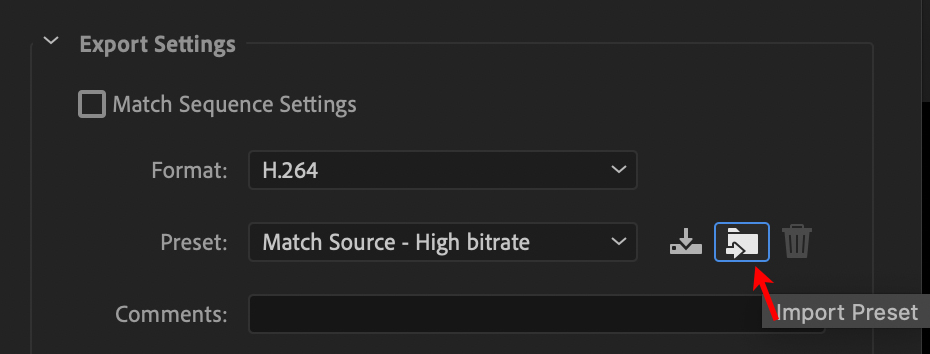 Below are the presets that you should use in Adobe Premiere Pro for exporting your playsentation video.
Download each preset (Right-click .epr file, then choose "Save Link As...") and import each preset into Premiere using the "Import Preset" icon in the Export Window.
Below are the presets that you should use in Adobe Premiere Pro for exporting your playsentation video.
Download each preset (Right-click .epr file, then choose "Save Link As...") and import each preset into Premiere using the "Import Preset" icon in the Export Window.
These are similar to the Social Media presets Brian mentions in the Video 101 lecture, but are specifically tailored for the 2.00b portfolio and live Playsentation event.
- Media encoder presets for your live playsentation event video, submitted to our 2.00b dropbox (.epr)
- Media encoder presets for the video used in your playsentation portfolio webpage (.epr)
If you are not using Premiere, please export as follows:
Codec: H.264 (optimized for social media streaming such as YouTube or Vimeo if possible)
Filetype: .mp4
Dropbox Submission
Resolution: 1920 x 1080
Bitrate: 10 Mbps (if you need to specify: variable, single pass)
Portfolio Submission
Resolution: 1280 x 720
Bitrate: 4 Mbps (if you need to specify: variable, single pass)