## Playing Area
To describe dimensions in the playing area, we define L to be the basic distance unit, equal to the edge length of a square bumper. Corresponding to standard usage in the graphics community, the origin is in the **upper** left-hand corner with coordinates increasing to the right and **down**.
The playing area must be 20 L wide by 20 L high. That is, 400 square bumpers
could be placed on the playing area without overlapping. The upper left corner is (0,0)
and the lower right corner is (20,20). When we say a gadget is at a particular location, that means that the gadget's origin is at that location. The origin of each of the standard gadgets is the upper left-hand corner of its bounding box, so the location furthest from the origin at which a gadget may be placed is (19,19) on a 20L × 20L board. In contrast, the origin of a ball is at its center.
## Standard Gadgets
A Pingball game has *gadgets* on the playing area, representing bumpers, balls, flippers, and so forth. The standard gadgets that must be supported are described in this section.
Every gadget has an (x,y) location, where x and y are integers in [0,19].
Every gadget has a width and height, also integers in [0,19]. Some gadgets have a fixed width and height (like bumpers), and others have a configurable width and height (like absorbers).
Some gadgets have a coefficient of reflection, which is a multiplier applied to the magnitude of the ball's velocity after it bounces off the gadget. Coefficient 1.0 means that the ball leaves the bumper with the same velocity with which it hit the bumper, but in a different direction. Coefficients less than 1.0 damp the ball's velocity, and coefficients greater than 1.0 increase it. By default, all bumpers have reflection coefficients of 1.0, but you can optionally extend Pingball to allow different coefficients to be specified.
Some gadgets have an orientation, which determines how the gadget is rotated from its default orientation. Orientation may be 0 degrees (the default orientation), 90 degrees, 180 degrees, or 270 degrees. When orientation is 90, 180, or 270 degrees, the value indicates a __clockwise__ rotation in degrees of the whole gadget from the default orientation, _around the center of the bounding box of the gadget_ (not around the (x,y) origin point of the gadget).
Each gadget may have a trigger and an action. A trigger is an event that happens at the gadget, such as a ball colliding with it. An action is a response that a gadget can make to a trigger happening somewhere on the board. A gadget's action can be hooked up to another gadget's trigger, in order to produce Rube Goldberg machines. A gadget's action can also be hooked up to its own trigger, so that it triggers itself.
### Square Bumper
Size and shape: a square shape with edge length 1L
Orientation: not applicable (symmetric to 90 degree rotations)
Coefficient of reflection: 1.0
Trigger: generated whenever the ball hits it
Action: none
### Circle Bumper
Size and shape: a circular shape with diameter 1L
Coefficient of reflection: 1.0
Orientation: not applicable (symmetric to 90 degree rotations)
Trigger: generated whenever the ball hits it
Action: none
### Triangle Bumper
Size and shape: a right-triangular shape with sides of length 1L and hypotenuse of length Sqrt(2)L
Orientation: the default orientation (0 degrees) places one corner in the northeast, one corner in the northwest, and the last corner in the southwest. The diagonal goes from the southwest corner to the northeast corner.
Coefficient of reflection: 1.0
Trigger: generated whenever the ball hits it
Action: none
### Flipper
Size and shape: A generally-rectangular rotating shape with bounding box of size 2L × 2L
Orientation: For a left flipper, the default orientation (0 degrees) places the flipper's pivot point in the northwest corner. For a right flipper, the default orientation puts the pivot point in the northeast corner.
Coefficient of reflection: 0.95 (but see below)
Trigger: generated whenever the ball hits it
Action: rotates 90 degrees, as described below
Flippers are required to come in two different varieties, *left flippers* and *right flippers*. A left flipper begins its rotation in a counterclockwise direction, and a right flipper begins its rotation in a clockwise direction.
In conventional pinball, flippers allow the user to control the ball. Phases 1 and 2 of this project have no user interaction with the pinball game, however, so flippers can't be controlled by the user. Phase 3 will change that to allow the user to trigger flippers with the keyboard.
A flipper should never extend outside its bounding box at any time, either while rotating or while at rest. The pictures below show flipper placements for various initial rotations. When a flipper is first triggered, it sweeps 90 degrees in the direction indicated by the arrows. If triggered again, the flipper sweeps back 90 degrees to the initial position. In the pictures, the shape and design of the flippers are for illustrative purpose only -- your final design may differ.
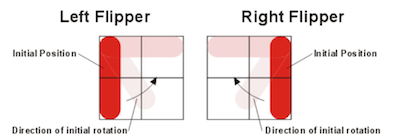
When a flipper's action is triggered, the flipper rotates at a constant angular velocity of 1080 degrees per second to a position 90 degrees away from its starting position. When its action is triggered a second time, the flipper rotates back to its original position at an angular velocity of 1080 degrees per second.
The standard coefficient of reflection for a flipper is 0.95. However, when computing the behavior of a ball bouncing off the flipper, you must account for the linear velocity of the part of the flipper that contacts the ball; therefore the ball may leave the flipper with a higher energy than it had when it reached it.
### Absorber
Size and shape: A rectangle kL × mL where k and m are positive integers <= 20
Orientation: not applicable (only one orientation is allowed)
Coefficient of reflection: not applicable; the ball is captured
Trigger: generated whenever the ball hits it
Action: shoots out a stored ball (see below)
An absorber simulates the ball-return mechanism in a pinball game. When a ball hits an absorber, the absorber stops the ball and holds it (unmoving) in the bottom right-hand corner of the absorber. The ball's center is .25L from the bottom of the absorber and .25L from the right side of the absorber. The absorber can hold any number of balls in this location.
If the absorber is holding at least one ball, then the action of an absorber, when it is triggered, is to shoot one ball straight upwards in the direction of the top of the playing area. The initial velocity of the ball should be 50L/sec. With the default gravity and the default values for friction, the value of 50L/sec gives the ball enough energy to lightly collide with the top wall, if the bottom of the absorber is at y=20L. If the absorber is not holding a ball, or if the previously ejected ball has not yet left the absorber, then the absorber takes no action when it receives a trigger signal.
An absorber can be made self-triggering by connecting its trigger to its own action. When the ball hits a self-triggering absorber, it should be moved to the bottom right-hand corner as described above, and then be shot upward as described above. There may or may not be a short delay between these events, at your discretion, but a ball that hits a self-triggering absorber must always leave the absorber.
### Outer Walls
The border walls surrounding the playfield.
Trigger: none
Action: none
Coefficient of reflection: 1.0
A Pingball game supports exactly one set of outer walls, which lie just outside the playing area:
* one horizontal wall just above the y=0L coordinate
* one horizontal wall just below the y=20L coordinate
* one vertical wall just to the left of the x=0L coordinate
* one vertical wall just to the right of the x=20L coordinate
## Pingball Physics
The animation grid may be no coarser than 0.05 L by 0.05 L. Suppose that a ball is at (1,1) and is moving in the (1,0) direction -- that is, left to right -- at a rate of .05L per frame redraw. Then the ball should be displayed at least in positions (1,1), (1.05,1), and (1.10,1), and can be displayed at more positions if you wish the animation to be smoother. Rotating flippers can be animated somewhat more coarsely; see the precise description of flippers below. If the ball is moving faster than the animation grid size per frame redraw, it need not be redrawn in each animation grid position.
The ball by default must have a diameter of approximately 0.5L. Ball velocities must range at least from 0.01 L/sec to 200 L/sec and can cover a larger range if you wish. 0 L/sec (stationary) must also be supported. An acceptable frame rate should be used to generate a smooth animation. We have found that 20 frames per second tends to work well across a reasonably wide range of platforms.
The ball should interact reasonably with the playing area. That is, the ball should bounce in the direction and with the resulting velocity that you would expect it to bounce in a physical pinball game.
The velocity of the ball should continually change to account for the effects of gravity. The default gravity value should be 25 L/sec2, which
resembles a pinball game with a slightly tilted playing surface, but your Pingball boards should be able to be configured with a different value for gravity.
The ball velocity should also continually change to account for the effects of friction. You should model friction by scaling the velocity of the ball using the
frictional constants mu and mu2. For sufficiently small deltat's you can
model friction as Vnew = Vold × ( 1 - mu × deltat - mu2 × |Vold| × deltat ). The default value of mu should be 0.025 per second. The default value of mu2 should be 0.025 per L. Pingball boards should be able to be configured with different values for mu and mu2.
## Text Mode Display
For Phases 1 and 2 of the project, a running Pingball game should be displayed as a sequence of frames printed to the console. Each frame should display the gadgets and balls in a 20x20 character grid, using these characters:
* Ball: `*`
* Square bumper: `#`
* Circle bumper: `O`
* Triangle bumper: `/` for orientation 0 or 180, `\` for orientation 90 or 270
* Flipper: `|` when vertical, `-` when horizontal
* Absorber: `=`
* Outer wall: `.`
For example, here is a board with a row of 5 square bumpers at the top; a triangle bumper on the right; two circle bumpers with a ball in flight between them; two flippers; and an absorber across the bottom.
......................
.    #####           .
.                    .
.                    .
.                    .
.                    .
.                    .
.                    .
.                   \.
.                    .
.                    .
.           *        .
.   O          O     .
.                    .
.                    .
.                    .
.    |       --      .
.    |               .
.                    .
.                    .
.====================.
......................
Note that this display omits some details that should still be represented in the simulation. For example, it shows which grid cell contains the ball, but doesn't show exactly where the ball is within that cell. It also doesn't show the exact orientation of triangle bumpers.
Phase 3 of the project, at the end of the semester, will augment this text-mode display with a more attractive and more precise graphical user interface, which will also support user interaction using the keyboard.
## Main Program
Your program should have a `main` method in a class called `Pingball.java`. The package structure of the project is up to you, but make it sensible so that your TA can find your main program easily.
Your Pingball program should take an optional command-line argument, the name of a board to run:
> Pingball [BOARDNAME]
Square brackets mean that the argument is optional. BOARDNAME is the name of a board, which your program should use internally to select a board to create and display. The required benchmark boards are listed in the next section. Your program may define additional boards as well if you wish. If the board name argument is not provided, then your Pingball program should display and run the `default` benchmark board.
## Benchmark Boards
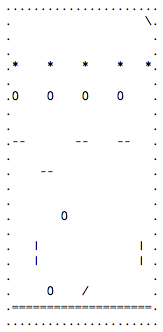
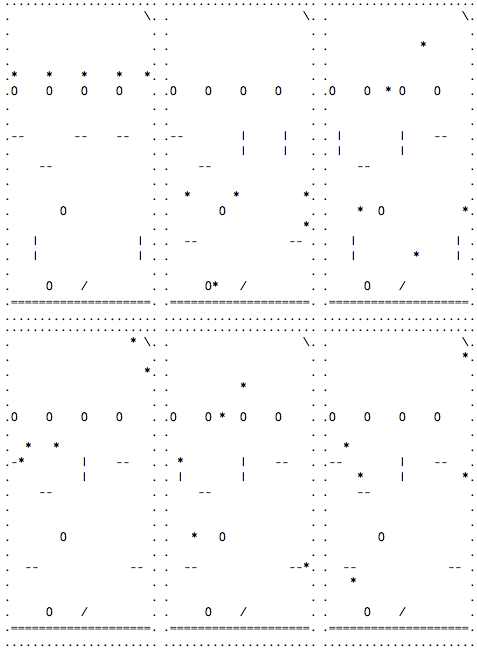
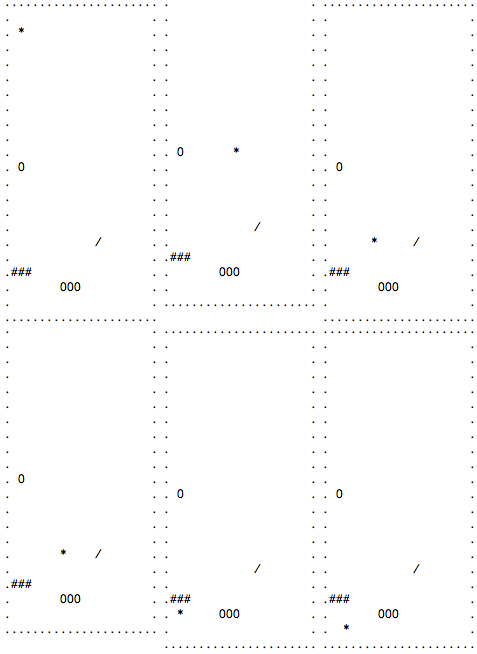
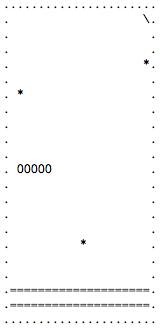
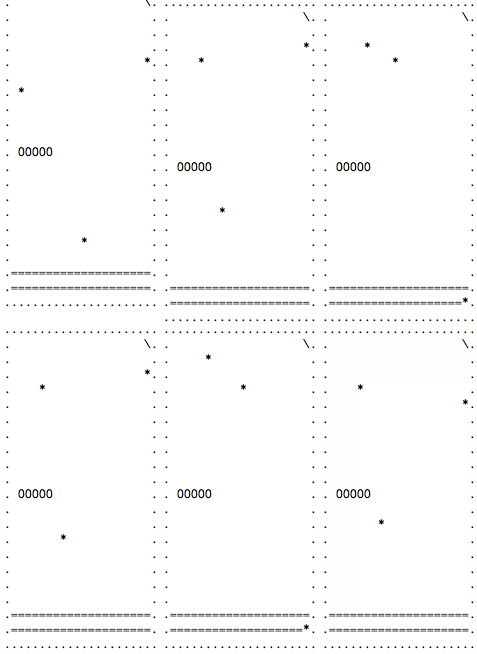
These are the sample boards that your program must be able to create and run. Your results do not need to match the precise timing shown in these animations.
All these boards use the default values of gravity and friction, and all balls start with zero velocity.
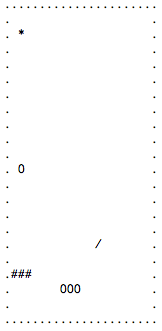
##### Board name: `default`
Ball @ (1.25,1.25)
Circle Bumper @ (1,10)
Triangle Bumper @ (12,15), Orientation: 180°
Square Bumper @ (0,17)
Square Bumper @ (1,17)
Square Bumper @ (2,17)
Circle Bumper @ (7,18)
Circle Bumper @ (8,18)
Circle Bumper @ (9,18)
##### Board name: `absorber`
Ball @ (10.25,15.25)
Ball @ (19.25,3.25)
Ball @ (1.25,5.25)
Absorber @ (0,18), k = 20, m = 2
Triangle Bumper @ (19,0), Orientation: 90°
Circle Bumper @ (1,10), Triggered Gadgets: Absorber
Circle Bumper @ (2,10), Triggered Gadgets: Absorber
Circle Bumper @ (3,10), Triggered Gadgets: Absorber
Circle Bumper @ (4,10), Triggered Gadgets: Absorber
Circle Bumper @ (5,10), Triggered Gadgets: Absorber
##### Board name: `flippers`
Ball @ (0.25,3.25)
Ball @ (5.25,3.25)
Ball @ (10.25,3.25)
Ball @ (15.25,3.25)
Ball @ (19.25,3.25)
LeftFlipper1 @ (0,8), Orientation: 90°
LeftFlipper2 @ (4,10), Orientation: 90°
LeftFlipper3 @ (9,8), Orientation: 90°
LeftFlipper4 @ (15,8), Orientation: 90°
Circle Bumper @ (5,18)
Circle Bumper @ (7,13)
Circle Bumper @ (0,5), Triggered Gadgets: LeftFlipper1
Circle Bumper @ (5,5)
Circle Bumper @ (10,5), Triggered Gadgets: LeftFlipper3
Circle Bumper @ (15,5), Triggered Gadgets: LeftFlipper4
Triangle Bumper @ (19,0), Orientation: 90°
Triangle Bumper @ (10,18), Orientation: 180°
RightFlipper1 @ (2,15), Orientation: 0°
RightFlipper2 @ (17,15), Orientation: 0°
Absorber @ (0,19), k = 20, m = 1, Triggered Gadgets: RightFlipper1, RightFlipper2, Absorber