The velocity of the ball should continually change to account for the effects of gravity. You should support the default gravity value of 25 L/sec2, which resembles a pinball game with a slightly tilted playing surface, but the board file may specify a different value for gravity.
The ball velocity should also continually change to account for the effects of friction. You should model friction by scaling the velocity of the ball using the frictional constants mu and mu2. For sufficiently small delta_t's you can model friction as Vnew = Vold × ( 1 - mu × delta_t - mu2 × |Vold| × delta_t ). The default value of mu should be 0.025 per second. The default value of mu2 should be 0.025 per L.
## Standard Gadgets The standard gadgets that must be supported are described below. Each gadget may have a trigger and an action. A trigger is an event that happens at the gadget, such as a ball colliding with it. An action is a response that a gadget can make to a trigger happening somewhere on the board. A gadget's action can be hooked up to another gadget's trigger, in order to produce Rube Goldberg machines. These hookups are specified by the board file format. A gadget also has a coefficient of reflection, which is a multiplier applied to the magnitude of the ball's velocity after it bounces off the gadget. Coefficient 1.0 means that the ball leaves the bumper with the same velocity with which it hit the bumper, but in a different direction. Coefficients less than 1.0 damp the ball's velocity, and coefficients greater than 1.0 increase it. By default, all bumpers have reflection coefficients of 1.0, but you can optionally extend Pingball to allow different coefficients to be specified. ### Square Bumper A square shape with edge length 1L Trigger: generated whenever the ball hits it Action: none Coefficient of reflection: 1.0 ### Circular Bumper A circular shape with diameter 1L Trigger: generated whenever the ball hits it Action: none Coefficient of reflection: 1.0 ### Triangular Bumper A right-triangular shape with sides of length 1L and hypotenuse of length Sqrt(2)L Trigger: generated whenever the ball hits it Action: none Coefficient of reflection: 1.0 ### Flipper A generally rectangular rotating shape with bounding box of size 2Lx2L Trigger: generated whenever the ball hits it Action: rotates 90 degrees (see below) Coefficient of reflection: 0.95 (but see below) In conventional pinball, flippers allow the user control the ball. Phase 1 of this project has no user interaction with the pinball game, however, so flippers can't be controlled by the user. Phase 2 will change that to allow the user to trigger flippers with the keyboard. Flippers are required to come in two different varieties, left flippers and right flippers. A left flipper begins its rotation in a counter-clockwise and a right flipper begins its rotation in a clockwise direction. A flipper should never extend outside its bounding box. The below pictures show flipper placements for various initial rotations. When a flipper is first triggered, it sweeps 90 degrees in the direction indicated by the arrows. If triggered again, the flipper sweeps back 90 degrees to the initial position. In the pictures, the shape and design of the flippers are for illustrative purpose only -- your final design may differ. 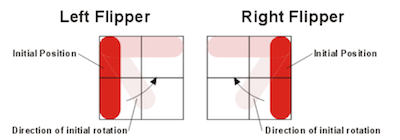 As with the three standard bumpers, a flipper generates a trigger whenever the ball hits it. When a flipper's action is triggered, the flipper rotates at a constant angular velocity of 1080 degrees per second to a position 90 degrees away from its starting position. When its action is triggered a second time, the flipper rotates back to its original position at an angular velocity of 1080 degrees per second. The standard coefficient of reflection for a flipper is 0.95. However, when computing the behavior of a ball bouncing off the flipper, you must account for the linear velocity of the part of the flipper that contacts the ball; therefore the ball may leave the flipper with a higher energy than it had when it reached it. ### Absorber A rectangle kL × mL where k and m are positive integers <= 20. Trigger: generated whenever the ball hits it Action: shoots out a stored ball (see below) Coefficient of reflection: not applicable; the ball is captured An absorber simulates the ball-return mechanism in a pinball game. When a ball hits an absorber, the absorber stops the ball and holds it (unmoving) in the bottom right-hand corner of the absorber. The ball's center is .25L from the bottom of the absorber and .25L from the right side of the absorber. If the absorber is holding a ball, then the action of an absorber, when it is triggered, is to shoot the ball straight upwards in the direction of the top of the playing area. By default, the initial velocity of the ball should be 50L/sec. With the default gravity and the default values for friction, the value of 50L/sec gives the ball enough energy to lightly collide with the top wall, if the bottom of the absorber is at y=20L. If the absorber is not holding the ball, or if the previously ejected ball has not yet left the absorber, then the absorber takes no action when it receives a trigger signal. An absorber can be made self-triggering by connecting its trigger to its own action. When the ball hits a self-triggering absorber, it should be moved to the bottom right-hand corner as described above, and then be shot upward as described above. There may or may not be a short delay between these events, at your discretion. ### Outer Walls The border walls surrounding the playfield. Trigger: none Action: none Coefficient of reflection: 1.0 (but see below) A Pingball game supports exactly one set of outer walls, which lie just outside the playing area: * one horizontal wall just above the y=0L coordinate. * one horizontal wall just below the y=20L coordinate. * one vertical wall just to the left of the x=0L coordinate. * one vertical wall just to the right of the x=20L coordinate. Each wall may be either solid or invisible. A solid wall is reflective, so that a ball bounces off it. An invisible wall allows a ball to pass through it, into another playing area. When the client is playing disconnected from a server, all four walls are solid. When the client is connected to a server, the server determines which of the client's walls are solid and which are transparent, depending on how the client's playing area is currently attached to other clients' playing areas. ## Pingball File Format By convention, the Pingball board files in your repository should end with the extension `.pb`, so that your TA can easily find them. [Several sample board files](boards/) have been provided. You will have to build a parser that can read in board files in the format described below. You may find it useful to write a grammar and use the ANTLR parser-generator to create your parser. antlr.jar can be found in the code that was handed out from the lecture and recitation about grammars. You will have to put antlr.jar in your Eclipse project, [add it to the build path](http://stackoverflow.com/questions/2727669/how-can-i-add-a-jar-to-my-build-path-in-eclipse), and make sure to commit and push it to your repo. The following is an example of a very simple Pingball board file: board name=Example # define a ball ball name=Ball x=1.8 y=4.5 xVelocity=-3.4 yVelocity=-2.3 # define some bumpers squareBumper name=Square x=0 y=2 circleBumper name=Circle x=4 y=3 triangleBumper name=Tri x=1 y=1 orientation=270 # define some flippers leftFlipper name=FlipL x=10 y=7 orientation=0 rightFlipper name=FlipR x=12 y=7 orientation=0 # define an absorber to catch the ball absorber name=Abs x=0 y=19 width=20 height=1 # define events between gadgets fire trigger=Square action=FlipL # make the absorber self-triggering fire trigger=Abs action=Abs Each line in the file describes a board element, like a ball or bumper. Whitespace at the beginning or ending of lines is irrelevant. Extra whitespace between tokens of a line (words or =) are not important. Lines that are blank, or lines that start with a #, are ignored. ``` # this is a comment # this is also comment ``` The specification below refers to integers, floating point numbers, and names, which are specified as follows: INTEGER ::= [0-9]+ FLOAT ::= -?([0-9]+.[0-9]*|.?[0-9]+) NAME ::= [A-Za-z_][A-Za-z_0-9]* We now describe each kind of line that may appear in the board file. board name=NAME gravity=FLOAT friction1=FLOAT friction2=FLOAT
Defines a board. This line must be the first non-comment line in a valid Pingball
board, and exactly one board line must appear in the file. The gravity of the board is set to gravity L/sec2 (default 25.0) in the downward direction. The global friction constants are set such that mu and mu2
(as described in the friction formula) are friction1 and friction2, respectively
(both have a default value of 0.025).
......................
.    #####           .
.                    .
.                    .
.                    .
.                    .
.                    .
.                    .
.                   \.
.                    .
.                    .
.           *        .
.   O          O     .
.                    .
.                    .
.                    .
.    |       --      .
.    |               .
.                    .
.                    .
.====================.
......................
Note that this display omits some details that should still be represented in the simulation. For example, it shows which grid cell contains the ball, but doesn't show exactly where the ball is within that cell. It also doesn't show the exact orientation of triangle bumpers. Phase 2 of the project, at the end of the semester, will augment this text-mode display with a more attractive and more precise graphical user interface, which will also support user interaction using the keyboard. ## Client-Server Play Pingball also has a client-server mode. In this mode, each client simulates its own board. The server joins the outer walls of clients together, so that a ball exiting one client's playing area can enter another client. Your Pingball server should have its `main` method in a class called `PingballServer.java`. Again, the package structure is up to you, but make it sensible so that your TA can find your client easily. The Pingball server should be started with command-line arguments as follows: > Usage: > PingballServer [--port PORT] > PORT is an optional integer in the range 0 to 65535 inclusive, specifying the port where the server should listen for incoming connections. The default port is 10987. For client-server play, the Pingball client should be started with command-line arguments as follows: > Usage: > PingballClient [--host HOST] [--port PORT] FILE > HOST is an optional hostname or IP address of the server to connect to. If no HOST is provided, then the client starts in single-machine play mode, as described above. > PORT is an optional integer in the range 0 to 65535 inclusive, specifying the port where the server is listening for incoming connections. The default port is 10987. > FILE is a required argument specifying a file pathname of the Pingball board that this client should run. ## Server Operation The server has a set of connected clients. Each client manages a single 20x20 Pingball board. The server keeps track of how the outer walls of these boards are joined together, so that balls can pass between the boards. A board can have a name, specified in the `board` line at the top of its board file. Only named boards can be joined with other boards. Clients who connect to the server while running an unnamed board can't participate in joins with other clients. If two or more clients are running a board with the same name, the behavior is unspecified. The server is configured by a command-line interface read from `System.in` (typed by a user). Each command is on one line, and whitespace at the beginning or ending of lines is irrelevant. Extra whitespace between tokens of a line are not important. Lines that do not match commands should report an error message. Two boards can be joined side-by-side using the following command: h NAME_left NAME_right The effect of this command is to join NAME_left's right wall with NAME_right's left wall. NAME_left and NAME_right are both board names, which follow the same syntax allowed for NAME in the board file. Two boards can be joined top-and-bottom using the following command: v NAME_top NAME_bottom The effect of this command is to join NAME_top's bottom wall with NAME_bottom's top wall. When two walls are joined, both walls become invisible, permeable to balls. A ball arriving on one side of the joined wall, on one client, is immediately transported to the corresponding position on the other side, on the other client. It maintains the same velocity vector, but now obeys the gravity and friction of the new board it has entered. Boards can be joined in arbitrary topologies, even if they can't exist in two-dimensional Euclidean space. For example, a board's own walls can be joined together, forming a [torus](http://en.wikipedia.org/wiki/Torus). If one of the walls involved in a join command was previously joined to a different board, then the previous join will be broken, reverting the previous board's wall to solid. When a client disconnects from the server, any boards joined to it revert to solid walls. The server forgets the lost client's joins, so if a client reconnects with the same board name, it does not automatically regain its joined walls, but must be rejoined with fresh `h` and `v` commands to the server. When a client disconnects, any balls on the client's board are lost. Note that this section does _not_ specify the network protocol between client and server. The commands in this section are not sent over the network, but are instead typed by a user on the console, to instruct the server how to join together clients that are currently connected to it. The network protocol is different. You will have to define your own network protocol that specifies how a client connects to the server, tells the server what it needs to know about its board, and sends and receives balls through the server. Your text mode display should show to the user which walls are joined with other boards, by displaying the other board's name (or as much as fits) in the joined wall. For example, a board that is joined at the top to a board named Mars and on the left to a board named Mercury might look like this:
..........Mars........
.    #####           .
.                    .
.                    .
.                    .
.                    .
.                    .
M                    .
e                   \.
r                    .
c                    .
u           *        .
r   O          O     .
y                    .
.                    .
.                    .
.    |       --      .
.    |               .
.                    .
.                    .
.====================.
......................
The exact position and content of the board labels is left unspecified, but they should be readable to a human being.