Deadlines
Useful links
waveforms.py -- sampled waveforms module
lab7.py -- Testing code for Lab #7
lab7_0.py -- template file for Task #0
hum_testsound.wav -- audio sample with 400 Hz hum
lab7_1.py -- template file for Task #1
lab7_2.py -- template file for Task #2
lab7_3.py -- template file for Task #3
lab7_4.py -- template file for Task #4
lab7_5.py -- template file for Task #5
lab7.zip -- zip file containing all of the above
Goal
Transmit and receive multiple message streams using frequency-division multiplexing over a shared channel.
Instructions
See Lab #1 for a longer narrative about lab mechanics. The 1-sentence version:
Complete the tasks below, submit your task files on-line before the deadline, and sign-up for your check-off interview with your TA.
As always, help is available in 32-083 (see the Lab Hours web page).
Task 0: Spectrum plot
For this task just run the code in lab7_0.py to see the plot of the magnitude of the Fourier coefficients for the with_hum.wav file from Lab #7:
import numpy
import matplotlib.pyplot as p
import waveforms as w

with_hum = w.wavfile('hum_testsound.wav',sample_rate=22050)
with_hum.spectrum(title='Spectrum with hum')
w.show()
There is a lab question associated with this task.
Task 1: Amplitude Modulation
In this task, we'll transmit a sequence of message bits using an amplitude modulation of a carrier frequency -- your job is to write a Python function am_receive that decodes the transmission and returns a numpy array with the received bits.
The waveforms module provides many useful functions. We'll be using its sampled_waveform object to represent discrete-time waveforms. That object has many methods for manipulating waveforms, some of which are described below as they are needed.
Looking at lab7_1.py, you can see how the transmitter works.
# template tile for Lab #7, Task #1
import numpy
import matplotlib.pyplot as p
import waveforms as w
import lab7

p.ion()

# transmission rate
bits_per_second = 20000

# Convert message bits into samples, then use samples
# to modulate the amplitude of sinusoidal carrier.
# Limit the bandwidth of the transmitted signal to
# bw Hz.  Repeated here for convenience, use the lab7
# version (i.e. lab7.am_transmit).
def am_transmit(bits,samples_per_bit,sample_rate,fc,bw):
    # use helper function to create a sampled_waveform by
    # converting each bit into samples_per_bit samples
    samples = w.symbols_to_samples(bits,samples_per_bit,
                                   sample_rate)
    bandlimited_samples = samples.filter('low-pass',
                                         cutoff=bw)
    # now multiply by sine wave of specified frequency
    return bandlimited_samples.modulate(hz=fc)

# receive amplitude-modulated transmission:
def am_receive(samples,fc,samples_per_bit,channel_bw):
    pass # your code here

if __name__ == '__main__':
    # a random binary message with zeros at both ends to
    # ensure periodicity
    message_size = 30
    message = numpy.zeros(message_size+2,dtype=numpy.int)
    message[1:-1] = numpy.random.randint(2,size=message_size)

    # send it through transmitter, modulate to legal freq near 125 kHz
    samples_per_bit = lab7.samples_per_bit(lab7.sample_rate,
                                           bits_per_second)
    fc = lab7.quantize_frequency(125e3,lab7.sample_rate,
                                 len(message)*samples_per_bit)
    rf = lab7.am_transmit(message,samples_per_bit,lab7.sample_rate,
                     fc,lab7.channel_bw)
    rf.spectrum(title="spectrum after transmission")

    received = am_receive(rf,fc,samples_per_bit,lab7.channel_bw)
    if not numpy.array_equal(message,received):
        print "Error when listening to channel"
        print 'message: ',message
        print 'received:',received
    else:
        print "Message received correctly"
First the transmit code uses a handy function from the waveforms module to convert the message sequence into a sample sequence, expanding each bit into the specified number of samples.
Next the sample waveform is passed through a low-pass filter to limit its spectrum to the specified channel bandwidth. Why? We need to eliminate the higher frequency components of our signal (caused by the fast transitions of digital encoding) so we don't affect transmissions on neighboring channels.
Finally the band-limited samples are multiplied by a sine wave at the carrier frequency using the modulate method provided by sampled_waveform objects. This is called amplitude modulation where the amplitude of the carrier is determined directly by the message bits.
am_receive should do the following:
xxx.plot(title='demodulated signal')
xxx.spectrum(title='spectrum of demodulated signal')
To implement the low-pass filter for a sampled waveform w you can use w.filter('low-pass',cutoff=xxx) which will return a new sampled_waveform as its result. xxx is the cutoff frequency in Hz.
Again, have your routine plot the signal coming out of the filter and its spectrum.
centers = waveforms.samples_to_centers(waveform,
                                       samples_per_symbol=xxx)
where you need to supply the number of samples used to transmit each symbol (in our case each bit). This function returns a list of integers which are indices of the samples located at the center of bit transmission.
Use the supplied indices to select the center samples:
bit_sample_array = filtered_demodulated_samples[centers]
Use the supplied test to debug your receiver code.
There are lab questions associated with this task.
Task 2: Multiple-Transmitter Test (2 points)
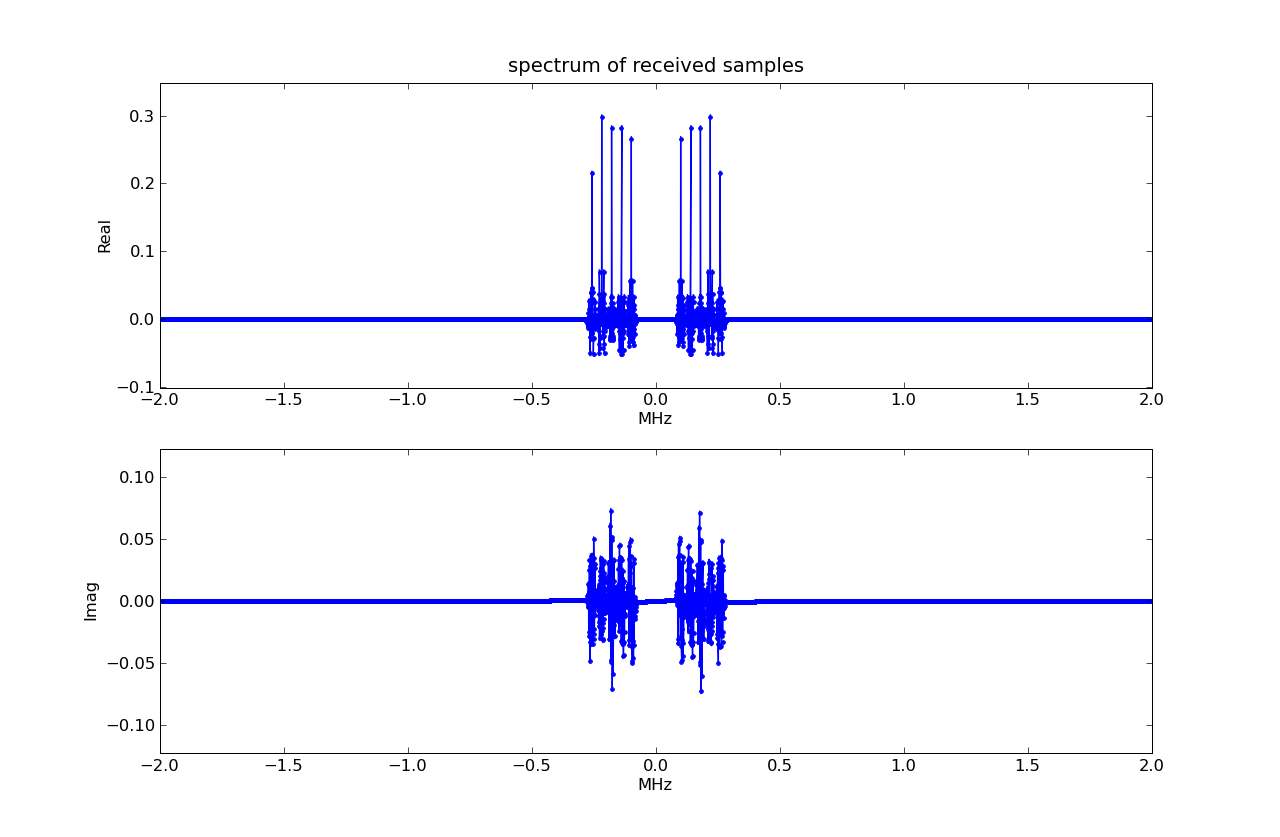
Using the receiver you built in Task #1, let's see what happens when there are multiple transmitters. The Task 2 verification code in lab7.py first constructs a shared-channel signal by combining the outputs of five transmitters, each sending a different message using a different modulation frequency. Here's a plot of the shared-channel spectrum:
The verification code then calls your am_receive five times; the modulation frequency of one of the transmitters is specified on each call. Each received message is verified using the original transmitted message.
lab7_2.py is the template file for this task:
# template tile for Lab #7, Task #2
import numpy
import waveforms as w
import lab7

# receive amplitude-modulated transmission:
def am_receive(samples,fc,samples_per_bit,channel_bw):
    #######
    # copy your Task 1 code for am_receive to here
    # but remove all the plot code
    ######
    pass

if __name__ == '__main__':
    # construct an RF spectrum containing 5 transmitter
    # channels, each sending a different random
    # message.  Call am_receive to receive the
    # message on each channel, verify the results.
    lab7.checkoff(am_receive,'L7_2')
Copy over your am_receive code from Task #1, but remove all the plotting code so that the testing doesn't fill your screen with plots. When submitting, run your task file using python602 since the submission will not work correctly when run from idle602.
There are lab questions associated with this task.
Task 3: Transmission Rate vs. Bandwidth
Copy your code from Task #2 and place it in the Task #3 template lab7_3.py
# template tile for Lab #7, Task #3
import numpy
import matplotlib.pyplot as p
import waveforms as w
import lab7

p.ion()

# transmission rate
bits_per_second = 20000

# receive amplitude-modulated transmission:
def am_receive(samples,fc,samples_per_bit,channel_bw):
    #######
    # copy your Task 2 code for am_receive to here
    # and add plot of eye diagram
    ######
    pass

if __name__ == '__main__':
    n = 8  # no. of bits of ISI to test for
    # generate all possible n-bit sequences
    message = [0] * (n * 2**n)
    for i in xrange(2**n):
        for j in xrange(n):
            message[i*n + j] = 1 if (i & (2**j)) else 0
    message = [0,0] + message + [0,0]  # periodic
    message = numpy.array(message,dtype=numpy.int)

    # send it through transmitter, modulate to legal freq near 125 kHz
    samples_per_bit = lab7.samples_per_bit(lab7.sample_rate,
                                           bits_per_second)
    fc = lab7.quantize_frequency(125e3,lab7.sample_rate,
                                 len(message)*samples_per_bit)
    xmit = lab7.am_transmit(message,samples_per_bit,lab7.sample_rate,
                            fc,lab7.channel_bw)

    # run receiver
    receive = am_receive(xmit,fc,samples_per_bit,lab7.channel_bw)

    # report results
    print 'message: ',message
    print 'received:',receive
    if not numpy.array_equal(message,receive):
        print '***** differences *****'
    else:
        print 'message received okay'
Modify your am_receive to plot an eye
diagram for the output of the low-pass filter using
sig.eye_diagram(samples_per_bit,
                title="Eye diagram for filtered demodulated signal")
where sig is the sampled_waveform returned by the low-pass filter and samples_per_bit is the number of samples transmitted for each bit (used to determine how many samples to plot for each pass of the eye diagram). You can comment out the lines that produce the spectrum plots.
With the channel bandwidth limited to 20 kHz, when you run the code you should see something like the following figure:

The eye has narrowed because of inter-symbol interference introduced by the low-pass filters. Try changing bits_per_second at the top of the file from 20,000 to 50,000. Rerun the code and notice how the eye changes. Also note that printout and whether the message was received correctly or if there were difference detected.
Try different values for bits_per_second to get an estimate for the maximum number of bits per second that we can transmit over this band-limited channel.
There are lab questions associated with this task.
Task 4: Transmission Delays
Up until now we've been dealing with an ideal shared channel with ISI but no channel-induced noise or transmission delays. Noise and ISI in shared channels are no different than they were when we worried about them in our dedicated wire channels: we can see their effects on the eye diagram for our "piece" of the shared channel and can adjust the transmission rate appropriately to create the most open eye possible.
Transmission delay introduces a slightly different problem as
illustrated by the following code in lab7_4.py:
Run this code: the message is received incorrectly. In fact,
every received bit has been flipped from the original message bit!
We'll figure out what happened in the lab questions associated
with this task.
Task 5: Dealing with transmission delays (4 points)
In this task your job is to design a transmitter and receiver
that work correctly in the face of unknown transmission delays.
Your code should include both the transmitter and receiver
low-pass filters described in Task #2.
lab7_5.py is a template file for this task.
The code tests your implementation with many different transmission
delays -- your code should work unchanged for all the tests.
Hint: Depending on the transmission delay, demodulating using some
fixed-phase sinusoid at the carrier frequency will result in
To successfully demodulate the received signal, your receiver
should iteratively try demodulating with carriers of with different
phase offsets and check whether the resulting received bit sequence is
"correct" -- four well-chosen offsets should be sufficient. Of
course, the receiver doesn't know what message was sent, so it cannot
tell what's "correct" as things stand. Hence, we've modifed the
message to include some additional, known message bits
-- lab7.sync -- that can help the receiver determine when the
received bit sequence is correct. Your receiver design should use
lab7.sync to determine if the received message is
correct and return None if the sync sequences isn't detected.
When you're ready to submit your code on-line, enable the call
to lab7.checkoff.
When submitting, run your task file
using python602 since the submission will not work correctly
when run from idle602.
# template tile for Lab #7, Task #4
import numpy
import waveforms as w
import lab7
import lab7_2
reload(lab7_2)

# transmission rate
bits_per_second = 20000

if __name__ == '__main__':
    # a random binary message with zeros at both ends to
    # ensure periodicity
    message_size = 30
    message = numpy.zeros(message_size+2,dtype=numpy.int)
    message[1:-1] = numpy.random.randint(2,size=message_size)

    # send it through transmitter, modulate to legal freq near 125 kHz
    samples_per_bit = lab7.samples_per_bit(lab7.sample_rate,
                                           bits_per_second)
    fc = lab7.quantize_frequency(500e3,lab7.sample_rate,
                                 len(message)*samples_per_bit)
    rf = lab7.am_transmit(message,samples_per_bit,lab7.sample_rate,
                     fc,lab7.channel_bw)

    ##################################################
    ## ADDED FOR TASK #4: a transmission delay
    ##################################################
    delayed_rf = rf.delay(nsamples=4)

    received = lab7_2.am_receive(delayed_rf,fc,samples_per_bit,
                          lab7.channel_bw)
    if not numpy.array_equal(message,received):
        print "Error when listening to channel"
        print 'message: ',message
        print 'received:',received
    else:
        print "Message received correctly"
# template tile for Lab #7, Task #5
import numpy
import waveforms as w
import lab7

# transmission rate
bits_per_second = 20000

# Uses lab7.sync to determine if message received correctly
# return None if received message does *not* contain lab7.sync
def am_receive(samples,fc,samples_per_bit,channel_bw):
    #### your code here
    return None

if __name__ == '__main__':
    # a random binary message with zeros at both ends to
    # ensure periodicity
    message_size = 30
    message = numpy.zeros(message_size+2,dtype=numpy.int)
    message[1:-1] = numpy.random.randint(2,size=message_size)

    # message with sync
    message = lab7.sync + list(message)

    # send it through transmitter, modulate to legal freq near 125 kHz
    samples_per_bit = lab7.samples_per_bit(lab7.sample_rate,
                                           bits_per_second)
    fc = lab7.quantize_frequency(500e3,lab7.sample_rate,
                                 len(message)*samples_per_bit)
    xmit_out = lab7.am_transmit(message,samples_per_bit,lab7.sample_rate,
                           fc,lab7.channel_bw)

    #######################################################
    ## ADDED FOR TASK #5: try different transmission delays
    #######################################################
    for delay in xrange(8):
        print "%d-sample delay:" % delay
        delayed_xmit_out = xmit_out.delay(nsamples=delay)
        delayed_xmit_out = delayed_xmit_out.noise(amplitude=0.1)

        # run receiver
        received = am_receive(delayed_xmit_out,fc,
                              samples_per_bit,lab7.channel_bw)

        # report results
        print '    message: ',message
        print '    received:',received
        if not numpy.array_equal(message,received):
            print '    => differences'
        else:
            print '    => message received okay'

    # when ready for checkoff, enable the following line.
    #lab7.checkoff(am_receive,'L7_5')
End of Lab #7!
Don't forget to submit the on-line lab questions!