3. MVC, APIs and FireBase
Reading 
If you didn't get a chance to go through sections The Basics to Initialization,
take the time to familiarize yourself with the concepts and syntax.
Not getting tripped up on the language will be a huge step!
Model View Controller
We mentioned the design strategy behind iOS apps on the first day - Model-View-Controller. In iOS it becomes very common for developers to put code into a View Controller even when it shouldn't. Beware of Massive View Controllers and make sure you are keeping a good separation of code!
The Model View Controller paradigm:
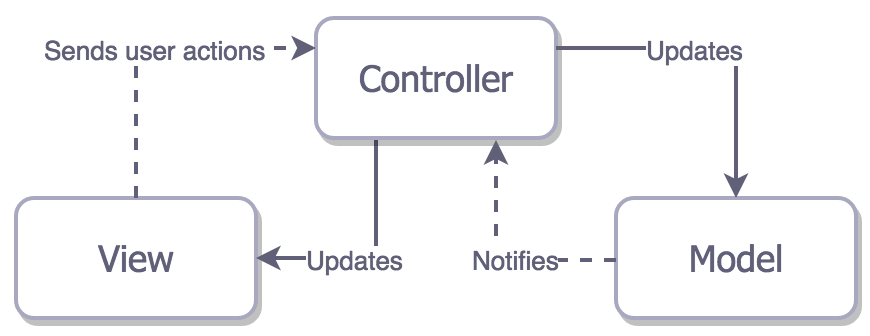
Models. Where your data resides. Things like persistence, model objects, parsers and networking code normally live there.
Views. The face of your app. Its classes are typically reusable, since there aren't any domain-specific logic in them. For example, a UILabel is a view that presents text on the screen, and it’s easily reusable.
Controllers. Mediates between the view and the model, typically via the delegation pattern. In the ideal scenario, the controller entity won’t know the concrete view it’s dealing with. Instead, it will communicate with an abstraction via a protocol. A classic example is the way a UITableView communicates with its data source via the UITableViewDataSource protocol.
Simple, right? Apple’s MVC documentation explains these layers in detail and can give you a theoretical understanding that will help you avoid potential pitfalls.
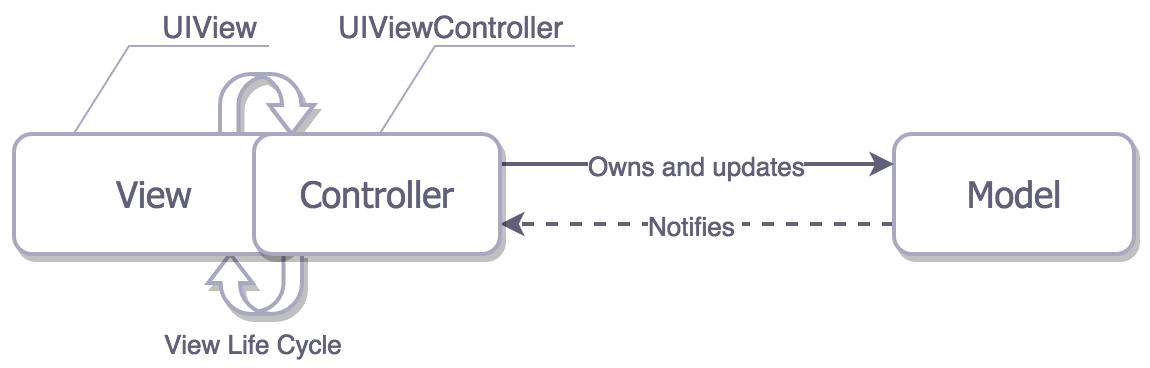
With the View Controller Lifecycle methods we learned about last week, we can draw a "more realistic" Cocoa MVC relationship, that follows the same principles:
When creating complex models, where certain classes "depend" on others, always try to pass an instance of the independent class to the dependent class in it's init method. This design strategy is called Dependency Injection, and is recommended by Apple.
- https://medium.com/ios-os-x-development/ios-architecture-patterns-ecba4c38de52
- https://www.raywenderlich.com/132662/mvc-in-ios-a-modern-approach
APIs
API stands for Application Programming Interface. It is a programmatic way to be able to access functions and data of other apps. In terms of Libraries, an API is the functions/methods included in the library. We've already been using Apple's APIs for TableViews. Today pretty much every major platform has an API, most of them are free and you can access them to work with maps and location. APIs allows you to access a huge amount of data and build apps that rely on existing systems like Facebook or Google.
JavaScript Object Notation, or JSON for short, is a common way to transmit data to and from web services. It’s simple to use and human-readable, which is why it’s so incredibly popular. We'll be working with JSON when dealing with Web APIs. To make HTTP requests to Web APIs that don't have iOS Libraries, we need to make raw GET and POST requests. To do this, one would use URLSession and JSONDecoder. The URLSession grabs the data using an HTTP request and then the JSONDecoder class converts the JSON response into the data type you need (such as String, Int and Objects).
- https://medium.com/aviabird/swift-3-apis-json-data-6ca749b550b3
Using Third Party Libraries
Sites like Github are full of Third Party Libraries - chunks of code written by developers like
you and me to share with others. Libraries offer quick and easy ways to bring awesome features
into your Xcode project. They save you code, time and sanity! There are libraries for various
things: everything from UI elements to random color generation to integration with cool Web services.
Check out
this list of awesome open-source libraries.
One of my favorite Libraries is Affectiva - it classifies emotions based on Facial
expression on
the device in near real time!
Installing Libraries
We can install libraries in two ways: 1) drag them into our project after downloading them from the Web or 2) use a dependency manager like Cocoapods.
Cocoapods is a dependency manager for Swift and Objective-C Cocoa projects. A dependency manager makes it easy to add, remove, update and manage third-party dependencies used by your app. CocoaPods has over 42 thousand libraries and is used in over 3 million apps. The configuration file for Cocoapods is called a "Pod file" - it lists all of the libraries your project depends on and their version numbers.
                      sudo gem install cocoapods

                      pod setup --verbose
Firebase 
Firebase is a mobile-backend-as-a-service from Google that
provides several features for building
powerful
mobile apps. Firebase has three core services: a realtime database, user authentication and
hosting. With the Firebase iOS SDK, you can use these services to build powerful apps
without
writing a single line of server code.
The realtime database is one of the most unique features of Firebase. When a Firebase database
updates, all connected users receive updates in realtime. This means your app can stay up to date without user interaction.
Many of you will be using Firebase as your Cloud Backend for you project and to Authenticate Users
(and give them accounts). We'll step through building an app with Firebase in class together!
Summary
- MVC is the design strategy for iOS - beware of Massive View Controllers
- Third Party Libraries are very useful and can save a developer a lot of time and work
- Firebase is a platform with realtime database, user authentication and hosting used by many developers