 OKI2
- Map G/L accounts for Billings Roll-up OKI2
- Map G/L accounts for Billings Roll-up
OKI2
- Map G/L accounts for Billings Roll-up OKI2
- Map G/L accounts for Billings Roll-up To maintain the table mapping GL accounts to sponsor expenditure types, follow the steps below.
 Note: If
a new cost element is reported on, without being added to the table below (mapping
G/L accounts to billings roll-ups), the new cost element will be "rolled
up" to the expense type (Service Number) of the next cost element appearing
in the table.
Note: If
a new cost element is reported on, without being added to the table below (mapping
G/L accounts to billings roll-ups), the new cost element will be "rolled
up" to the expense type (Service Number) of the next cost element appearing
in the table.
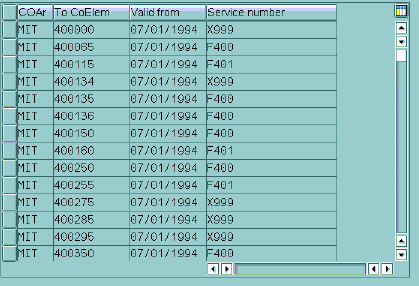
For example, if a new cost element 400145 is used (without being added to the table) then it will be rolled up to F400, the Service number/expense type of 400150 (see sample table below).
This can cause errors when creating bills, for example when
allowable costs are rolled up to unallowable expense types. To avoid these errors,
you should add any new cost element, including its Service number (or expense
type for sponsor billing), to the billing roll-ups table, as described below.
 Role
ZSBM=>Cost Reimbursable=>OKI2 - Map G/L accounts for Billings Roll-up
Role
ZSBM=>Cost Reimbursable=>OKI2 - Map G/L accounts for Billings Roll-up
At the Command Line, enter: /nOKI2 (the three letters "OKI" followed by number 2)
| To do this... | do this... |
|---|---|
| Add new rows |
|
| Change existing rows |
Type over existing data
|
 to SAVE.
Copyright © 2002, Massachusetts Institute of Technology. All rights reserved.
 to get table
of empty rows (see below).
to get table
of empty rows (see below). 
