import java.applet.*;
import java.awt.*;
Syntax
public abstract class Projection extends Jcalmcomp
Description
Projection class is 3D drawing tool in engineering usage which
is extended from Jcalcomp.
It provides 3D vector and tensor treatment of graphics.
Projection is extended from Jcalcomp class and user should
make thier own class extended from Projection .
psymbol() draw 3D symbol in Vector font
pnumber() draw 3D Numbers in Vector font
paxis() draw 3D linear axis in arbitrary direction with title
plgaxis() draw 3D log axis in arbirtrary direction with title
Poly3DPaint() Draw filled polygon in 3D
RayTrace() Give cosine of reflection angle and eye line for a surface element
SYNTAX :
public Projection(int x_dim,int y_dim, double wid, double
gx01,double gy01, long jgx0,long jgy0, long jgx1,long
jgy1)
public Projection(int x_dim,int y_dim,
double wid, double gx01,double gy01)
public Projection()
public Projection(int x_dim,int y_dim)
public Projection(int x_dim,int y_dim,double
wid)
DESCRIPTION : The projection operation is controlled by bprep(), while projection plane is fixed by this constructor. Users have to call bprep() after construction method.
PARAMETERS :
parent constructor is called and see Jcalcomp(). Only default values
are presented here.
SEEALSO : Jcalcomp(),bprep()
EXAMPLE :see example of pplot()
SYNTAX :
void bprep(int ang,int idf, double h1d,double
h2d,double h3d, double phaid,double psaid,
double cvdd, double
x,double y,double z)
DESCRIPTION :
This Projection class has the perspective and isometric
mode. They are controlled by variable ang.
In case of perspective view, the eye point is needed, which is decided
by the distance cvd (Clear View Distance) vertically behind the origin
on projection plane. The view port has 5 degrees of freedom.
2 of them are rotating angle around y axis and z axis sequentially.
and parallel movement defined by (x,y,z). Initially, the view port
is placed vertically to x axis , and 20.0 distance from 3D origin. For
Isometric view, the view port is rotated twice, and then moved in parallel.
For perspective view the eye is moved with the plane, keeping cvd distance.
PARAMETERS :
SEEALSO : Projection()
EXAMPLE :see example of pplot()
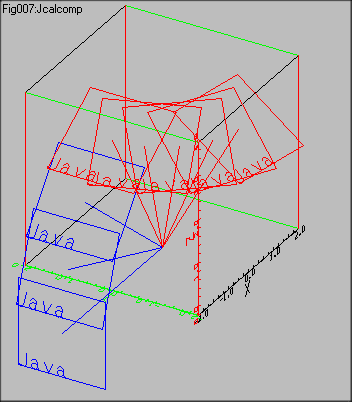
import java.applet.*;
import java.awt.*;
//******************************************
public class Fig007 extends Projection
//******************************************
{
//==========================================
public Fig007()
//==========================================
{
super(500,400,30.,-16.,-5.5,0,0,300,300);
}
//==========================================
public void paint( Graphics g )
//==========================================
{
int i,j;
double n=30.,m=60.;
bprep(1,3,
0.,0.,0.,
90.- m,-180.+n,
25.,
0.,0.,0.);
g.setColor(Color.black);
paxis(g,-al,-al,0.,1.,2.*al,0.,90.,0.,"X",1,1,5,-2.,1.);
pplot(g,-al,+al,-al+al,3);pplot(g,al,+al,-al+al,2);
pplot(g,-al,-al,+al+al,3);pplot(g,al,-al,+al+al,2);
pplot(g,-al,+al,+al+al,3);pplot(g,al,+al,+al+al,2);
pplot(g,-al,-al,-al+al,3);pplot(g,al,-al,-al+al,2);
g.setColor(Color.green);
paxis(g,-al,-al,0.,-1.,2.*al,0.,0.,90.,"Y",1,1,5,-2.,1.);
pplot(g,-al,-al,-al+al,3);pplot(g,-al,+al,-al+al,2);
pplot(g,+al,-al,-al+al,3);pplot(g,+al,+al,-al+al,2);
pplot(g,+al,-al,+al+al,3);pplot(g,+al,+al,+al+al,2);
pplot(g,-al,-al,+al+al,3);pplot(g,-al,+al,+al+al,2);
g.setColor(Color.red);
paxis(g,-al,-al,0.,-1.,2.*al,90.,-90.,180.,"Z",1,1,5,0.,1.);
pplot(g,-al,+al,-al+al,3);pplot(g,-al,+al,al+al,2);
pplot(g,+al,-al,-al+al,3);pplot(g,+al,-al,al+al,2);
pplot(g,+al,+al,-al+al,3);pplot(g,+al,+al,al+al,2);
pplot(g,-al,-al,-al+al,3);pplot(g,-al,-al,al+al,2);
g.setColor((Color.blue));
Vector
V0=new Vector(-al-10.,0.,0.),
V1=new Vector(0.,5.,0.),
V2=new Vector(0.,0.,5.);
g.setColor(Color.blue);
for(double phai=0.;phai<=60.;phai+=20.)
{
Trape( g,V0,V1,V2,phai,0.);
}
g.setColor(Color.red);
for(double psai=0.;psai<=80.;psai+=20.)
{
Trape( g,V0,V1,V2,60.,psai);
}
}
//==========================================
public void Trape( Graphics g,
Vector V0, Vector V1, Vector V2,
double phai, double psai)
//==========================================
{
Tensor E=new Tensor(1.);
Vector
Origin = new Vector(),
W1 = new Vector(V0.Plus(V1.Plus(V2))),
W2 = new Vector(V0.Plus(V1.Minus(V2))),
W3 = new Vector(V0.Minus(V1.Plus(V2))),
W4 = new Vector(V0.Minus(V1.Minus(V2)));
E.Z_Rotate(psai);
E.Y_Rotate(phai);
Vector
A0 = new Vector(E.Mult(V0)),
A1 = new Vector(E.Mult(W1)),
A2 = new Vector(E.Mult(W2)),
A3 = new Vector(E.Mult(W3)),
A4 = new Vector(E.Mult(W4));
pplot(g,Origin,3);
pplot(g,A0,2);
psymbol(g,A2.Get_Elem(0),
A2.Get_Elem(1),
A2.Get_Elem(2),
0.,90.-phai,psai-90.,1.5,"Java",4);
pplot(g,A1,3);
pplot(g,A2,2);
pplot(g,A3,2);
pplot(g,A4,2);
pplot(g,A1,2);
}
}
DESCRIPTION :
3D lines are projected to the projection plane.
PARAMETERS :
SEEALSO : Projection(),bprep(),Jcalcomp.lline()
EXAMPLE : 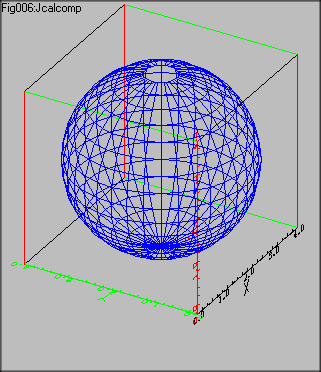
import java.applet.*;
import java.awt.*;
//******************************************
public class Fig006 extends Projection
//******************************************
{
//==========================================
public Fig006()
//==========================================
{
super(500,400,30.,-16.,-5.5,0,0,300,300);
}
//==========================================
public void paint( Graphics g )
//==========================================
{
int i,j;
double n=30.,m=60.;
bprep(1,3,
0.,0.,0.,
90.- m,-180.+n,
25.,
0.,0.,0.);
// Base square
g.setColor(Color.black);
paxis(g,-al,-al,0.,1.,2.*al,0.,90.,0.,"X",1,1,5,0.,1.);
pplot(g,-al,+al,-al+al,3);pplot(g,al,+al,-al+al,2);
pplot(g,-al,-al,+al+al,3);pplot(g,al,-al,+al+al,2);
pplot(g,-al,+al,+al+al,3);pplot(g,al,+al,+al+al,2);
pplot(g,-al,-al,-al+al,3);pplot(g,al,-al,-al+al,2);
g.setColor(Color.green);
paxis(g,-al,-al,0.,-1.,2.*al,0.,0.,90.,"Y",1,1,5,0.,1.);
pplot(g,-al,-al,-al+al,3);pplot(g,-al,+al,-al+al,2);
pplot(g,+al,-al,-al+al,3);pplot(g,+al,+al,-al+al,2);
pplot(g,+al,-al,+al+al,3);pplot(g,+al,+al,+al+al,2);
pplot(g,-al,-al,+al+al,3);pplot(g,-al,+al,+al+al,2);
g.setColor(Color.red);
paxis(g,-al,-al,0.,-1.,2.*al,90.,-90.,180.,"Z",1,1,5,0.,1.);
pplot(g,-al,+al,-al+al,3);pplot(g,-al,+al,al+al,2);
pplot(g,+al,-al,-al+al,3);pplot(g,+al,-al,al+al,2);
pplot(g,+al,+al,-al+al,3);pplot(g,+al,+al,al+al,2);
pplot(g,-al,-al,-al+al,3);pplot(g,-al,-al,al+al,2);
g.setColor((Color.blue));
for(double latitude=-90.;latitude<90.;latitude+=10.)
{
pplot(g,al*Math.cos(latitude*DPAI),0.,al*Math.sin(latitude*DPAI)+al,3);
for(double longitude=0.;longitude<=360.;longitude+=10.)
{
double xx=al*Math.cos(latitude*DPAI)*Math.cos(longitude*DPAI);
double yy=al*Math.cos(latitude*DPAI)*Math.sin(longitude*DPAI);
pplot(g,xx,yy,al*Math.sin(latitude*DPAI)+al,2);
}
}
for(double longitude=0.;longitude<=360.;longitude+=10.)
{
pplot(g,0,0.,al+al,3);
for(double latitude=-90.;latitude<90.;latitude+=10.)
{
double xx=al*Math.cos(latitude*DPAI)*Math.cos(longitude*DPAI);
double yy=al*Math.cos(latitude*DPAI)*Math.sin(longitude*DPAI);
pplot(g,xx,yy,al*Math.sin(latitude*DPAI)+al,2);
}
}
}
}
DESCRIPTION :
This method is logically different from contour method in Jcalcomp.
Ths is mainly for Cartesian mesh system, which is located in x-y plane.
The value of z component is given by double func(double x,double
y) which can be overridden by user.
PARAMETERS :
g
x0 x
componet of the origin of 3D contour
y0 y
componet of the origin of 3D contour
z0 z
componet of the origin of 3D contour
xwid dimension of 3D contour
in x direction( world coordinate)
ywid dimension of 3D contour
in y direction( world coordinate)
imax mesh size in x direction
jmax mesh size in y direction
SEEALSO : bprep()
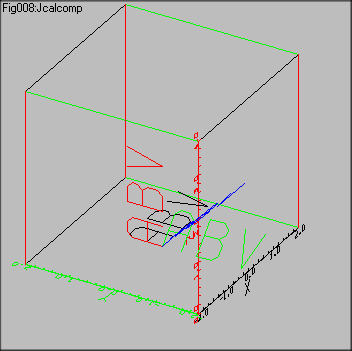
EXAMPLE :
DESCRIPTION :
PARAMETERS :
g
x Starting
point of string. The x coordinate of Left bottom corner of the first charcter.
y Starting
point of string. The y coordinate of Left bottom corner of the first charcter.
z Starting
point of string. The z coordinate of Left bottom corner of the first charcter.
dphai
The angle of string in degree from horizontal left to right direction.
dtheta
dpsai,
height The height of characters.
text String to be paint. If
the 1st syntax is applied, Vector font is chosen.
If 2nd, the current system font is chosen which is horizontal only.
in The number of charactors in
the string.
RETURNS : none
SEEALSO : bprep(),paxis(),plgaxis(),pnumber(),Jcalcomp.symbol()
import java.applet.*;
import java.awt.*;
//******************************************
public class Fig008 extends Projection
//******************************************
{
//==========================================
public Fig008()
//==========================================
{
super(500,400,30.,-16.,-5.5,0,0,300,300);
}
//==========================================
public void paint( Graphics g )
//==========================================
{
int i,j;
double n=30.,m=60.;
bprep(1,3,
0.,0.,0.,
90.- m,-180.+n,
25.,
0.,0.,0.);
// Base square
g.setColor(Color.black);
paxis(g,-al,-al,0.,1.,2.*al,0.,90.,0.,"X",1,1,5,-2.,1.);
pplot(g,-al,+al,-al+al,3);pplot(g,al,+al,-al+al,2);
pplot(g,-al,-al,+al+al,3);pplot(g,al,-al,+al+al,2);
pplot(g,-al,+al,+al+al,3);pplot(g,al,+al,+al+al,2);
pplot(g,-al,-al,-al+al,3);pplot(g,al,-al,-al+al,2);
g.setColor(Color.green);
paxis(g,-al,-al,0.,-1.,2.*al,0.,0.,90.,"Y",1,1,5,-2.,1.);
pplot(g,-al,-al,-al+al,3);pplot(g,-al,+al,-al+al,2);
pplot(g,+al,-al,-al+al,3);pplot(g,+al,+al,-al+al,2);
pplot(g,+al,-al,+al+al,3);pplot(g,+al,+al,+al+al,2);
pplot(g,-al,-al,+al+al,3);pplot(g,-al,+al,+al+al,2);
g.setColor(Color.red);
paxis(g,-al,-al,0.,-1.,2.*al,90.,-90.,180.,"Z",1,1,5,0.,1.);
pplot(g,-al,+al,-al+al,3);pplot(g,-al,+al,al+al,2);
pplot(g,+al,-al,-al+al,3);pplot(g,+al,-al,al+al,2);
pplot(g,+al,+al,-al+al,3);pplot(g,+al,+al,al+al,2);
pplot(g,-al,-al,-al+al,3);pplot(g,-al,-al,al+al,2);
g.setColor((Color.blue));
g.setColor(Color.black);
psymbol(g,0.,0.,0.,0.,0.,0.,4.,"ABV",3);
g.setColor(Color.red);
psymbol(g,0.,0.,0.,90.,0.,0.,4.,"ABV",3);
g.setColor(Color.green);
psymbol(g,0.,0.,0.,0.,45.,-90.,4.,"ABV",3);
g.setColor(Color.blue);
psymbol(g,0.,0.,0.,45.,0.,-90.,4.,"ABV",3);
}
}
DESCRIPTION :
PARAMETERS :
g
x Starting
point of number. The x coordinate of Left bottom corner of the first charcter.
y Starting
point of number. The y coordinate of Left bottom corner of the first charcter.
z
Starting point of number. The zcoordinate of Left bottom corner of the
first charcter.
h The
height of characters.
dphai
dtheta
dpsai
fpn The objective double number.
n The
column under decimal point. It n<0, the number is rounded by n power
of 10.
RETURNS : none
SEEALSO : psymbol(),plgaxis(),Jcalcomp.number()
EXAMPLE :
PARAMETERS :
g
x Starting
point x coordinate(in World Coodinate system)
y Starting
point y coordinate(in World Coodinate system)
z Starting
point z coordinate(in World Coodinate system)
t
lemgth of lgaxis(in World Coodinate system)
dphai
dtheta
dpsai
isep Abs(isep) is number of power
to be developed in t. If isept>0, axis is drawn in the direction of clockwise.
If isep<0, counter-clockwise.
text Title string. It is located
at the place specified by t and isep.
in length
of title string
m starting power
RETURNS : none
SEEALSO : bprep()
EXAMPLE :
SYNTAX :
void paxis(Graphics g,
double x,double y,double z,double
d,double t,
double dphai,double dtheta,double
dpsai,
String text,int in,int
m,int md,
double sm,double smd)
DESCRIPTION :
paxis provide arbitrary location of axis, which include it rotation.
User have to recognize 3D system applying "world coordinate"
here.
This axis method is the interface of them. x0, y0, d, and t are in
world coordinate system,
and
sm and smd are in User Coordinate system.
PARAMETERS :
g
x Starting
point x coordinate(in World Coodinate system)
y Starting
point y coordinate(in World Coodinate system)
z Starting
point z coordinate(in World Coodinate system)
d length
of axix (in World Coodinate system)
t Abs(t)
is length and increment of supplemental line. If t>0, axis is drawn in
the direction
of clockwise.
If t<0, counter-clockwise.
dphai
dtheta
dpsai
text Title string. It is
located at the place specified by t.
in number
of characters of text
m initial
position to print value
md increment
of supplemental line
sm starting
value printed
smd increment
of printed value
RETURNS : none
SEEALSO : bprep()
EXAMPLE : see example of bprep()
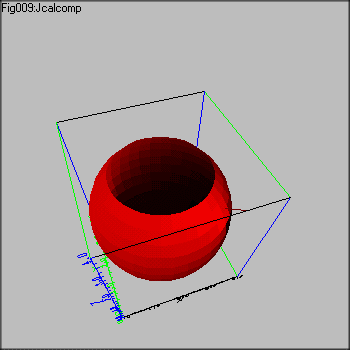
DESCRIPTION :
The allocation vector m identifies the coordinate of objective surface.
Vector s1 and s2 is unit vector on the surface, which are linear independent.
The vector r is light source unit vector.
The surface element have outer and inner surface, which is decided
by the sequence of s1 and s2.
The right screw method is applied here. The vector product of these
two vectors makes a vertical unit vector, in which direction of "+" is
outer surface. When two same surface elements are given at the same coordinate,
if the sequence of s1 and s2 is inverse in calling method, the brightnesses
have different sign "+" and "-".
PARAMETERS :
g
m The location of the
surface element.
s1 Unit
vector. One of independent vector on the surface
s2 Unit
vector. Another of independent vaector on
the surface
r Unit
vector. The light source vector.
RETURNS : double
SEEALSO : bprep()
import java.applet.*;
import java.awt.*;
//******************************************
public class Fig009 extends Projection
//******************************************
{
//==========================================
public Fig009()
//==========================================
{
super(500,400,30.,-16.,-5.5,0,0,300,300);
}
//==========================================
public void paint( Graphics g )
//==========================================
{
g.drawString("Fig009:Jcalcomp",0,10);
int i,j;
double n=70.,m=30.;
bprep(0,3,
0.,0.,0.,
90.- m,-180.+n,
25.,
0.,0.,0.);
// Base square
g.setColor(Color.black);
paxis(g,-al,-al,0.,1.,2.*al,0.,90.,0.,"X",1,1,5,0.,1.);
pplot(g,-al,+al,-al+al,3);pplot(g,al,+al,-al+al,2);
pplot(g,-al,-al,+al+al,3);pplot(g,al,-al,+al+al,2);
pplot(g,-al,+al,+al+al,3);pplot(g,al,+al,+al+al,2);
pplot(g,-al,-al,-al+al,3);pplot(g,al,-al,-al+al,2);
g.setColor(Color.green);
paxis(g,-al,-al,0.,-1.,2.*al,0.,0.,90.,"Y",1,1,5,0.,1.);
pplot(g,-al,-al,-al+al,3);pplot(g,-al,+al,-al+al,2);
pplot(g,+al,-al,-al+al,3);pplot(g,+al,+al,-al+al,2);
pplot(g,+al,-al,+al+al,3);pplot(g,+al,+al,+al+al,2);
pplot(g,-al,-al,+al+al,3);pplot(g,-al,+al,+al+al,2);
g.setColor(Color.blue);
paxis(g,-al,-al,0.,-1.,2.*al,90.,-90.,180.,"Z",1,1,5,0.,1.);
pplot(g,-al,+al,-al+al,3);pplot(g,-al,+al,al+al,2);
pplot(g,+al,-al,-al+al,3);pplot(g,+al,-al,al+al,2);
pplot(g,+al,+al,-al+al,3);pplot(g,+al,+al,al+al,2);
pplot(g,-al,-al,-al+al,3);pplot(g,-al,-al,al+al,2);
g.setColor((Color.blue));
double Dlongi=10.,Dlatit=10.;
Vector rr=(new Vector(-2.,2.,-1.)).Unit();
Vector vv[]=new Vector[5];
for(double latitude=-90.;latitude<50.;latitude+=Dlatit)
{
for(double longitude=0.;longitude<=360.;longitude+=Dlongi)
{
Vector m0=new Vector(
al*Math.cos(latitude*DPAI)*Math.cos(longitude*DPAI),
al*Math.cos(latitude*DPAI)*Math.sin(longitude*DPAI),
al*Math.sin(latitude*DPAI)+al);
Vector m1=new Vector(
al*Math.cos((latitude+Dlatit)*DPAI)*Math.cos(longitude*DPAI),
al*Math.cos((latitude+Dlatit)*DPAI)*Math.sin(longitude*DPAI),
al*Math.sin((latitude+Dlatit)*DPAI)+al);
Vector m2=new Vector(
al*Math.cos(latitude*DPAI)*Math.cos((longitude+Dlongi)*DPAI),
al*Math.cos(latitude*DPAI)*Math.sin((longitude+Dlongi)*DPAI),
al*Math.sin(latitude*DPAI)+al);
Vector m3=new Vector(
al*Math.cos((latitude+Dlatit)*DPAI)*Math.cos((longitude+Dlongi)*DPAI),
al*Math.cos((latitude+Dlatit)*DPAI)*Math.sin((longitude+Dlongi)*DPAI),
al*Math.sin((latitude+Dlatit)*DPAI)+al);
double Bright=RayTrace(g,m0,(m1.Minus(m0)).Unit(),(m2.Minus(m0)).Unit(),rr);
vv[0]=m0;vv[1]=m1;vv[2]=m3;vv[3]=m2;
if (Bright >1.)
Poly3DPaint(g,new Color((float)((Bright+1.)/2.),(float)((Bright+1.)/2.),(float)((Bright+1.)/2.)),vv,4);
else
Poly3DPaint(g,new Color((float)((Bright+1.)/2.),(float)0.,(float)0.),vv,4);
}
}
pplot(g,new Vector(.5*al,-al,2.0*al),3);
pplot(g,(rr.Mult(2.)).Plus((new Vector(.5*al,-al
,2.0*al))),2);
g.setColor(Color.black);
pplot(g,-al,-al,+al+al,3);pplot(g,al,-al,+al+al,2);
g.setColor(Color.green);
pplot(g,-al,-al,+al+al,3);pplot(g,-al,+al,+al+al,2);
g.setColor(Color.blue);
paxis(g,-al,-al,0.,-1.,2.*al,90.,-90.,180.,"Z",1,1,5,0.,1.);
}
}
SYNTAX :
void Poly3DPaint(Graphics g,Color Ucolor,Vector[] v,int n)
DESCRIPTION :
PARAMETERS :
g
Ucolor user giving color
specification
v
Array of 3D vector.
n
Number of vertex. Under 5.
RETURNS : none
SEEALSO : RayTrace(),bprep(),Vector class
EXAMPLE : see example of RayTrace()