

Welcome to SolsticeTM AdminSuiteTM 2.3
Solstice enables a cooperative enterprise management approach to system administration. This cooperative management approach focuses on reducing the number of managed objects by implementing management components and appliances. Management components provide configuration management, data integrity, and a software repository. Appliances are servers and desktops that are field replaceable units (FRUs). Appliances can be centrally administered, do not require backup, and provide improved network performance. Solstice AdminSuite, combined with the use of name services like NIS+ and products like Solstice AutoClientTM, make cooperative enterprise management a reality.
Benefits
Solstice AdminSuite lowers system administration costs by:- Managing distributed systems: Solstice AdminSuite offers location-independent administration of Solaris work flows through the use of network services such as NIS and NIS+. This centralizes desktop administration and makes remote management an easy process.
- Automating routine administration tasks: Solstice AdminSuite automates tasks such as host set up, printer set up, and user set up, allowing system administrators to be more productive.
- Providing easy-to-use system administration tools: An extensive graphical user interface facilitates centralized set up and maintenance of the network environment. Administration is done without requiring root privileges, making centralized support a reality.
Features
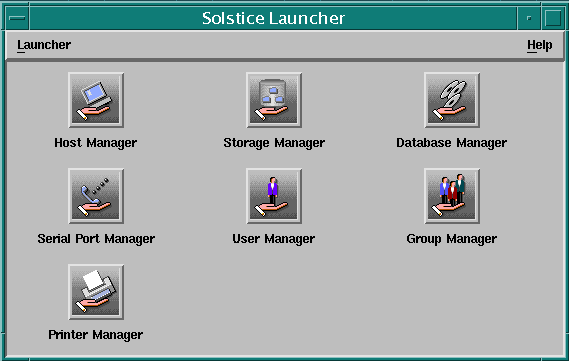
Solstice AdminSuite provides an integrated collection of graphical user interfaces to perform administrative tasks such as managing hosts, users, groups, administrative data, file systems, disks, printers, and serial port devices.
Host Management
Host Manager is used to connect client systems onto the network, then to modify and delete them. Supported client types include stand-alone, diskless, dataless, and autoclients. Host Manager also allows you to add and delete OS services and set up remote installation services.
User Management
User Manager allows easy set up and maintenance of user accounts. This includes adding new users, removing users, and updating user information. Some of the defaults that can be set include: login shell, password policy, and identification of the user's mail server.
Group Management
The Group Manager adds, displays, modifies, and deletes groups in the NIS or NIS+ name service environment or on a local or remote system (/etc files). Administrators can also add and change group passwords.
Administrative Data Management
Database Manager allows the direct manipulation of UNIX® administration data. Database Manager is name service independent, allowing the administrator to use a consistent window when working with both centralized and standard UNIX administration data.
Printer Management
Printer Manager allows the easy set up of both the client and server side of the SVR4 print subsystem. Printer Manager is used for creating new print servers and administering the connection of the Solaris 2.5.1 through 7 clients to their print servers. Printer Manager supports use of either the new Sun print client software or the LP print service software. Using the Sun print client software gives users complete access to all of the printer manager functionality, including simplified and centralized printer administration through the use of name services. The use of NIS or NIS+ eliminates redundant administration steps.
Serial Port Management
Serial Port Manager is used for adding and maintaining port services for terminals and modems. It can display serial port information and facilitates port set up, modification, or deletion. It also provides templates for common terminal and modem configurations.
Storage Manager
The Storage Manager consists of two components: a File System Manager and a Disk Manager. The File System Manager allows file system management of a server or a group of clients on a server. The Disk Manager enables management of disk slices and fdisk partitions on a single disk or a group of equivalent disks. Storage Manager also supports management of High Sierra file system CD-ROMs.
Software Usage Monitoring
Software Usage Monitoring provides the ability to monitor the use of software across network servers and clients.
GUI and CLI Support
Users can operate Solstice AdminSuite either with its robust GUI or with commands typed directly in the Command Line Interface (CLI).
Operation Logging
Creates a log entry for each major operation completed with a Solstice AdminSuite tool, providing a record of past transactions for diagonstic purposes.
Remote Access Support
- Remotely halt and boot systems, without logging in to each machine to halt or boot it.
- Remotely view a system's hardware configuration.
Customization of Certain Functions
User and Host Manager allow you to customize adding, modifying, and deleting users and hosts through the support of user-created scripts.
Multiple Product Installations
The Solstice AdminSuite installation program allows the selection of multiple products instead of one at a time.
New Features
The Solstice AdminSuite 2.3 and AutoClient 2.1 products include the following new features:- Remove OS Services Functionality: The Host Manager tool now enables you to remove OS services from an OS server.
-
Add Remote Printer Functionality: The Printer Manager tool now has added functionality that enables you to add a remote printer on print servers running Solaris 2.5.1 through 7.
-
Group Password Functionality: Using the Group Manager tool, you can now set the group password for added security and privacy for your group files.
-
Script Feature: Using Host Manager and User Manager, you can run user specified and created scripts. This feature enables you to run a
script that customizes your adding, modifying, or deleting of a user or
host.
-
Enhanced Root User Support: AdminSuite now has additional support for users running as root.
- Improved Installation Procedure: The installation script has been improved to make the installation and setup of AdminSuite and AutoClients easier.