Advanced Placement
Functional Specification
Categories of
students and transfer credit
Requirement:
The administrative
office at MIT responsible for tracking the evolution of MIT's advanced
placement policy, supporting efforts by the Faculty to update those policies,
publishing departmental advanced placement policies, and reporting on the
statistical trends related to advanced placement at MIT should be moved to the
Office of Academic Services.
The "Director
of Advanced Placement" is currently housed in the Admissions Office. This
administrative detail is a vestige of a much earlier practice at MIT,
long-abandoned, of active involvement by several faculty members in the
day-to-day operations of the Admissions Office. Under that regime, it was
appropriate for day-to-day decisions concerning advanced placement policy, and
its overall administration, to be made in the Admissions Office.
This administrative
arrangement is no longer appropriate. The most important decisions about
advanced placement concern whether matriculating students should receive MIT
subject credit for the successful completion of high school curricula. This is
an academic decision, not an admissions decision. Therefore, it is more
appropriate for the administrative support of MIT's advanced placement policy
to be housed in a unit of the Undergraduate Dean's Office that is responsible
for the undergraduate curriculum, and the freshman year particularly. That
office is the Office of Academic Services.
Supporting functions
and system processes will be written to support the Office of Academic Services
to fulfill their needs in relationship to advanced placement. The main area for this project from SSIT is
to get the data, display it, and provide mechanisms to maintain and support
it. Also, this data will eventually be
used to display on the faculty forms during the freshman advising process.
Functional Specification:
Overview/WBS:
The project will be broken into 4 different areas of work Maintenance, Communication, Miscellaneous, and MaintainCredit.
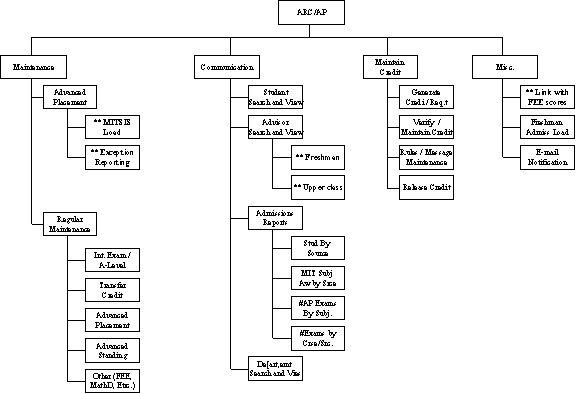
** Groundwork was laid out in support of the Freshman Folder. These items will be reviewed for enhancements and added functionality to streamline the process.
Maintenance:
The different processes to update the different types of scoring that will be used to identify credit that a student can receive.
Communication:
The processes to display and get information to the various students, advisors and departments that may use this information for advising or making decisions about what credit the student may receive.
Maintain Credit:
The processes to generate credit setup the rules for applying credit, validating and correcting the credit.
Miscellaneous:
Major processes that will need to be modified that don’t fit into a maintenance or communication type of role.
Maintenance:
There will be a multitude of test scores that have to be maintained. Some of the test scores are Advanced Placement, International Exams, Transfer Credit, A-Level, FEE scores etc. There will be a small subsystem built where all scores are maintained manually along with automatic load processes including files from ETS.
ARC/AP Load:
MITSIS Load:
The initial schedule of files will be Monday, Tuesday, and Thursday. However, ETS will send files whenever necessary to catch up from holidays, or other reasons. So we cannot guarantee that the files will come from ETS only on Monday, Tuesday, and Thursday. The files will be encrypted with PGP and must go through a machine that has the PGP software installed onto it. An automatic process will be written to check the ETS server and automatically pull the files designated for MIT and place them onto the production servers where they will be loaded into the database. The AP files on the ETS system will have APP3514 as first section of the datafile name and the Julian date will be the extension for example APP3514.191. The files will be available on ETS for 14 days. When the files have been loaded, an e-mail confirmation will be sent the to AP team, showing them a log output of the run.
Admissions Load:
It was found that modifying the Admissions programs to create an automatic load of information into the Natural database was not feasible or desired.
After much discussion on what was needed, a decision was made to process electronic files from ETS beginning this year through the ARC. Admissions will receive the paper copy for 60 days, or whenever we decide to cut over. ARC will process the data into the MITSIS database for use by the Freshman Advising project. This will be something that will be used later by the application of credit process that AP will need. After the cutover period, Admissions will be able to search and view the scores online. Therefore there will be no need to try and keep any paper copies of the follow up scores
Basically the ARC will assume the responsibility of ETS when the 60 days are over and process the electronic files for Admissions as well as the Freshman Folder.
It was determined that the ARC will become the source for all AP data. It will be the ARC’s responsibility to make sure the files are processed appropriately. The ARC will designate a person who will make sure the data has been processed.
Up to date information will be provided to the freshman advisors without a negative impact to Admissions at all. Admissions will have an added benefit that they will not have to save and process any paper files.
Exception Reporting:
Exceptions from the MITSIS Load will be put into a temporary table with a brief message stating why it couldn’t be loaded. The exceptions will be reviewed and an attempt will be made to correct the problems and submit the data.
Regular Maintenance:
There will be exceptions to the rule and some manual updates and changes will need to be done to the data that was posted to MITSIS. Therefore, screens will be built to allow access to the AP data that was loaded and corrections can take place.
International Exams:
Regular Maintenance:
International exams are manually input because the university community has not seen it necessary to create electronic feeds of the information at this time. The number of students that are input is pretty small, so the effort to manually input them is minimal. Therefore there will be screens built to maintain the information manually.
Transfer Credit:
Transfer credit will be maintained manually. The students that have to be manually input are small and the impact will be minimal. Therefore screens will be built to manually update the Transfer Credit for a student.
Communication:
The processes to display and get information to the various students, advisors, and departments who use this information to make decisions about what subjects the students should take. There will be reporting functions within the ARC to allow us to disseminate information to various people. The following areas are the focus points of this project. Because the student will be viewing the information there will be a need to update the information from ETS and the others sources in a more efficient and timely manner.
Student Folder:
The student will be allowed to view their scoring information through WEBSIS. There will be an understanding that, if there is a delay in getting a score, it may be due to various delays in loading.
The information displayed will be based on what we have on file for the student. When a student is missing an AP exam, they will be given instructions to contact ETS to request a score be sent to us. Scores may be missing by taking an exam late and the score wasn't processed by the June 'tape' transfer, or (more often) because a student didn't ask for the exam to be sent to us. For example, they took the exam as a sophomore and they hadn’t decided to come to MIT when they designated the universities to send the scores.
Advisors:
Freshman:
The freshman advisors will be allowed to view a student’s scoring information through the freshman advisor folder. There will be an understanding that, if there is a delay in getting a score, it may be due to the delay from ETS.
The information displayed will be based on what we have on file for the student
Upper Class:
Students who transfer from another school may come into MIT as a sophomore and will not have a freshman advisor. These students are assigned an advisor at the department. Therefore, access to the test scores will be given to advisors and will be used when discussing things with the incoming student.
The information displayed will be based on what we have on file for the student.
Admissions Reports:
Admissions currently creates 4 different reports that will need to be replicated within the new process.
Misc. Reports:
There may be a need to create miscellaneous reports to various departments in support of the test scores and the generation of credit. These reports will be reviewed on an as needed basis.
Generate Credit:
Generate Applied Credit:
We will replicate the programs that Admissions currently uses to generate credit. The programs will be moved to MITIS and the operational aspect of them will be moved to the ARC.
Validate/Maintain:
The Registrars office will have the ability to validate and maintain the credit given to students when it is generated. Access will be given to the credit that was generated so that any changes may occur. There may be cases where an automatic process will need to be overridden.
Rules Setup:
With all the rules that need to be setup for AP credit and Advanced Standing, we will need a mechanism to maintain and modify the rules surrounding the advanced standing and generation of credit.
Advanced Standing Placement:
The AP test scores are used to see if a student can take a certain subject as advanced. Certain AP scores allow a student to advance into a more challenging course.
Misc.:
The posting of data to the student’s permanent record will need to be reported in hard copy. This report may not have a permanent use, but for the initial implementation the report will be used to help validate that everything is working correctly.
Notification of change in credit.
Link With FEE Scores:
Anna Frazer currently has a Filemaker Pro database that has AP scores and a process was built to fulfill a requirement based on the FEE. Anna Frazer needs to consolidate this information, so an effort will be made to move the algorithms that generate the FEE requirement to MITSIS.
Process Timelines:
Advanced Placement:
The
following business activities correspond to the technical process outlined in
the AP flowchart.
New
AP Process
|
Step |
Timeline |
Proposed Process |
Process Questions |
|
1 |
Jan of preceding year |
Set rules by preceding January for admissions brochure; rules apply by Sept for early admits. |
|
|
2 |
Early May |
ARC receives data file of entering freshmen from
admissions. Admissions gives ARC
updates as needed. |
|
|
3 |
May |
Entering freshmen get letter from admissions containing ID
and Kerb, cd from I/S with browser giving them ability to use
certificates. Letter from ARC details
what features will be available when in webSIS and freshman folder |
|
|
4 |
|
Rules revisited for this entering class are programmed |
|
|
5 |
May/June |
ARC manually handles waitlisted students. |
|
|
6 |
June |
MIT notified by email that PGP encrypted file is available to be ftp'd. File available for 14 days. |
|
|
7 |
|
Electronic file imported and matched to enrollees in
MITSIS and scores are loaded into MITSIS. Errors/exceptions are handled by ARC. AP records that
do not match will be added to the contact table |
|
|
8 |
|
Rules assigning tentative credit
and placement advice gets run either in batch or they are applied dynamically
as the information is loaded/updated. |
|
|
9 |
Late July |
Students can view itemized scores, equivalent subjects, and advanced subject placement in Freshman Folder |
No need to email notify freshman. What about upperclass scores that arrive with initial file and follow-up files prior to add date? |
|
10 |
Starting now thru career |
Student requests via web that additional scores be sent from ETS to MIT. |
|
|
11 |
Weekly, June to Orientation |
Follow-up reports sent from ETS electronically and go directly through ARC to be matched to students and loaded into MITSIS. |
|
|
12 |
June to Orientation |
Students have phone and email access to advice from ARC. |
|
|
13 |
August |
Students and advisors can view AP scores and tentative credit in Freshman Folder |
|
|
14 |
Orientation to Add date |
Students meet with ARC staff. |
|
|
15 |
Orientation to Add date |
Follow-up files uploaded to MITSIS as they arrive. Rules run. Explanatory email goes out notifying student, registrar, ARC, and student’s advisor. |
Dynamic generation of tentative
credit for Freshman Folder? |
|
16 |
Any time |
Academic depts have access to scores and summaries |
|
|
17 |
|
Updated data/statistics fed back into admissions |
How to handle “freshman” status
discrepancies between admissions and reg office (e.g., returning students)? |
|
18 |
Sept/Reg Day |
Registration. AP credits not yet applied. |
|
|
19 |
End of reg week |
Actual subject enrollments appear in student reg record. |
|
|
20 |
Add date |
Rules run applying the tentative
AP credits to student registration record.
Exceptions/Errors handled manually in reg office. Frosh folder stops displaying tentative
credit. |
|
|
21 |
After Add Date/Year-round. |
New updates that arrive from ETS dynamically loaded and rules applied to both generate tentative credit AND to automatically apply it to the MITSIS official record. Explanatory email goes out notifying student, registrar, ARC, and student’s advisor. Statistical reports to Provost and Admissions. Any registration changes are handled manually at registrar’s office. |
How to handle different rules for different class years?
(Different equivalency rules may apply for each entering year). |
|
22 |
Forever |
AP Tests and Other types tests
results get mapped to “Equivalent subjects” for prerequisite checking. |
|
|
23 |
Forever |
AP Tests and Other types of
credit gets mapped to “Equivalent subjects” to check for “double dipping” |
|
Categories of students and transfer credit
Credit for college courses taken prior to entrance:
The bulk of these students are processed over the summer and when the freshman first arrives on campus. They deal with the Admissions office.
Credit for courses take after student has been enrolled:
This student has taken a subject during the summer or while on an exchange or study abroad program. They deal with the Registrar's Office.
Transfer Student:
This student is transferring in from another school as a sophomore. They deal with the Admissions office.
International Exams:
This student has taken an international exam and is requesting credit.
A-Levels:
This student has taken an A-Level exam and is requesting credit.
Credit for college courses taken prior to entrance:
Approximately 75 students
|
Sequence |
TimeFrame |
Description |
Notes |
|
|
1 |
|
Admissions receives transcripts |
|
|
|
2 |
|
Admissions creates credit sheets |
|
|
|
3 |
|
Batches are created and sent to the Math department. If the information is in the summer, then the admissions office acts on behalf of the student. |
If students come later then they have to get their own signatures, from the departmental transfer credit examiner. |
Or have a transfer credit form. |
|
4 |
|
Departments review and determine credit by an examiner |
A graduate student for math goes to Admissions to determine credit. |
|
|
5 |
|
Credit is sent back to Admissions and input to admission system |
|
|
|
6 |
|
Paperwork (Transcript and Credit Sheet) is sent to registrar’s office. |
|
|
|
7 |
|
Credit and transcript is reviewed. |
All credit is reviewed by registrar’s office. |
|
|
8 |
|
Manually input to student’s record |
Does credit come in through pass after add date? Yes but it gets kicked out as an exception. |
|
Credit for courses take after student has been enrolled:
|
Sequence |
TimeFrame |
Description |
Notes |
|
1 |
|
Student arranges fro the transcript to be sent to the registrar. |
|
|
2 |
|
Student brings Credit Sheet to the departments for signatures. |
|
|
3 |
|
Student returns Credit sheet to registrar |
|
|
4 |
|
Credit and Transcript are reviewed |
|
|
5 |
|
Manually input to student’s record |
|
Transfer Student:
Approximately 20-25 students
|
Sequence |
TimeFrame |
Description |
Notes |
|
1 |
|
Admissions receives Application and transcript |
|
|
2 |
|
Student goes to departments for signatures |
Signatures are on the actual application? |
|
3 |
|
Admissions brings the application and transcript to registrar. |
|
|
4 |
|
Application and transcript are reviewed |
|
|
5 |
|
Manually input to student’s record. |
|
|
6 |
|
Student receives letter from Admissions about what subjects they got credit for |
|
International:
Approximately 30 students
|
Sequence |
TimeFrame |
Description |
Notes |
|
2 |
|
Admissions receives test score |
Electronic? |
|
3 |
|
Credit is entered on admissions |
|
|
4 |
|
Credit/Paperwork is sent to registrar. |
Are there signatures for this stuff |
|
5 |
|
Credit is review |
|
|
6 |
|
Manually input to student’s record. |
|
|
7 |
|
Student gets official document. |
IB =January? A-Lvl = November |
A-Level:
Approximately 30 students
|
Sequence |
TimeFrame |
Description |
Notes |
|
|
After winter break |
Student receives documentation on official score |
|
|
|
|
Brings paperwork to admissions |
|
|
|
|
Admissions creates credit |
|
|
|
|
Paperwork goes to registrar |
|
|
|
|
Manually input to student’s record |
This is done without review. There are hard rules that are already known. |
High Level Use Cases:
This
is a listing of the different sections and functions that will need to be
performed within each section.
|
Module |
AP |
IB Exams |
A-Level Exams |
Other, FEE, Math Etc. |
Transfer Credit |
Adv. Stand |
Pri. |
|
*Datafile Feed |
X |
|
|
X |
|
X |
Low |
|
*Exception Handling |
X |
|
|
X |
|
X |
Low |
|
Maintain Test Score |
X |
X |
X |
X |
|
X |
High |
|
Generate Credit / Requirements |
X |
X |
X |
X |
|
? |
High |
|
Rules / Message Maintenance |
X |
X |
X |
X |
|
? |
High |
|
Verify/Maintain Credit |
X |
X |
X |
X |
X |
X |
High |
|
Release Credit |
X |
X |
X |
X |
X |
X |
High |
|
E-mail notification |
X |
X |
X |
X |
X |
X |
Low |
|
Admissions Statistics |
X |
X |
X |
X |
X |
X |
*** Low |
|
*Student Search and View |
X |
X |
X |
X |
X |
X |
Low |
|
*Advisor Search and View |
X |
X |
X |
X |
X |
X |
Low |
|
*Department Search and View |
X |
X |
X |
X |
X |
X |
Med |
|
Freshman Admissions Load |
X |
X |
X |
X |
X |
X |
High |
|
|
|
|
|
|
|
|
|
Pri. – Priority:
Low= Can Live with things they way they currently are without any modifications. Some modifications are justifiable, but if push comes to shove we can live without.
Med=Things that were decided upon, but only if the high priority stuff is complete and should be accomplished prior to working on Low priority stuff.
High=Things that must be accomplished to satisfy the project requirements.
*** Data will not be looked at until May 2004
* Base has already been built to support the Freshman Folder. The main changes will be for improved functionality and enhancements that come out of the Freshman Folder.
Validate and
Maintain credit are considered one module, but the validate has the full screen
ability to show all students who are going to receive certain types of credit
etc.
Datafile Feed:
Already built to support the freshman folder
Exception Handling:
Already built to support the freshman folder. There may be some requests for additional functionality and enhancements to streamline the current process already built.
Maintain Test Score:
Search student
If exists automatically go to maintain page
Else
Display list and allow user to choose which student
Display all Scores.
Allow updates to score values and or codes.
Flag scores that have credit associated with them
Insert a new score.
Delete a score.
Refresh Tentative Credit.
Goto Validate Credit based on single student
Generate Credit / Requirements:
Run Rules batch
Run Rules online
Programs to generate credit based on scores. There will be 2 ways to run this process, one will be in a batch mode after a major file upload has occurred, the other will be based on updating a students scores online.
2 wrapper programs 1 to handle a single student, the other to handle all scores that changed in a day.
All actual rules processing will be handled within individual procedures and methods to make modular.
Rules / Message Maintenance:
This module is going to be maintained within written
stored procedures or java that will be maintained by SSIT.
Verify/Maintain
Credit:
This will allow people to view the credit that has not been released to the student’s permanent record. There can be 2 ways of doing the credit, one by a complete listing and the other can be by the individual student.
Complete
list:
Search for pending credit based on date created or type of credit.
Display list of all pending credit
Check credit to post to permanent record
Automatically click all pending credit on screen, or just select/deselect certain ones.
Submit Credit
Only checked records
Allow credit to go to individual student’s permanent record.
Maintain Credit:
Search for Student
If multiple matches display list of student
Else go directly to credit page
Display the credit and the scores that were involved in generating the credit.
Allow update of the credit information as well as inputting a list of scores that can used to evaluate the credit.
Credit does not have to be tied directly to a score. There could possibly be some cases where we want to give a student credit and not directly tie it to any scores. Transfer Credit does come to mind, but we may want to allow additional information to be posted to the result.
Email Notification:
2 parts to this
E-mail when score/ credit has been updated.
Program should get a list of people to e-mail based on the score.
Build and send e-mail for each recipient. Maybe use the ATVGN_TEST_RULE_AUDIT to help join the mailing list to the results and test scores.
Maintain list of who gets the notification and when.
There should be a group that a person can belong to.
This group should be applied to certain scores or credit.
Date to start sending the notification.
There may be times when we want to send the notification after add date
Group Maintenance
Member list update
Score/Credit list update
Date to begin sending for term or academic year.
Release Credit:
Will be a part of validate credit screens.
Admissions Statistics:
Duplicate admissions report.
Student Search and View:
The student will access their scores in the same manner as they do now through the Freshman Folder. If there is a need to see scores more regularly throughout the students’ career, then a modification to the Freshman Folder can be done.
Advisor Search and View:
Use the current Freshman Folder. Modify as necessary for enhancements and functionality based on this year’s results.
Department Search and
View:
Use the current test score search with possible modifications and enhancements as needed base on this year’s results.
Freshman Admissions Load:
Scores that come into MITSIS through ETS will be occurring for students before they arrive here at MIT. The admissions pass from admissions to MITSIS should be modified to match up the scores already received with the incoming student.