Dr. Thomas E.
von Wiegand
&
Dr. Jonathan D.
Pfautz
Massachusetts Institute of Technology,
Research Laboratory of Electronics
Fifty Vassar St. 36-755
Cambridge, MA
tew@mit.edu
jpfautz@mit.edu
A simple physiological monitoring suite for Virtual Environment Research
AbstractA simple physiological monitoring suite, based on commonly-available components, is described. Examples of a "polygraph" recording application and notes on integrating the suite into an interactive VE are also provided. KeywordsAdaptive presentation, attention, cardiac monitor, cutaneous sensor, eye blink, eye motion, GSR, heart rate, ocular motion, orienting response, physiological correlates, skin resistance, skin temperature, startle response. 1 IntroductionThere is a long history of interest in using physiological measurements to serve as objective and quantifiable indicators of psychological state (Galen 200, Wiegand 1989, Stern 2001). This approach is becoming increasingly popular among VE researchers (Meehan 2001) due to the limitations of self-report instruments. One of the most promising areas of application of this technology within the sphere of VE is that of adaptive presentation based on physiological state (Pope 1993, Picard 2000). In this paper we describe the suite of hardware and software that we are using in our laboratory to explore this method of improving the mesh between the virtual world and the user's "inner psychological world." 
Figure 1. Illustration representing the three types of signal, ocular, cutaneous, and cardiac, addressed in this paper. 2 HardwareInside the box (depicted in figure 2) are three microcontrollers that output serial data at 38400baud, 8 data bits, 1 stop bit, no parity, no handshaking. The serial port of each microcontroller is connected to a Keyspan USA-19 adapter that converts the RS-232 to USB. The three adapters are plugged into a MacSense Minihub-4 hub, and there is a 6ft USB extension cable going from the box for connection to the host computer. The box is rack-mountable, 1RU height, 5in deep and has an associated "wall wart" 7.5v 500mA power supply. There are 3 identical control groupings on the front panel, color-coded and labeled. Each group includes: a signal led (red), an accumulator led (orange), a reset button (white), and a 4-pin miniDIN connector for connecting the appropriate sensing device. The devices are color-coded to match the connector that they should be plugged into (orange=GSR, green=heart, purple=blink). With judicious pin selection, plugging an interface into the wrong input should not cause damage. 
Figure 2. Photograph of the ATC (accumulator/timer/communicator), in rack-mount enclosure, surrounded by modality-specific interfaces. Clockwise from the top: GSR interface with integral electrodes (external electrodes and indicator meter to right and left respectively), Eyeblink&motion interface with attached sensor, spare eyeblink sensor, thermistor for use with GSR interface, Heart rate interface receiver box, chest strap electrodes/transmitter. The following sections document construction of the hardware (interface modules and ATC) in sufficient detail that they can be reproduced according to the builder's particular needs.
2.1 GSR (and thermo) InterfaceThe circuit shown in figure 3 below is designed to accept the "speaker" signal from a battery-operated (traditionally UJT-based but now usually using an op-amp) GSR monitor, such as those available from electronic and science supply houses (Radio Shack, JDR microdevices kits, Edmund, Electronix Express). Both leads from the speaker connection are capacitively-isolated for additional safety. A 10 to 100k ohm resistor across the electrodes of the GSR sensor can be used to provide a test signal for development of the GSR software, and for calibration purposes. Similarly, a thermistor can be connected across the electrode contacts to provide an indication of temperature shifts on the skin surface.. 
Figure 3. Diagram of gsr interface. The GSR unit is self-contained and battery-operated. In order to maintain the intrinsic safety of this arrangement, the output signal from the loudspeaker output jack is coupled through a pair of (400v breakdown voltage or higher) capacitors in both hot and ground leads. The connection to( pin 14 B4 of) the microcontroller is diode clamped by the indicated zener and LED, the 1.6k ohm resistor provides current limiting for the clamp circuit.
2.2 Wireless Heart Rate InterfaceThe easiest and safest method of measuring heart rate is to utilize a chest-strap heart rate exercise monitor system. These units couple, via electromagnetic pulses, the heart beat signal from a self-contained detector strap to a receiver unit (contained in a wristwatch). It is relatively easy to tap into the detected signal within the wristwatch receiver, then buffer this signal so that it can drive a microcontroller input pin, as shown in figure 4. These units are available from suppliers such as Nashbar, Heartpacers, and direct from Polar. 
Figure 4. Diagram of the heart interface, which is based on a Polar Beat 1901201 receiver. With some careful probing of the COB watch module, a suitable signal corresponding to the received heart beat was readily found, the attachment point is indicated in the figure. The 100k ohm resistor and sensitive-gate MOSFET provide level translation and buffering for attachment to the microcontroller input (pin 14). The 470 ohm resistor and 3.3 volt zener diode form a power supply for the watch module to eliminate the need for a battery.
2.3 Eye-Blink and Motion InterfaceThe eye-blink and motion interface works by illuminating the eye and/or eyelid area with infrared light, then monitoring the changes in the reflected light using a phototransistor and differentiator circuit. The exact functionality depends greatly on the positioning and aiming of the emitter and detector with respect to the eye. For example, a relatively robust detection of blinking is easy to achieve by arranging the detector so that it is near the eyelid, mounting the detector to the rubber eyecup of an HMD has this effect. Detection of saccadic eye motion is more difficult but is still easier than detection of absolute position, due to the characteristically rapid change in the light reflected from the eye surface during the saccadic jumps. For saccadic detection the phototransistor and IR source are best separated, so that the corneal reflection is the main source of detected light. We have used the circuit of figure 5 with an assortment of emitter/detector pairs with good success. Although the OPB706A is specified in the schematic, we recommend experimentation with other components as they may better fit your application. For example, the Omron Electronics EE-SY124 is an emitter/detector pair in a 3 x 4 x 1.5mm package, which may better fit the available space in the eyecup of your HMD. 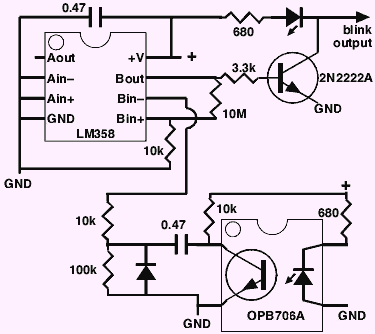
Figure 5. Diagram of the blink interface. This module serves as a differentiator for the signal from the phototransistor, the output transistor provides buffering to drive the microcontroller input line (pin 14). The op-amp chosen is designed to operate from a single-ended power supply. Other "reflective surface sensors" can be used if the packaging of the OPB706A is not suitable for your application.
2.4 ATC (Accumulator/Timer/Communicator)2.4.1 ATC Hardware
Figure 6. Diagram of main module comprising the ATC. This circuit is repeated as needed for each channel desired. The 50MHz system clock of the first module is shared among all modules, as is the power supply and enclosure. In our prototype, we used a RS-232 to USB adapter by Keyspan (USA-19) and a USB hub, installed within the rack-mount enclosure, resulting in a single USB connection from the enclosure to the host computer (click to enlarge). 2.4.2 ATC FirmwareThe code listing for the three types of module is contained in the appendix. For each type of input the controls operate similarly:
Communication and commands between host and ATC box:
GSR unit:
• d is the duration to keep the accumulator window open for, specified as 1 to 4 characters, 0~9,A~F covering the range of 0 to FFFF milliseconds. • f is a hexadecimal number (same attributes as d above) that represents number of counts in the accumulator when it is below FFFE and represents accumulator overflow when it is FFFF.
Heart unit:
• d is the duration to keep the accumulator window open for, specified as 1 to 4 characters, 0~9,A~F covering the range of 0 to FFFF milliseconds. • f is a hexadecimal number (same attributes as d above) that represents number of counts in the accumulator when it is below FFFE and represents accumulator overflow when it is FFFF.
Blink unit:
• d is the number of milliseconds to wait for a blink, specified as 1 to 4 characters, 0~9,A~F covering the range of 0 to FFFF milliseconds. • f is a hexadecimal number (same attributes as d above). If f =0 then no blinks occurred in the past d milliseconds, otherwise, the blink occurred f milliseconds (1<= f < d) after the command was issued.
Example/suggested algorithms for the host machine:
GSR: read input string
if input string <> 'Csres' then exit with
"wrong connection"
loop:get prompt '>'
n=03E8; '1000 milliseconds'
send n
wait for input string, convert to number,
put in variable m
if m=FFFF then n was too big,
so n=(n/8 < 1)?1:(n/8) goto loop to try again
if m<0010 then n was too small,
so n=(n*2 < FFFF)?(n*2):FFFF goto loop
assume 0010<= m < FFFF if the above tests are passed
(print (or otherwise utilize) m/n = counts per msec)
reenter through loop to make more measurements
Heart: read input string
if input string <> 'Heart' then exit with
"wrong connection"
loop:get prompt '>'
n=3A98; '15 seconds'
send n
wait for input string, convert to number,
put in variable m
print (or otherwise utilize) 4*m/n in beats per minute
reenter through loop to make more measurements
(may want to calculate averages
on small accumulator intervals instead)
Blink: read input string
if input string <> 'Blink' then exit with
"wrong connection"
loop:get prompt '>'
n=03E8; '1000 milliseconds'
i++
flash target
send n
wait for input string, convert to number,
put in variable m
latency(i)=m
if i<maxi goto loop
(print (or otherwise utilize) array of latency values,
perhaps as a frequency histogram with
different time bins so that you see a
peak at the duration representing the
average latency)
3 Polygraph Recording SoftwareThe polygraph recording software (see the Appendix for commented source code listings) uses a simple GUI, developed using the fltk library (a library designed for fast, simple, cross-platform GUI design, see: http://www.fltk.org ), to present the basic functions available in the system. 
Figure 7. Screen shot of the "polygraph" software. In addition to the graphical output panels representing the measured variable vs. time, the text panels convey the status and specific data values as they come in from the ATC interface (click for bigger view). Referring to figure 7, the window on the left shows general debugging information, including the results of port assignment. Smaller windows and graphs show data captured from each device. The system was developed so it would be relatively easy to extend the GUI to additional monitoring devices. Some specification is apparent in each module; for example, the eye blink graph displays a line if an eye blink occurred during the interval polled, while the heart rate and GSR graphs show continuous X-Y plots. A user begins a session by hitting the "Assign" button. Because the serial port numbers (e.g., "COM9") are dynamically assigned when the USB-to-Serial adapters are attached (or on start-up if they are already attached), the system needs to poll the available ports, querying attached devices, in order to map the heart rate, GSR, and eye blink displays to the right serial ports. Once the device-to-serial-port mappings have been established, the user can select an output file name. Filenames for each device are the entered file name plus ".hr", ".gsr", and ".eb" extensions. When the "Poll" button is pressed, the system begins polling the devices. Polling the devices involves specifying an interval (tantamount to a request for data) over which to accumulate data, then listening on the ports for any response. Ideally, Microsoft's synchronization objects could be used; however, this would limit code portability. Instead, the system continuously attempts non-blocking reads until something is read. The data is then processed, the GUI is updated, and a new request for data (an interval over which to accumulate data) is sent. Testing with the high-accuracy CPU ticker function, QueryPerformanceTimer, showed that this processing resulted in gaps of less than 8msec where no data was collected (this was without any attempt for optimization on a PIII 933MHz PC). Clearly, the size of the gap between measured intervals will affect the accuracy of the data collected. To this end, an "Info" button was added to display the average difference between the desired interval and the actual amount of time before new data was requested. The system was designed to be easily extensible and customizable, especially as different types of physiological monitoring require different types of data handling. For example, the heart rate measure is averaged over a window of time. Instantaneous heart measurement is noisy, especially given that there is potentially some small error in the polling interval. Instead, the number of beats are averaged over a window (of 10sec) to calculate relatively noise-free beats-per-minute. Extending the system to show heart rate acceleration would be similarly trivial. The interface with the serial ports utilizes Ramon de Klein's Serial class. This class could be replaced with system-specific code. Some work was done using a Linux-based system to ensure the compatibility of the USB-to-Serial adapters (newer Linux kernels support the Keyspan US-19 adapter). In general, using the USB-to-Serial adapters was successful. However, Windows 2000 does present some difficulties in its management of USB devices. Unlike Linux or MacOS, Windows requires that a user manually stop a device before removing it. If the system were to crash during a run, the device could become "locked", thus requiring that it be removed and reinserted. In the worst case, the Windows System Registry would become confused, requiring a tedious system reboot. Despite this shortcoming, the tools provided with the Keyspan adapters were particularly useful for debugging..
4 ApplicationsThe following simplified examples attempt to show how one would interactively integrate the new hardware with existing VEs, as opposed to the more typical approach of simply allowing the physiological recording to take place as an independent and non-interactive process correlated to activity in the VE by timestamps or event markers. In order to provide some context, we propose three extremely simplified examples: 1.counting the delay between a bright flash in the VE and an eyeblink, 2.controlling the amount of "atmospheric haze" in the graphics rendering based on skin conductivity, 3. storing the subject's peak heart rate within each virtual room visited. The best way to begin is to utilize the software of section 3 as a starting point, removing the GUI code which was written primarily for demonstration and debugging purposes. The main event loop in your program should look something like: if (Assign_Ports() = WAS_SUCCESSFUL) {
While (Not_Done) Do {
Poll_Devices()
}
}
else Handle_Assignment_Error();
where the update procedure called by the polling procedure updates the graphics and handles any user interface events.
4.1 Example: use of eye-blink timing dataTo capture the delay between a flash stimulus in the VE and a user's eyeblink, we would first implement the above main event loop. Removing the code to poll the other devices would be a trivial step and would improve accuracy. Then, the developer could rewrite the update procedure as follows: Procedure update() {
time_before_draw = Check_Time();
if (now >= TIME_OF_FLASH) && (FLASH_NOT_OCCURRED) {
Draw_Scene_With_Flash();
Else
Draw_Scene_Without_Flash();
time_after_draw = Check_Time();
}
and rewrite write_to_file to place the value returned from the polling procedure into a file. The value returned is the time, within the interval specified, at which an eye blink occurred. By adding this value to the time after the scene was drawn, a reasonably accurate measure of delay between the stimuli and the response can be obtained.
4.2 Example: use of skin conductivity dataControlling the amount of atmospheric haze (fog), based on skin conductivity follows a similar pattern. Like the previous example, the first step would be to remove the GUI code and rewrite the main event loop. Similarly, the update function should be rewritten: Procedure update() {
Draw_Scene();
}
and the write_to_file procedure should set a variable specifying the current level of fog as a function of the value (the current GSR measure) it receives. Because GSR can be a noisy measure, it may be best to buffer the values received and use a windowed average.
4.3 Example: use of heart rate dataStoring the subject's peak heart rate within each virtual room visited, again, requires the removal of the GUI code and reimplementation of the main event loop. Then, in the same two procedures: Procedure update() {
Draw_Scene();
}
Procedure write_to_file (Value) {
...
If (Value > Max_Heart_Rate[Current_Room]) {
Max_Heart_Rate[Current_Room] = Value;
}
...
}
AcknowledgementsThis work was performed with support from ONR grant N00014-01-1-0197. ReferencesGalen (ca. 200). Opera ex sexte Juntarum editione, 1586, Venice. Meehan, M. (2001). Physiological Reaction as an Objective Measure of Presence in Virtual Environments. Doctoral Thesis supported by NIH grant P41RR02170. Chapel Hill: University of North Carolina. Picard, R. W. (2000). "Toward computers that recognize and respond to user emotion." IBM Systems Journal, Vol 39, Nos.3&4, pp 705-719. Pope, A. T., and Bogart, E. H. (1993). Method of encouraging attention by correlating video game difficulty with attention level. U.S. Patent # 5,377,100, awarded Dec 27, 1994. Stern, R. M., Ray, W. J., and Quigley, K. S. (2001). Psychophysiological Recording Second Edition. Oxford: Oxford University Press. Wiegand (1989). Saccadic activity as an indicator of mental states. Master's Thesis supported by NASA grant NAGW860. New York: Columbia University.
AppendixAssembly code for programming the Ubicom SX28 microcontrollers:
Source code for programming the GUI and communication:
|