Deadlines
Useful links
lab6.py -- testing code for Lab #6
waveforms.py -- support for sampled waveforms
lab6_1.py -- template file for Task #1
lab6_2.py -- template file for Task #2
lab6_3.py -- template file for Task #3
lab6_4.py -- template file for Task #4
lab6_5.py -- template file for Task #5
lab6_6.py -- template file for Task #6
testsound.wav -- audio sample without hum
hum_testsound.wav -- audio sample with 400 Hz hum
lab6.zip -- zip file containing all of the above
pyaudio --
audio device support for Python under Windows and Mac OS X. Not
needed with Athena, Debathena, or Ubuntu where the Python module
ossaudiodev is installed and will be found by waveforms.py.
Goal
Construct a variety of filters using parallel and series combinations, starting with a low-pass filter synthesizer. Develop a filter that can eliminate a single-frequency hum without corrupting an audio signal.
Instructions
See Lab #1 for a longer narrative about lab mechanics. The 1-sentence version:
Complete the tasks below, submit your task files on-line before the deadline, and sign-up for your check-off interview with your TA.
As always, help is available in 32-083 (see the Lab Hours web page).
Introduction
You may have noticed that ocassionally inexpensive audio equipment generates a humming sound. This humming is produced by the 60Hz AC electrical power "leaking" into the audio signal processing. This hum is at such low frequency that usually it is not annoying. On most aircraft, the electrical power is at 400Hz and when 400Hz "leaks" into audio signals, the result is very annoying. In this problem you will try to eliminate the 400Hz hum from a digital signal, but of course you will try to accomplish this without eliminating much of the desired signal.
An example of a signal with and without the 400Hz hum are in the files hum_testsound.wav and testsound.wav, respectively. These are sampled versions of the audio signal, where the audio was sampled at sample_rate (the sample rate in this example is 22060) times a second. You can load the files into numpy arrays and sample_rates with the Python lines
with_hum,sample_rate = lab6.read_sound('hum_testsound.wav')
without_hum,sample_rate = lab6.read_sound('without_hum.wav')
To hear the sound (use headphones if you're at a public terminal!!!), you can use lab6.play_sound, passing it a numpy array of audio samples and a sample rate. For example
lab6.play_sound(with_hum,sample_rate)
Note: The appropriate Python sound libraries are installed in the course Athena locker. If you're working on your own computer under Windows or Mac OS X, you will need to download and install the pyaudio module using the link above. Debathena/Ubuntu already have a suitable Python audio module (ossaudiodev).
In this lab you will be developing functions that will allow you to design a notch filter, which you can then apply to eliminate the annoying hum from the audio signal.
Task 1: Determine magnitude of frequency response (1 point)
In this task we'll compute magnitude of frequency response for our three channels. To compute the frequency response of a channel we'll first compute the unit-sample response for the channel. You can use your code for Lab #2 Task #2.
Now that we have the h's for the unit-sample response, compute the magnitude of the frequency response using in the formula
|H(ejΩ)| = |Σm h[m]e-jΩm| for m=0 to L
where L is the number of samples in the unit-sample response. Write a function freq_res_usr starting from our template in lab6_1.py. The function should take a numpy array with the unit-sample response and return two numpy arrays, the first should be an array of the test frequencies and second should be an array of magnitudes of the frequency response at those test frequencies. In our template, we used 1001 frequency points in the range -π ≤ Ω &le π.
One can use complex numbers in Python just as one uses ints and floats. To create a complex constant with real part r and imagininary part i, use complex(r,i) or (r + i*1j). The built-in arithmetic operators and functions will accept complex operands, as will numpy's array operators. For example, if you have an array u with complex elements, the python statement
v = numpy.exp(u)
will create a numpy array v whose length is the same as the length of u, containing the values v[0]=exp(u[0]), v[1]=exp(u[1]), etc. Note also that numpy.abs computes the magnitude of a complex number.
lab6_1.py is the template file for this task:
# template file for Lab #6, Task #1
import numpy
import matplotlib.pyplot as p
import channel
import lab6
reload(lab6)
import lab2_2
reload(lab2_2)

p.ion()

# Return two numpy arrays, one containing frequencies, one containing
# magnitudes of frequency responses.
def freq_res_usr(usr, num_freqs=1001):
    pass  # your code here

if __name__ == '__main__':
    # Create the channels (noise free with no random delays
    # or padding)
    channel0 = channel.channel(channelid='0')
    channel1 = channel.channel(channelid='1')
    channel2 = channel.channel(channelid='2')

    for mychannel in [channel0, channel1, channel2]:
        usr = lab2_2.unit_sample_response(mychannel) # Get channel's u.s.r.
        omega_1, mag_hejw_chan1 = freq_res_usr(usr)
        lab6.plot_freq_res_usr(omega_1, mag_hejw_chan1,
                               usr, mychannel.id)

    # when ready for checkoff, enable the following line
    #lab6.checkoff(freq_res_usr,'L6_1')
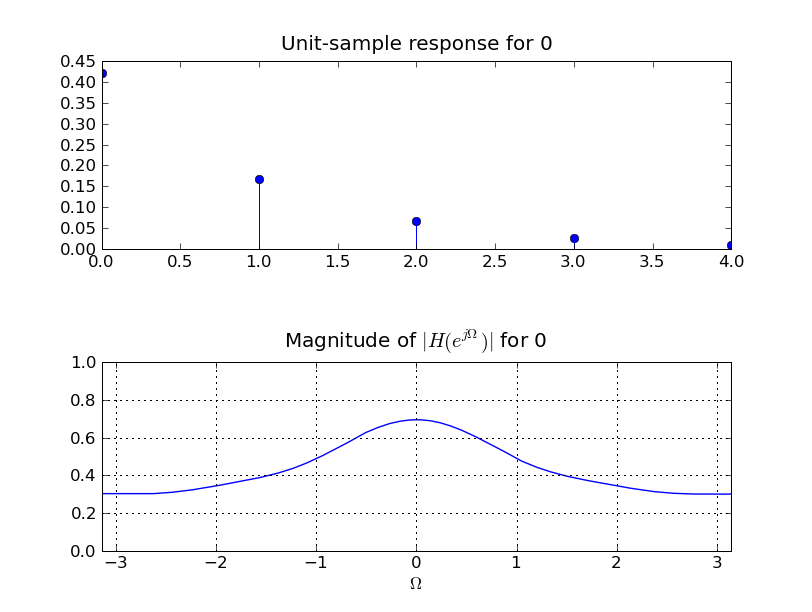
The following figures show the expected plots:
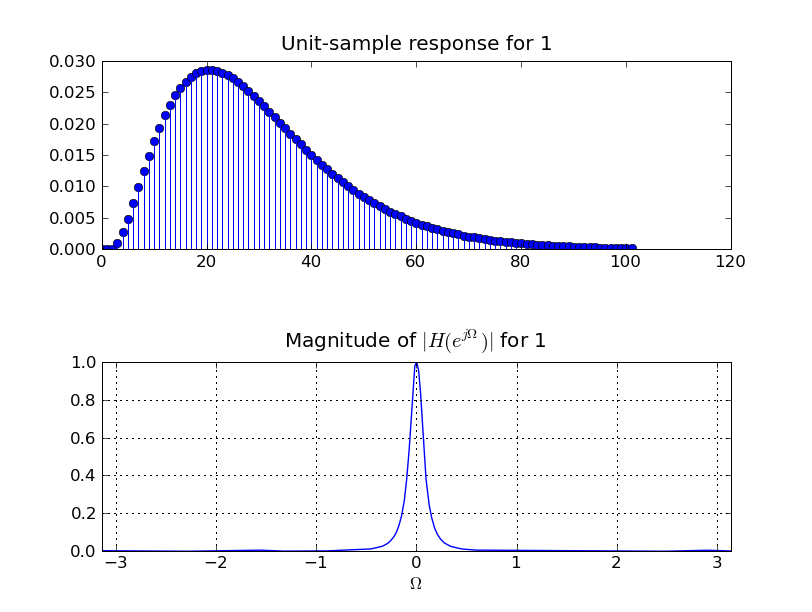
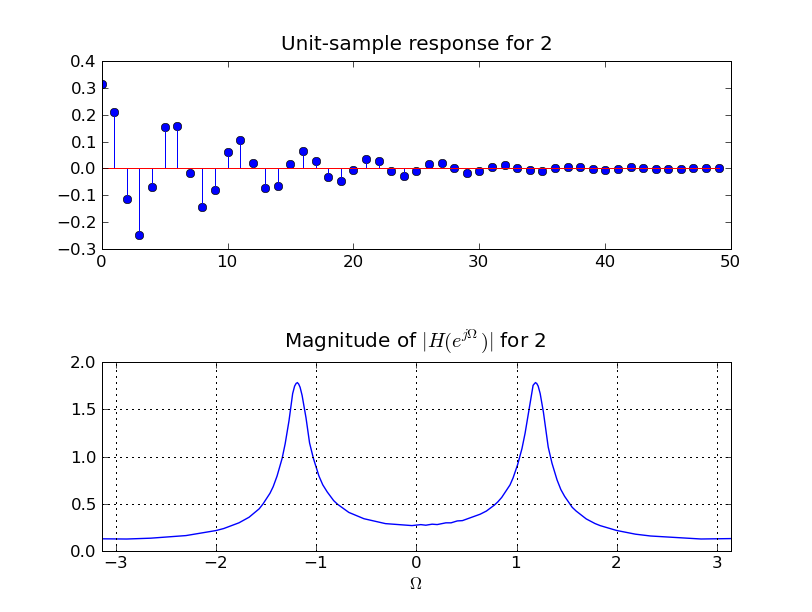
When you're ready to submit your code on-line, enable the call to lab6.checkoff. This will just upload your file to the server. Points will be assigned during the checkoff interview. When submitting, run your task file using python602 since the submission will not work correctly when run from idle602.
Task 2: Examining a Low Pass Filter Synthesizer(2 points)
As mentioned in lecture, one can solve a system of equations to determine the unit sample response of a filter with any desired frequency response, though there are several subtleties involved in setting up the equations that are beyond the scope of 6.02. We have written a low-pass filter synthesizer function (that you are welcome to peruse in lab6.py). The function:
usr = lab6.lpf(omega_pass, omega_stop)
returns usr, a numpy array containing the unit sample response of a filter whose frequency response magnitude is approximately one for 0≤|Ω|≤&Omegapass and is approximately zero for &Omegastop≤|Ω|≤π. There is also a transition region between &Omegapass and Ωstop. The smaller you make the transition region, the more sharply the low-pass filter cuts off, though the unit sample response will be longer.
In this task you use the frequency response function you wrote in Task 1 as well as two new functions, to help elucidate the properties of the low pass filters being synthesized. In particular, please write the function
freq_res_usr_direct(usr, num_freqs=200)
which should compute the frequency response of the filter associated with usr in a more direct manner than the summation formula used in Task 1. The function should provide unit amplitude sinusoidal sequences as inputs to the filter for a range of sinusoidal frequencies, and record the amplitude of the sinusoids at the output of the filter. You can use our function for applying sinusoids the filter,
apply_test_sin(omega_test, filter_usr, n_samples)
but you will have to decide how long a sequence of samples to use for the sinusoids being generated to test your filter (it should depend on the length of the filter's unit sample response and the test frequency), and you will have to decide what subset of the filter's output samples should be used to test for the frequency response (recall, the frequency response computation in Task 1 is based on the assumption that the sinusoids were eternal).
In addition, please write the function
estimate_delay(usr)
which should return index of the sample of the step response (which must be computed from usr) that exceeds half of the eventual value of the step response. In other words, the lowest value of i for which s[i] > 0.5*s[infinity]. This should be a very short program if you recall your unit sample response and step response properties.
You will use this estimate delay program in the next task, when you design a high pass filter.
lab6_2.py is the template file for this task:
# template file for Lab #6, Task #2
import numpy
import matplotlib.pyplot as p
import channel
import lab6
reload(lab6)
import lab6_1
reload(lab6_1)

p.ion()

def apply_test_sin(omega_test, filter_usr, n_samples):
    # Create a number of samples equal to twice the length
    # of the filter usr
    n_list = numpy.array(range(n_samples))

    # Create a sinusoidal input at the test frequency
    sine_in = numpy.cos(omega_test*n_list)

    # Apply the filter
    sine_out = numpy.convolve(sine_in, filter_usr)

    # Make input and output same length
    return sine_in, sine_out[0:len(sine_in)]

# Uses apply_test_sin to determine the frequency response of a filter
# specified by the numpy array containing the usr.
# Return two numpy arrays, one containing frequencies, one containing
# magnitudes of frequency responses.
def freq_res_usr_direct(usr, num_freqs=200):
    pass  # your code here

# Returns an estimate of the delay of a filter specified by the numpy
# array containing its usr.
def estimate_delay(usr):
    pass  # your code here

if __name__ == '__main__':

    # A low pass filter with a reasonably wide transition
    pi = numpy.pi
    omega_pass = 0.25*pi
    omega_stop = 0.45*pi

    lpf_usr = lab6.lpf(omega_pass, omega_stop)

    print "delay for wide transition filter is",\
          estimate_delay(lpf_usr)

    omega_1, mag_hejw_chan1 = lab6_1.freq_res_usr(lpf_usr)
    lab6.plot_freq_res_usr(omega_1, mag_hejw_chan1, lpf_usr, 'lpf')

    omega_1, mag_hejw_chan1 = freq_res_usr_direct(lpf_usr)
    lab6.plot_freq_res_usr(omega_1, mag_hejw_chan1, lpf_usr, 'lpf')

    # A low pass filter with a narrow transition region
    pi = numpy.pi
    omega_pass = 0.44*pi
    omega_stop = 0.45*pi

    lpf_usr = lab6.lpf(omega_pass, omega_stop)

    omega_1, mag_hejw_chan1 = lab6_1.freq_res_usr(lpf_usr)
    lab6.plot_freq_res_usr(omega_1, mag_hejw_chan1, lpf_usr, 'lpf')

    omega_1, mag_hejw_chan1 = lab6_1.freq_res_usr_direct(lpf_usr)
    lab6.plot_freq_res_usr(omega_1, mag_hejw_chan1, lpf_usr, 'lpf')

    print "delay for narrow transition filter is",\
          estimate_delay(lpf_usr)

    # when ready for checkoff, enable the following line
    #lab6.checkoff(estimate_delay,'L6_2')
When you're ready to submit your code on-line, enable the call to lab6.checkoff. This will just upload your file to the server. Points will be assigned during the checkoff interview. When submitting, run your task file using python602 since the submission will not work correctly when run from idle602.
Task 3: Synthesize High-Pass Filter (1 point)
Use the lab6.lpf function, and the insights you gained about it, to write a Python function hpf, where
usr = hpf(omega_stop, omega_pass)
returns usr, a numpy array containing the unit sample response of a filter whose frequency response magnitude is approximately zero for 0≤|Ω|≤Ωstop and is approximately one for &Omegapass≤|Ω|≤π. There is also a transition region between Ωstop and Ωpass. Since you will be using the lab6.lpf function to generate your high-pass filter unit sample response, you should expect that smaller you make the transition region, the more sharply the high-pass filter turns on, though the unit sample response will be longer.
Before you begin, please consider the following. Suppose H1 and H2 are the unit sample responses of two LTI systems. Suppose we subtract H2 from H1, as in
Y = H1 ∗ X - H2 ∗ X = (H1 - H2) ∗ X = H ∗ X
where here ∗ means convolution. It might be tempting to make the FALSE statement that the magnitude of the frequency response of H is given by the difference in the magnitudes of the frequency responses of H1 and H2. The correct statement is
|H(ejΩ)| ≠ |H1(ejΩ)| - |H2(ejΩ)|.
So, if you want to create a high-pass filter by subtracting a low-pass filter from an all-pass filter, that all-pass filter has to have certain properties. The filters generated from our filter synthesizer program have delays, and you have estimated those delays. You should be able to use the delay information to derive the kind of all-pass filter that will help you generate a high-pass filter from the lowp-pass filter synthesized by our program.
lab6_3.py is the template file for this task:
# template file for Lab #6, Task #3
import numpy
import matplotlib.pyplot as p
import channel
import lab6
reload(lab6)
import lab6_1
reload(lab6_1)
import lab6_2
reload(lab6_2)

p.ion()

# Return a numpy array containing the usr for a high-pass filter.
def hpf(omega_stop, omega_pass):
    pass  # your code here

if __name__ == '__main__':

    # A high pass filter with a reasonably wide transition
    pi = numpy.pi
    omega_stop = 0.25*pi
    omega_pass = 0.45*pi

    hpf_usr = hpf(omega_stop, omega_pass)

    omega_1, mag_hejw_chan1 = lab6_1.freq_res_usr(hpf_usr)
    lab6.plot_freq_res_usr(omega_1, mag_hejw_chan1, hpf_usr, 'hpf')

    # A high pass filter with a narrow transition region
    pi = numpy.pi
    omega_stop = 0.44*pi
    omega_pass = 0.45*pi

    hpf_usr = hpf(omega_stop, omega_pass)

    omega_1, mag_hejw_chan1 = lab6_1.freq_res_usr(hpf_usr)
    lab6.plot_freq_res_usr(omega_1, mag_hejw_chan1, hpf_usr, 'hpf')


    # when ready for checkoff, enable the following line
    #lab6.checkoff(hpf,'L6_3')
When you're ready to submit your code on-line, enable the call to lab6.checkoff. This will just upload your file to the server. Points will be assigned during the checkoff interview. When submitting, run your task file using python602 since the submission will not work correctly when run from idle602.
Task 4: Eliminating Hum with a High-Pass Filter (1 point)
Using your hpf function from Task 3, write a Python function eliminate_hum_hpf that accepts a numpy array of audio samples, passes the samples through a high-pass filter that eliminates the hum, and returns the result. You'll have pick the appropriate frequency for the high-pass filter, and you should try to design the filter to eliminate as little of the music as possible.
Note, in a discrete-time system, Hz and Ω are related by the formula
&Omega = 2π*freq_in_Hz/sample_rate
and you will have to use this formula to correct omega_hum in the template for this task.
lab6_4.py is template file for this task that plots the frequency response of your filter, reads in the wav file with the hum, processes the samples with your function and then plays the result:
# template file for Lab #6, Task #4
import numpy
import matplotlib.pyplot as p
import lab6
reload(lab6)
import lab6_1
reload(lab6_1)
import lab6_3
reload(lab6_3)

# Use a high-pass filter to eliminate the hum. Return a numpy array
# containing usr for hum eliminating filter.
def eliminate_hum(omega):
    pass  # your code here

if __name__ == '__main__':

    pi = numpy.pi

    # Read in the good sound and play
    without_hum,sample_rate = lab6.read_sound('testsound.wav')
    # feel free to comment out the following line after you've
    # heard the sound without hum
    lab6.play_sound(without_hum,sample_rate)

    # Read in the corrupted sound and play
    with_hum,sample_rate = lab6.read_sound('hum_testsound.wav')
    p.figure()
    p.plot(with_hum[0:1000])
    # feel free to comment out the following line after you've
    # heard the sound with hum
    lab6.play_sound(with_hum, sample_rate)

    #YOUR VALUE HERE!!!
    omega_hum = 0

    # Determine the filter
    hpf_usr = eliminate_hum(omega_hum)
    omega_1, mag_hejw_chan1 = lab6_1.freq_res_usr(hpf_usr)
    lab6.plot_freq_res_usr(omega_1, mag_hejw_chan1, hpf_usr, 'hpf')

    # Apply the filter and play
    hum_removed = numpy.convolve(with_hum, hpf_usr)
    p.figure()
    p.plot(hum_removed[0:1000])
    lab6.play_sound(hum_removed,sample_rate)

    # when ready for checkoff, enable the following line
    #lab6.checkoff(eliminate_hum,'L6_4')
PLEASE USE HEADPHONES IF YOU ARE IN THE ATHENA CLUSTER (even if you are using your own machine). And please make note of what you hear, you should notice that the high-pass filter was able to eliminate the hum, but the result was not particularly satisfactory, and you should understand why.
When you're ready to submit your code on-line, enable the call to lab6.checkoff. This will just upload your file to the server. Points will be assigned during the checkoff interview. When submitting, run your task file using python602 since the submission will not work correctly when run from idle602.
Task 5: A Bandpass Filter (1 point)
Write a Python function bandpass that takes two frequencies Ωlo and Ωhi and delta, and returns the unit-sample response for a filter where the magnitude of the frequency response is
A series combination of appropriately-chosen low-pass and high-pass filters will easily do the job, as the magnitude of the frequency response for series combinations is much easier to relate to the individual frequency response magnitudes than in the parallel case of Task 3. That is, if
W = H1 ∗ X
and
Y = H2 ∗ W
then
Y = H2 ∗ (H1 ∗ X) = (H2 ∗ H1) ∗ X = H ∗ X,
and the magnitude of the frequency response of the series combination is just the product of the magnitudes of the individual systems, as in
|H(ej&Omega)| = |H1(ej&Omega)| |H2(ej&Omega)|.
Use our lab6.lpf and your hpf functions from Tasks #2 and #3 and then convolve their responses to get the response for the series combination.
lab6_5.py is a template file that plots the response of your bandpass filter.
# template file for Lab #6, Task #5
import numpy
import matplotlib.pyplot as p
import channel
import lab6
reload(lab6)
import lab6_1
reload(lab6_1)
import lab6_3
reload(lab6_3)

p.ion()

# Return a numpy array containing the usr for a band-pass filter.
def bandpass(omega_lo, omega_high, delta):
    pass   # your code here

if __name__ == '__main__':

    # Create a testing filter
    pi = numpy.pi
    omega_lo = 0.6*pi
    omega_high = 0.8*pi

    bpf_usr = bandpass(omega_lo, omega_high, 0.2)

    omega_1, mag_hejw_chan1 = lab6_1.freq_res_usr(bpf_usr)
    lab6.plot_freq_res_usr(omega_1, mag_hejw_chan1, bpf_usr, 'bpf')

    # Create a second testing filter
    omega_lo = 0.4*pi
    omega_high = 0.5*pi

    bpf_usr = bandpass(omega_lo, omega_high, 0.05)

    omega_1, mag_hejw_chan1 = lab6_1.freq_res_usr(bpf_usr)
    lab6.plot_freq_res_usr(omega_1, mag_hejw_chan1, bpf_usr, 'bpf')

    # when ready for checkoff, enable the following line
    #lab6.checkoff(bandpass,'L6_5')
When you're ready to submit your code on-line, enable the call to lab6.checkoff. This will just upload your file to the server. Points will be assigned during the checkoff interview. When submitting, run your task file using python602 since the submission will not work correctly when run from idle602.
Task 6: Ho-Hum, No-Hum (2 points)
Now you should be prepared to eliminate the audio hum while still preserving almost all of the music. Write a Python function eliminate_hum_notch that accepts a numpy array of audio samples, passes the samples through an appropriate filter that eliminates the hum but preserves more of the music (referred to as a notch filter), and returns the result. There are many approaches for designing a notch filter, either starting with a bandpass filter or starting with low- and high-pass filters.
BE FOREWARNED! For a bandpass and a highpass filter, the step response eventually goes to zero (why?). You will probably have to modify your approach to estimating the delays in these two types of filters.
lab6_6.py is template file for this task that plots the frequency response of your filter, reads in the wav file with the hum, processes the samples with your function and then plays the result:
# template file for Lab #6, Task #6
import numpy
import matplotlib.pyplot as p
import lab6
reload(lab6)
import lab6_1
reload(lab6_1)
import lab6_5
reload(lab6_5)

# Given a frequency omega, return a numpy array that contains the
# unit sample response of a notch filter that will eliminate the hum.
def eliminate_hum_notch(omega):
    pass  # your code here

if __name__ == '__main__':

    pi = numpy.pi

    # Read in the good sound and play
    # remove the comment from the two lines below if you want to hear
    # hear the sound without hum
    #without_hum,sample_rate = lab6.read_sound('testsound.wav')
    #lab6.play_sound(without_hum,sample_rate)

    # Read in the corrupted sound and play
    with_hum,sample_rate = lab6.read_sound('hum_testsound.wav')
    p.figure()
    p.plot(with_hum[0:1000])
    # remove the comment from the line below if you want to hear
    # to hear the sound with hum
    #lab6.play_sound(with_hum, sample_rate)

    #YOUR VALUE HERE!!!
    omega_hum = 0

    # Determine the filter
    notch_usr = eliminate_hum_notch(omega_hum)
    omega_1, mag_hejw_chan1 = lab6_1.freq_res_usr(notch_usr)
    lab6.plot_freq_res_usr(omega_1, mag_hejw_chan1, notch_usr, 'notch')

    # Apply the filter and play
    hum_removed = numpy.convolve(with_hum, notch_usr)
    p.figure()
    p.plot(hum_removed[0:1000])
    lab6.play_sound(hum_removed,sample_rate)

    # when ready for checkoff, enable the following line
    #lab6.checkoff(eliminate_hum_notch,'L6_6')
PLEASE USE HEADPHONES IF YOU ARE IN THE ATHENA CLUSTER (even if you are using your own machine). And please make note of what you hear, you should notice that your notch filter, if you did a good job, should completely eliminate the hum and leave the music mostly unscathed. You should understand why.
When you're ready to submit your code on-line, enable the call to lab6.checkoff. This will just upload your file to the server. Points will be assigned during the checkoff interview. When submitting, run your task file using python602 since the submission will not work correctly when run from idle602.