ADDING NEW BUSINESS RULES
There are three types of business rules – Default rules, Question rules, and Function rules. The method for
adding new rules depends on the type of rule.
Default rules
Default Rules are rules based on specific columns from the database. When a Default Rule is used in the
application, the user specifies a value that will be compared to the value selected from a specific column
in the database. The column to be selected is specified in the rule definition.
Here is the procedure to add a new default rule:
· Using the Code Table Maintenance in Coeus, go to the Rule Variables table.
· Add a row for the new rule. The variable name must be unique and must begin with a colon.
· Add the appropriate data type, column name and table name .
Note: The evaluation of the rule takes place in the pkg_get_maps package. For rules based on the
OSP$BUDGET table, only the final version of a budget marked as complete is considered in rule evaluation.
Question rules
Question rules are rules based on the proposal Yes/No questions (taken from the OSP$EPS_PROP_YNQ table).
No action is necessary to add these rules – all proposal questions will appear in the Question rules tab.
Function rules
Function rules are rules that are more involved and that require new stored procedures to be written. Each
function rule is associated with a specific stored procedure for evaluation, and will return either a True or False value.
Function rules can have arguments. Some functions require arguments and some do not. Argument values can come
from three sources: they can be typed in directly, they can come from a search window result, or they can come from
an existing code table. When a function that requires arguments is dropped onto the expression datawindow in
W_RULE_EXPR, the W_ARGUMENTS window is opened. Information about the required arguments for this
function is retrieved from OSP$RULE_FUNCTION_ARGS. All arguments for this function are displayed in the
dw_args datawindow in w_arguments.
Here is the procedure to add a new function rule:
- Create the function to evaluate the rule,
create a public synonym for the function, and grant execute
privilege on the function to coeususer.
- Using the Code Table Maintenance window,
add a row into the Rule Functions table
(OSP$RULE_FUNCTIONS). Enter the rule name (labeled ‘Function name’ on the
window), and the nam
of the database function that you just wrote.
- If the function does not require arguments
other than proposal number you are done.
- If the function has arguments that are to
be typed in directly, then (using the Code Table Maintenance),
add rows into the Rule Function Arguments table (osp$rule_function_args).
Insert one row for each argument and set the window_name
to blank.
- If the function has arguments that will
come from an existing Coeus search window, then
insert rows
into the Rule Function Arguments table (one for each argument), and set the
window name to the appropriate search window (W_PERSON_SELECT, W_UNIT_SELECT,
W_ROLODEX_SELECT, W_SELECT_COST_ELEMENT).
- If the function has arguments that will
come from an existing Coeus code table, then
insert rows into
the Rule Function Arguments table (one for each argument) and set the window_name to W_ARG_CODE_TBL. Update the stored
procedure dw_get_arg_code_tbl. This stored
procedure selects the appropriate code table.
- If the function has arguments that will
come from a lookup table that is not currently in the system, then
add rows into the Rule Function Arguments table (OSP$RULE_FUNCTION_ARGS) -
one for each argument - and set the window_name to
W_ARG_VALUE_LIST. Insert rows into the Argument Values table
(OSP$ARG_VALUE_LOOKUP) containing the argument values.
·
· This is a bit confusing, so here is an example.
·
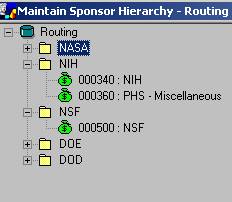
· We added a new Sponsor Hierarchy named ‘Routing’. This enables us to group sponsors in categories that correspond to the appropriate OSP administrator who handles the agency.
·
·
·
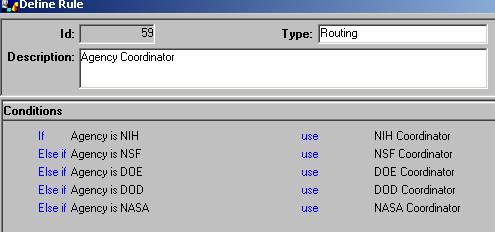
· Then we created a new rule called ‘Sponsor group’. The rule will check to see if the sponsor of a
· proposal is part of the designated sponsor group. This enables us to create the following business rule
· for routing within OSP.
·
·
·
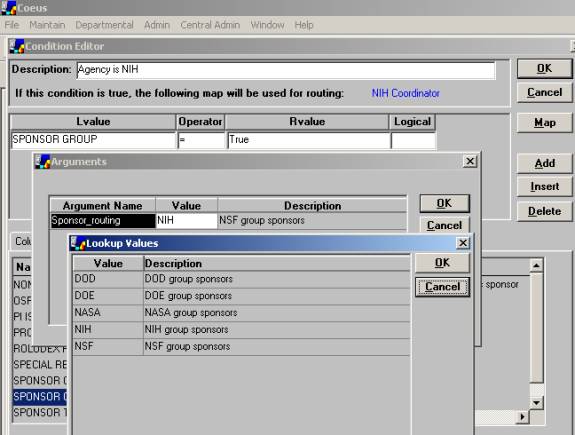
· The individual conditions of the rule are based on the new Sponsor group rule:
·
·
·
· In order to do this, after writing the Oracle function to evaluate the rule, here are the code table entries.
·
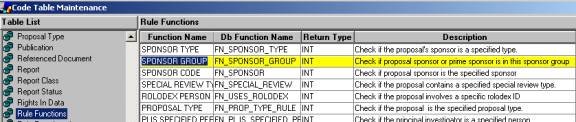
· This is the new function definition with the corresponding oracle function name.
·
·
·
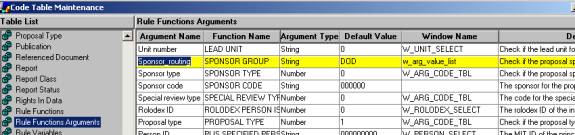
· This is the argument name needed for the function. Note the Window Name is W_Arg_Value_list, indicating that we are creating a dynamic code table.
·
·
·
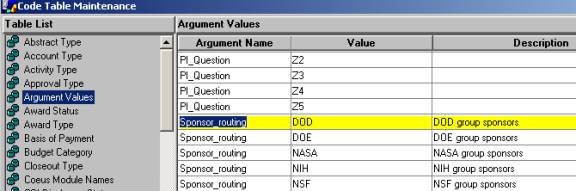
· These are the values for the argument ‘code table’. The argument name is the same as that in the Rule Functions Arguments table.
·
·