Appletalk Before and After
Printer Configuration in a routed AppleTalk environment (pre-retirement)
The following graphic below illustrates a traditional networked printer
configuration dialogue using appletalk. Please note how the zone list
within the chooser contains a number of zones located in various buildings
around campus.


Printer Configuration in a non-routed AppleTalk environment
(after retirement)
The next graphic illustrates a printer configuration dialogue in an environemnt
that no longer has appletalk routing available. Please note the zone list
within the chooser is now completely empty, and all available printer choices
represent printers within the building, available via localtalk.


AppleShare Fileserver Configuration in a routed AppleTalk environment
(pre-retirement)
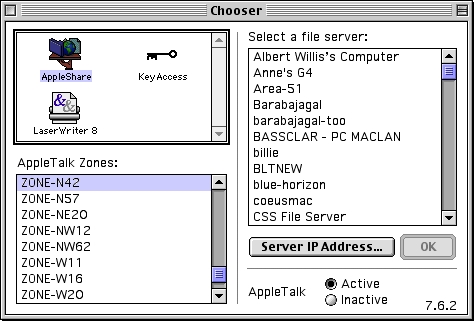
The next example demonstrates the configuration of a network fileserver within
an environment which has appletalk routing available. The chooser lists a
variety of available zones to choose from.
AppleShare Fileserver Configuration in a non-routed AppleTalk environment
(after retirement)
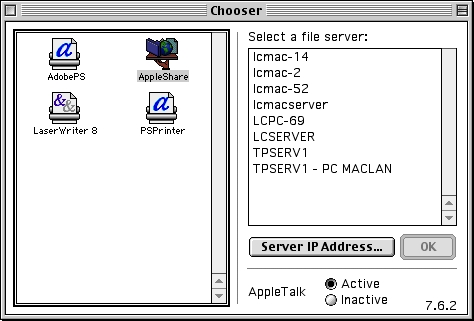
After appletalk routing is no longer available the chooser will only reflect
fileservers which are located within the local building, accessible via
localtalk.
TCP/IP Fileserver Configuration
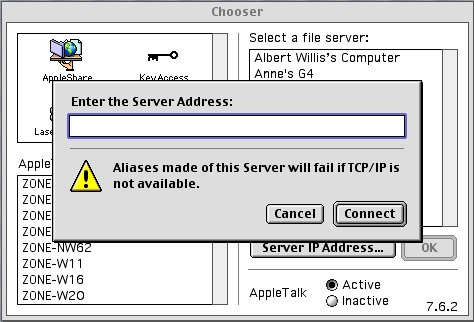
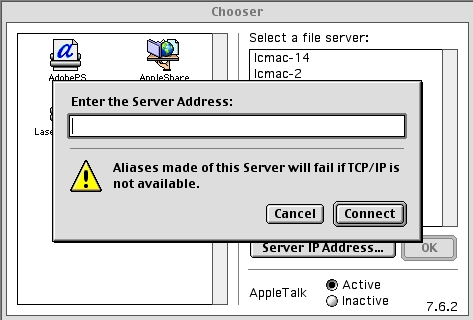
TCP/IP is the supported and recommended method for accessing AppleShare file
services both locally and across campus. The following images illustrate
configuring access to a fileserver via TCP/IP on both a network supporting
appletalk, and another network on which appletalk routing is no longer
available. Both illustrations show a nearly identical, user interaction,
as TCP/IP based methods are unaffected by the AppleTalk retirement efforts.
View prior to AppleTalk retirement
View after AppleTalk retirement

Last updated 7 November 2002 (appletalk@mit.edu)
