
Home Table Of Contents Support Pages Feedback & Contact Apple Computer, Inc. Mirror Sites Huh? | By John Phelps
The SCSI Port and CablingThe SCSI port used in the PowerBook series is called an HDI-30. It is a square socket SCSI connector with 30 pins. There are two different SCSI cables. In addition to one of these cables, you may need a terminator, model number M3503LL/A.
SCSI Disk ModeThis mode lets your PowerBook be connected to a desktop Macintosh and appear on that machine as an external hard disk. This mode is supported on all PowerBook models with the exception of the 140, 145, 145B, 150, and 170 and is recommended for high speed transfer of information, but is not necessarily intended for long-term usage. Follow these steps to setup SCSI disk mode:
To end the session, shut down the desktop Macintosh, then power off the PowerBook by either pressing and holding the power switch for two seconds then releasing, or, for the PowerBook 100, press both of the buttons on the left side of the unit. IMPORTANT: The Macintosh Plus and the Macintosh SE without an internal Hard Disk can be used with SCSI disk mode. Also, you can dock to another PowerBook (of any kind). When attaching under these configurations, you do NOT use the terminator between the two SCSI cables.
Adding External DevicesThere are many devices that use the SCSI port to connect to your PowerBook. Some examples are Hard Disks, CD-ROM drives, backup devices, video expansion, and Ethernet connections.The most important thing to keep in mind when adding devices to a SCSI chain is the ID number. The SCSI chain has an ID range from 0 to 7. ID 7 is reserved for the PowerBook itself; ID 0 is reserved for the internal hard drive. The other 6 ID numbers are for external devices. Generally, this ID can be set on the device by some external selector - consult the manual for the device to see how to set this number. The ID number for each device must be unique on the chain, that is, only one device can use a given number. A SCSI device chain must be terminated at the beginning and end. The PowerBook provides termination at one end, you need to add a terminator to the last device on the chain. Additional devices are connected together using the Apple SCSI Peripheral Interface Cable which is a Centronics 50 pin to 50 pin cable. Some older devices are internally terminated. If you are not sure, it is very important that you check the manual for each device. When creating a SCSI chain for the PowerBook, you want a terminated device at the beginning of the chain, and another at the end. If any of the devices in the middle are terminated, you will have difficulties seeing all the devices. Before connecting or disconnecting devices on a SCSI chain, turn the power off for all devices. When you get ready to power up, turn on all external devices first, then turn on the PowerBook. When you wish to end the session, shut down the PowerBook first, then turn off all the devices.
Common Problems Q&AQuestion: I am attempting to use the SCSI Disk Mode, and the PowerBook does not display the diamond pattern. What is wrong?Answer: First, make sure you are using the correct cable. This is the most common problem. Refer to the previous Cabling section to verify that you are using the SCSI Disk Adapter cable. Second, be aware that SCSI Disk Mode is only supported in certain PowerBooks. Review the instructions under SCSI Disk Mode to see which PowerBooks are supported. Question: I have added an external SCSI device to my PowerBook and when I start up, I get a diamond symbol on my screen. What does this mean? Answer: You are using the Disk Adapter Cable instead of the System Cable. See the previous section on Cabling to see the difference. Question: I have added an external SCSI device to my PowerBook and when I start up, I only get a flashing question mark (?) over a disk icon. Why? Answer: Something is preventing your Hard Disk from starting up correctly. First try and start your computer from its Disk Tools disk. If it starts up, and your hard drive does not show up on the desktop, you may have a SCSI ID conflict. Make sure that the external device is set to an ID number from 1 to 6, and if more than one device is connected, make sure each has a unique ID number. Try opening the Apple HD SC Setup program on the Disk Tools disk. If that program can see your hard drive, try selecting the update button. This updates the driver software on the Hard Disk. Check the version of the Apple HD SC Setup application. It is possible that a newer version is available which may address your problem. Make sure you are configuring your SCSI chain correctly, refer to the previous section, paying close attention to termination. Question: In SCSI Disk Mode, the desktop computer tries to start up from the PowerBook's drive, rather than its own internal drive. An example is an error message such as the one saying the system software is not correct for this Macintosh. What should I do? Answer: Power the desktop computer off, and then start up from the Disk Tools disk for that computer. Make sure that both the PowerBook drive and the desktop's internal drive both show up on the screen. Verify that the names of the two drives are different. Open the Startup Disk Control Panel and verify the desktop computer is selected. Restart and let the Disk Tools disk be ejected, it should then start up from the correct drive.
 [Previous] [Top] [Next] | ||||

"The Information Alley", in all formats, is copyright Apple Computer, Inc.
All Rights Reserved.
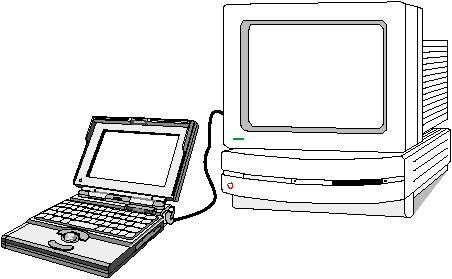 All PowerBook computers that have been released to date, with the exception of the PowerBook 200 Series, have an integral SCSI port. The PowerBook 200 Series computers must be attached to a Dock of some kind to gain that port. This article describes adding peripheral devices to your PowerBook and also using SCSI Disk Mode, which lets some PowerBook computers connect to a desktop Macintosh and appear as an external hard disk.
