Problems 4.1+4.2 -- Checking your answer with MATLAB!
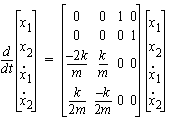
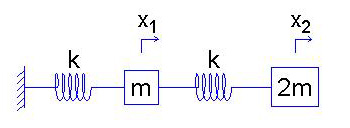
You are all experts at creating state equations. Recall our solution to the translational mass tutorial example:
Putting these into matrix format allows you to create a 'state-space' model in MATLAB (using the 'ss' command).
Once your have used 'ss' to create a system, you can various commands to convert the system to other 'formats' and extract useful information.
Below, we'll create a state-space system in MATLAB:
mysys = ss(A,B,C,D)
The 'A' matrix is clearly the 4x4 matrix above, and 'D=0' (as usual for us). But what about 'B' and 'C'??
'B' represents the input driving the system.
We can just pick some state variable as this input. Here, we'll drive the system with the larger mass.
We simply want to frequencies and relative amplitudes that form our natural mode shapes, and often most or all of the state variable can serve as an input for this purpose.
B = [0 1 0 0]'
'C' identifies the output of interest.
Set this to look at whatever state variable is of interest, e.g.:
C = [1 0 0 0]'
You can look at multiple outputs at once, too, if you know what you're doing: C=[1 1 0 0]
Here's a quick list of some useful MATLAB commands.
Note that I prefer the 'vector' ('v') option for the zpkdata command below:
To get the system's zeros, poles and gain, use zpkdata:
[z,p,k]=zpkdata(mysys,'v')
To get the magnitude and phase at a particular frequency, you can use the 'Bode' command:
[m1,p1,w1]=bode(mysys,abs(p(1)))
To compare magnitude and phase with that of a DIFFERENT output variable, change C:
C=[0 1 0 0]
Now, create a new state-space system and find the new magnitude and phase:
[m2,p2,w2]=bode(mysys2,abs(p(1)))
(Repeat for any other frequencie(s) of interest...)
At a given modal frequency, what does it mean to compare the magnitudes, m1 and m2? How about the phases, p1 and p2?