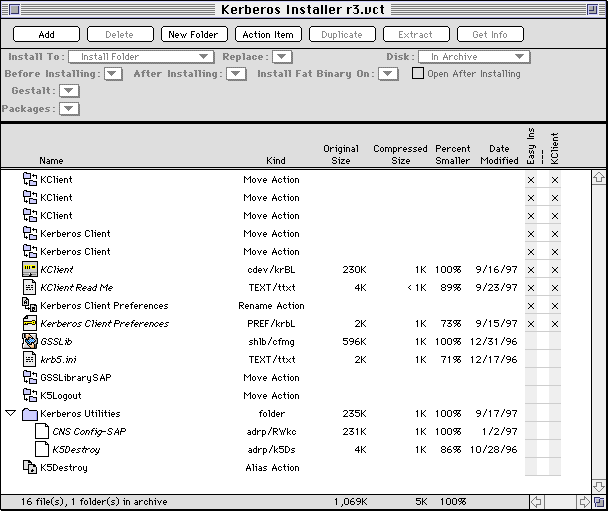
This document covers revision 3.1 of the installer.
There are two packages that the user can install.
Easy Install:
Installs the KClient (Kerberos 4) files.
Custom Install:
* "KClient" package - installs the KClient (Kerberos 4) files.
[In theory there should be a "Kerberos 5" package which installs the Kerberos 5 files (GSSLib, CNSConfig, etc.). However, the Kerberos 5 package has been deleted, even though placeholder files are still in the installer - there's no way for the user to install them.]
All packages are set to "restart after installing" to force the installer to quit any other programs that are running, and the installer is set to "Force Restart" so that a restart is required when it's done installing.
|
|
Install to: |
Packages |
Replace |
Before installing |
After installing |
Gestalts | |
|---|---|---|---|---|---|---|---|
|
Move Action Item: |
--- |
Easy Install, KClient |
|
|
|
| |
|
Move Action Item: |
--- |
Easy Install, KClient |
|
|
|
| |
|
Move Action Item: |
--- |
Easy Install, KClient |
|
|
|
| |
|
Move Action Item: |
--- |
Easy Install, KClient |
|
|
|
| |
|
Move Action Item: |
--- |
Easy Install, KClient |
|
|
|
| |
|
KClient |
Control Panels |
Easy Install, KClient |
if Newer |
|
ftp |
| |
|
KClient Read Me |
Install Folder |
Easy Install, KClient |
if Newer |
|
ftp |
| |
|
Rename action item: |
--- |
Easy Install, KClient |
|
|
|
| |
|
Kerberos Client Preferences |
Preferences |
Easy Install,KClient |
Always |
|
ftp |
| |
|
GSSLib |
Extensions |
none |
if Newer |
|
ftp |
| |
|
krb5.ini |
Preferences |
none |
if Newer |
|
ftp |
| |
|
Move Action Item: |
--- |
none |
|
|
|
| |
|
Move Action Item: |
--- |
none |
|
|
|
| |
|
Kerberos Utilities (folder) |
Install Folder |
none |
|
|
|
| |
|
CNS Config-SAP |
Kerberos Utilities |
none |
if Newer |
|
ftp |
| |
|
K5Logout |
Kerberos Utilities |
none |
if Newer |
|
ftp |
| |
|
Alias Action Item: |
ShutDown Items |
none |
|
|
|
System 7.5 or Greater | |
(1) A Move action item checks the "Extensions" folder for extension versions of KClient (versions 1.1b1, 1.5, and 2.0d2 were extensions, we're installing 1.76 which is a control panel) and moves them to the Trash if any are found. It checks by looking for file(s) whose name start with KClient - this catches variously named versions - and have a file type/creator of INIT/krbL , and moves all matching files to the Trash..
(a) Several computers with two different previous versions have been found; while the previous versions coexisted peacefully, old versions and the new version don't. The "Move Multiple Occurrences" box in the Action Item is checked to make sure we get them all.
(b) Another Move action item checks the "Control Panels" folder for any out of date Control Panel versions of KClient. It checks by looking for file(s) whose name starts with "KClient", has a file type/creator of cdev/krBL, has a version less than 1.7.6, and moves all matching files to the Trash.
(c) Another Move action item checks the "Extensions (disabled)" folder for extension versions of KClient (versions 1.1b1, 1.5, and 2.0d2 were extensions, we're installing 1.76 which is a control panel) and moves them to the Trash if any are found. It checks by looking for a files whose names start with KClient - this catches variously named versions - and have a file type/creator of INIT/krbL, and moves all matching files to the Trash.
(d) Two more Move action items check the "Extensions" and "Extensions (disabled)" folders for file(s) called "Kerberos Client" which is an extremely old version of KClient, and moves all matching files to the Trash.
(2) The KClient control panel is installed. (The replace criteria is set to "if newer", which means "if it has a newer modification date". We could also do it by creation date, probably it makes no difference. What we don't want to do is "if newer version" which checks the version resources, because there is a version of KClient called "2.0" which is not as new as version 1.76).
(3) Any existing "Kerberos Client Preferences" file is renamed to "Kerberos Client Preferences.bak" with a Rename action item. This is because we force a new copy of this file to be installed, and there may be some users out there who have extra realms in the original preferences file. While they can easily re-add this information with the control panel, the backup is made just in case.
(4) A copy of the Kerberos Client Preferences file with the proper MIT info is installed. The replace option is set to "always" so a correct copy is always installed. (The Preferences file distributed with Eudora 2 apparently had extra, unnecessary stuff in it.)
Steps 5 - 9 are only performed if the Kerberos 5 files are being installed (which currently they're not).
(5) The GSSLib and krb5.ini files are installed.
(6) A previous version of the GSSLib was named "GSSLibrarySAP" - so there is a Move action item to search the Extensions folder and put it in the Trash if it exists.
(7) The K5Logout program has been superseded by the KDestroy program, so there is a Move action item look for the K5Logout program on the user's startup disk and move it to the Trash if it's found.
(8) A "Kerberos Utilities" folder is created, and two utility programs - CNSConfigSAP and K5Destroy - are placed in it.
(9) An alias to the K5Destroy program is placed in a user's ShutDown Items folder, so that tickets will automatically be destroyed when a user shuts down their Mac. Since the ShutDown Items folder only exists in System 7.5 or later, this action item is set only to run on those systems.
All files are set to execute the FTP code resource after they're installed, since only aliases are in the installer.
Also see the Kerberos Installer Version History for details about the changes the Kerberos installer has gone through.
(1) Installing a new version of KClient over a running version is dangerous because in version 1.5 of KClient, the driver does not respond to CloseDriver calls. This is unfortunate because KClient saves data to its file when the Mac shuts down. Since the old version will still be in memory and it's now trying to write to the newer version's file, data may be written incorrectly or an error may occur when writing is attempted. This only happens in a very few cases, however.
To avoid this, there was a code resource called KClientRunning which moved KClient out of the Extensions folder, placed an alias to the Installer into the Startup Items folder, and forced a reboot of the Mac so that we could be guaranteed that KClient wasn't running and avoid any danger.
However, this code was written with the extension version (1.5) in mind and assumed the next version of KClient would also be an extension. It wasn't, and the code broke. Instead of re-writing it and perhaps just having it break again at the next version of KClient, it was decided to just go ahead and install, and anyone who has problems with installation should be told to reboot with their extensions off and install again.
It DOES NOT work as advertised if a user is upgrading from 1.5 to 1.62 or 1.76, or from 1.62 to a newer version.
(2) There is a code resource called "BackupK5Files" which would copy the previous versions of the Kerberos 5 files to a backup folder. There were some issues involved with this, and we decided not to use it either.
(3) You may also want to read How the Kerberos Template Was Built.