
 |
 |
 |
 |
Viewing Messages and Receiving Invitations
The Meeting Maker Java Client Messages window displays six message types. Unopened messages appear in bold type; unopened messages are not bold.
To view messages:
- From the toolbar, click the
Messagesicon. The Messages window appears: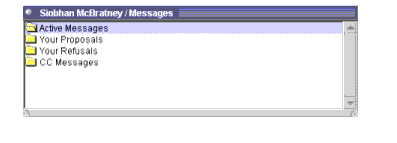
- Double-click on one of the four folders to open it. The folder will not open it does not have any contents. The
Active Messagefolder is the only folder containing proposals that you need to respond to. The four folders are:- From the
Active Messagefolder, double-click the message you want to open.- The Invitation screen appears detailing the Title, Location, Guests, Schedule, Agenda, and Comment (if any) form the person who proposed the meeting.
- Respond to the meeting by choosing one of the radio buttons located at the bottom of the Invitation screen.
Yes--lets the propose know that you can attend the meeting, and placed the meeting on your calendar.No--lets the proposer know that you can not attend the meeting, and placed the message in the Your Refusals folder. The meeting is not placed on your calendar.I'll decide later--returns the message to your Active Messages folder, and allows you to respond at a later date.
| ON Corporation http://www.on.com |
| |
|
|
|