|
Getting Started
The first step is to ensure that you have added the course
locker. This is done by the following command at your Athena
prompt.
athena% add 13.021
To skip this step, all you have to do is put the command
add 13.021 in a file called
.environment
in your Athena home directory.
Make sure you are running on an SGI
platform before issuing the following command.
This will open the current version of Amass.
athena% /mit/13.021/programs/amass
Be sure not to put an ampersand, "&", after the command, as
Amass requires the use of your xterm as a command interface.
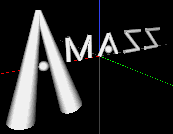
At this point Amass should open and display the default structure,
which spells 'Amass' in cylinders and spheres.
In the xterm you opened Amass from,
a few status lines should appear.
At this point, you may change views,
or enter your own structure.
Continue
|