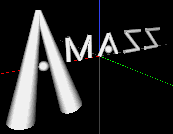
In order to access the built-in menu in Amass, you must hold down
the right mouse button inside the Amass display window (the one titled
"Structure Profile"). This will bring up the following menu:
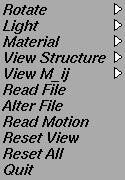
The first option, Rotate, will give you the option of rotating the structure
about the viewing axes.
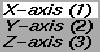
These axes are fixed in the window.
When a rotation is applied, the structure rotates
within this viewing axis, but its coordinates
DO NOT CHANGE. The true X, Y, and Z axes are fixed
to the structure and cannot be changed in this manner.
For the purpose of display,
Red
corresponds to the X-axis,
Green
corresponds to the Y-axis,
and Blue
corresponds to the Z-axis.
Again, this affects the viewing
angle ONLY. Your structure will retain its original
coordinates and added mass matrix.
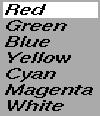
The next two options, Light and Material, will change the color of the light
shining on the object and of the material itself.
The sub-menu of View Structure will
change the structure displayed.
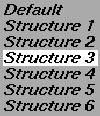
Initially, only the default structure can be displayed, as it is
the only one stored in the program itself. Later, as you input additional
structures, you can toggle between them to view each one in turn. Click here
to learn about reading files.
The final menu item with a sub-menu, View M_ij,
will enable you to print out the calculated Added Mass Matricies of any
structures that have been read into Amass.
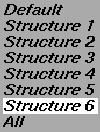
At first, only the Default
structure will have any non-zero M_ij entries, but after other data files
are entered, their M_ij matricies will be stored in memory to be displayed
later. (They are also displayed as the file is entered). The M_ij for any
structure may be recalled individually, or all 6 may be displayed at once.
Read File will let you input a new structure. To learn how to do this,
click here.
Alter File will let you translate a structure,
and then output the altered datafile. This enables the creation of many
similar, complicated structures without a lot of retyping on your part.
To learn how to do this,
click here.
Read Motion will let you enter a motion file
which contains a series of runs varying velocity, angular velocity, and
acceleration. Click
here to learn about Motion Files.
Reset View will reset the viewing angle to the original position and the colors to white. All structures and M_ij's will be maintained.
Reset All will completely reset the entire
program. It is effectively the same as quiting Amass and restarting.
Quit will exit Amass and return your xterm.
Continue