It's been a while since it happened, but I had my first big art show the weekend before Thanksgiving last November at the Brickbottom Annual "OpenStudios" event in Somerville. It was a great event, and I encourage anyone who lives in Massachusetts to come next year -- there were hundreds of artists, doing everything from large scale metalworking and forge work to pottery, to the lighting work that I do.
In any event, I've been planning a new light for the past few months which is finally coming to fruition. The basic idea was that although my current lights are beautifully suited for use in illuminating artwork with lots of color control and direct frequency selection, I wanted something more powerful. I also realized that the biggest hole in my electronics knowledge is building higher power power supplies, and so I could take out two birds with one stone by building an extremely high power light fixture with a home-built power supply.
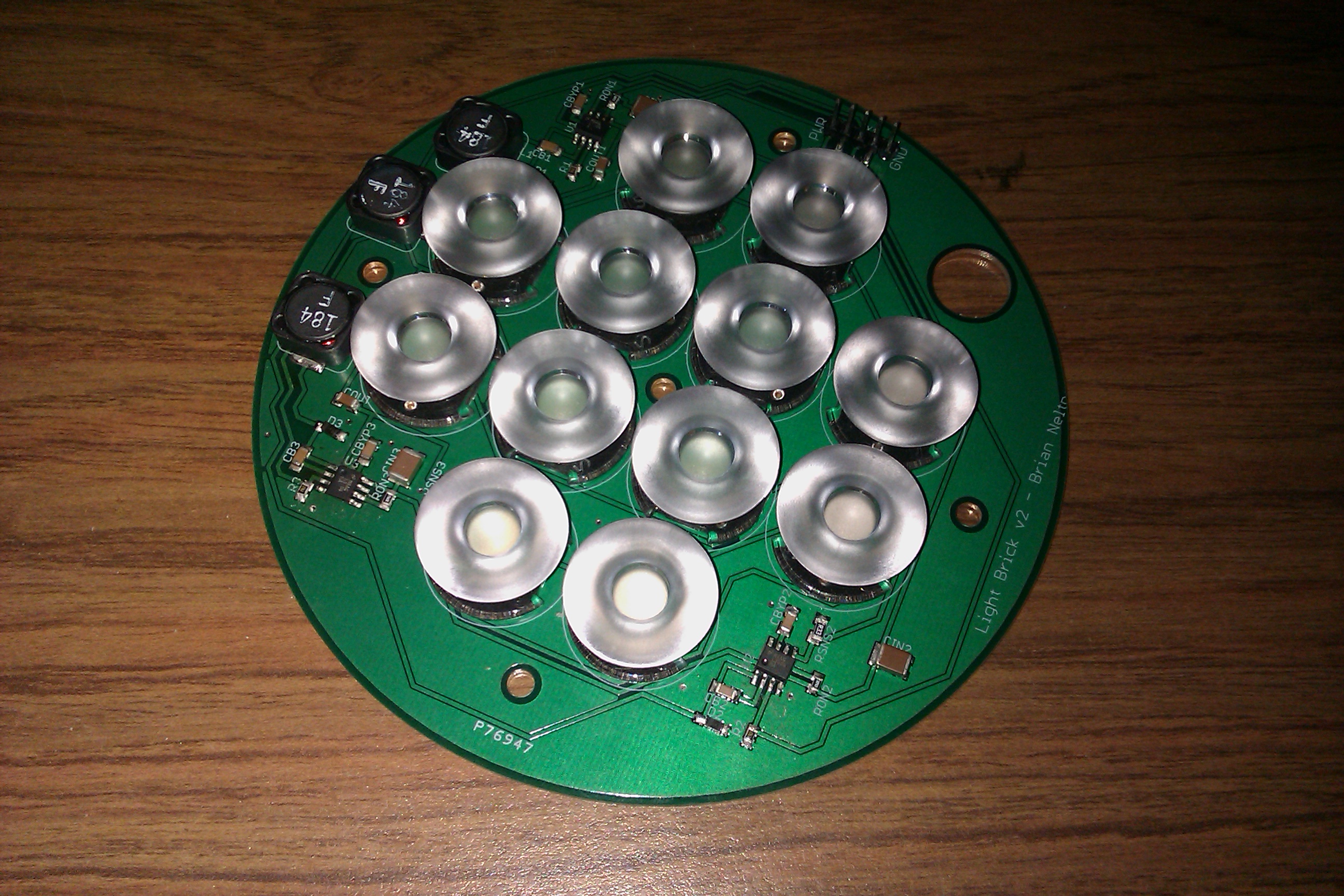
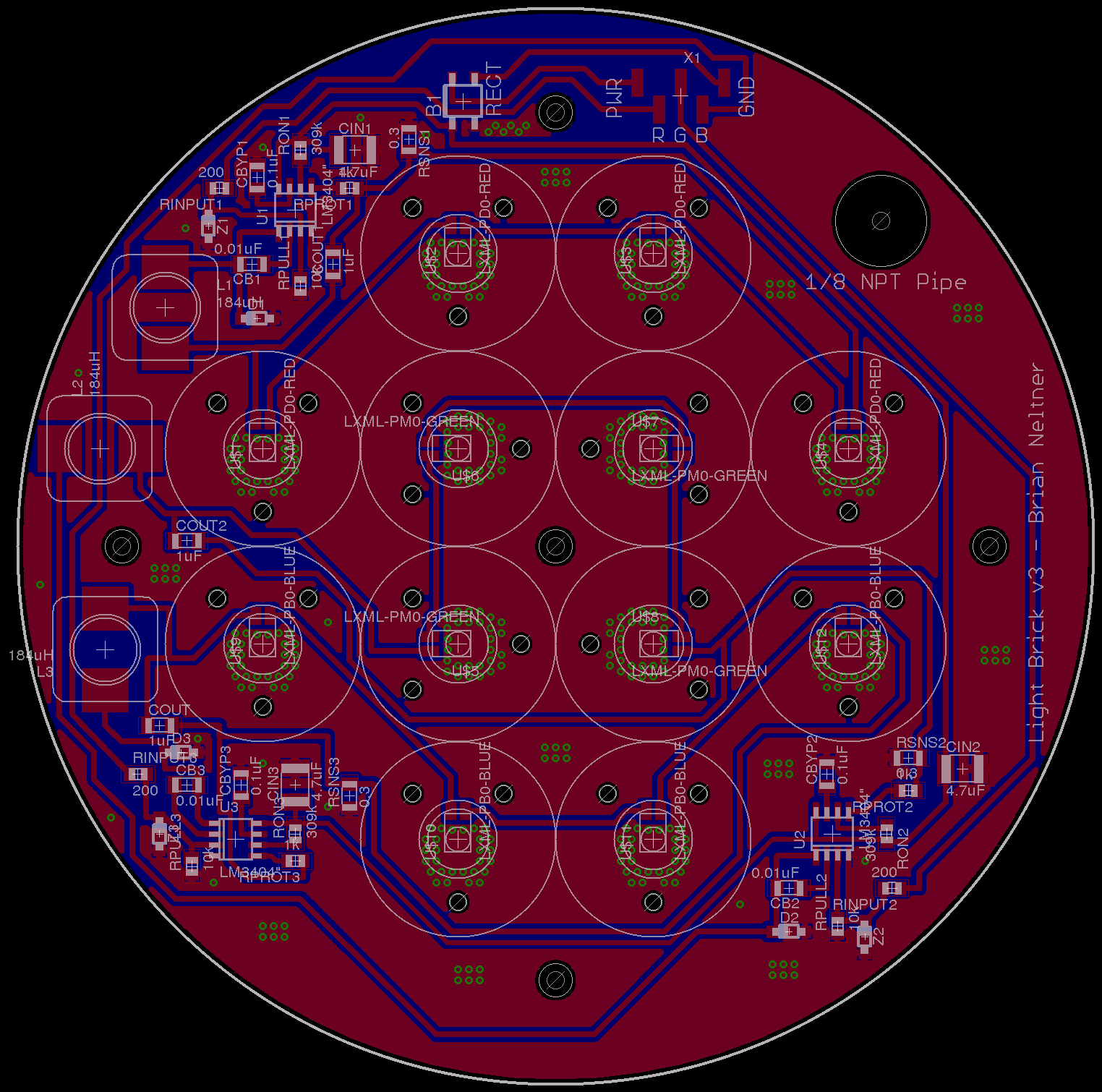
The result is the concept of what I call the "Ridiculobright Illuminator", or fondly by my friends as the "Death Ray". The board consists of a 6" diameter circle, on which are 20 each of Royal Blue, Green, and Red Rebel Luxeon LEDs, running at 700mA. Each of my Ultrabright Illuminators have only four LEDs of each color running at 350mA, so this light should end up putting out roughly 10 times as much light as the Ultrabright Illuminators.
To make things even more absurd, I decided that I should put focusing optics on the device, which is something I resisted doing on the Ultrabright Illuminator because I was worried it would look funny. On the contrary, the focusing optics make the lights much better, because less light is getting lost on the sides of the case. I chose to use these 7 degree Dialight 11mm reflective adhesive based optics for the board, which had the advantage of being quite inexpensive.
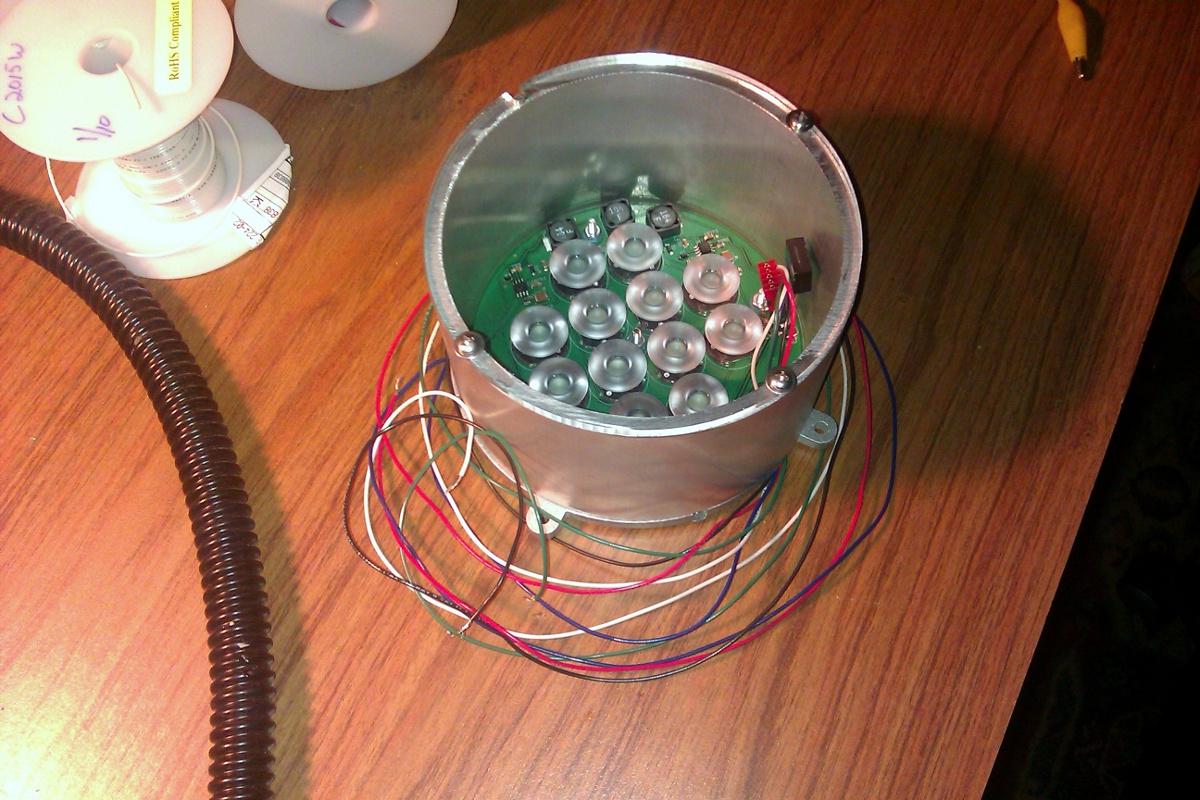
After a bit of a SNAFU at Digikey where they sent me defective parts and then took two weeks to correct the mistake, I assembled the board and turned it on. This is, without a doubt, the brightest light I have ever seen -- the spot was easily bright enough to read by in a room across our house about 50 feet away just scattering off the walls. This light is truly able to be a "cloud painter", and let me make a cloud whatever color I choose.
Lumens are a measure of luminous flux; i.e. photons through a given solid angle. I calculated that even with a 30% loss in the optics, inside the light cone, the flux is in excess of 200,000 lumens! Considering that if I look directly into the light, it is as bad or worse than looking directly into the sun, this strikes me as not at all outrageous a claim! Even without focusing, this light should be as bright as a ColorBlaze 72 (a 6 foot long light fixture) in a 6" diameter circle, which I think is pretty awesome. Essentially this is possible only because the LEDs in my light operate at about 6-8 times the efficiency as the commercially available fixtures. This also means that I can potentially passively cool the device as it will only be consuming 50W as compared to 350W for the commercial fixtures
The difficult part then is the power supply -- I have 20 LEDs in series for each color, which means a forward voltage of 60VDC for the blues, 64VDC for the greens, and 74VDC for the reds (measured with a multimeter at 700mA). Unfortunatley, this high of a voltage means that standard power supplies I could buy wouldn't even be able to handle it, and it also substantially complicates the LED driver circuitry as they are only designed to run at up to 70VDC.
In any event, it's a difficult but not intractable problem. I have been looking at using the NCP1002 as an initial off-line regulator to provide a 100VDC bus capable of supplying 700mA, along with a 3.3VDC regulated output for controlling the digital chips on the board. I'm also looking at switching to using the LM3401, which is similar in concept to the LM3404, but with an external transistor.
In looking at how to accomplish this design, I was very surprised to discover that there are a variety of companies that will wind custom transformer cores for you, which is wonderful. In particular, MCE Magnetics helped me design a core, and is even going to send me some free samples to try to work through this prototype. What nice people, and based in the US too!
The case design I'm fairly pleased with as well. Keith helped me design it, and we think that it should have enough surface area to actually be passively cooled. I have included a SolidWorks built model showing what the light fixture will end up looking like. We have yet to decide how we want to put on a handle for attaching it to things, but that should be pretty straightforward.
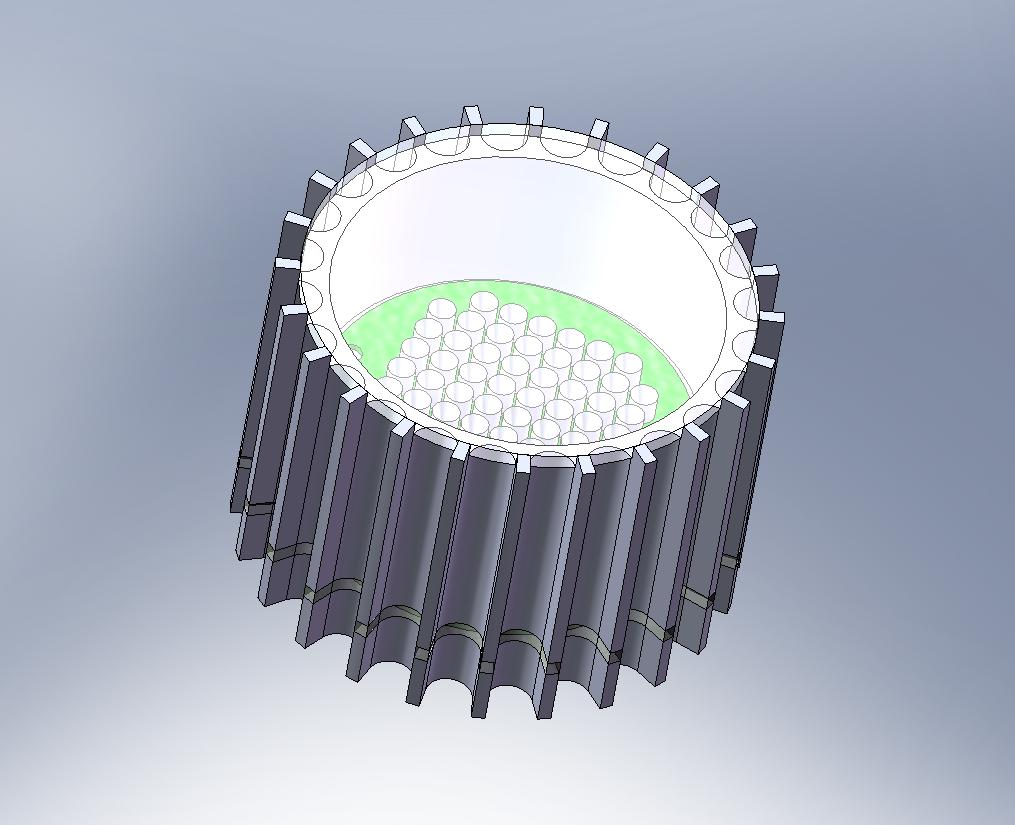
The idea with this is that the scalloped outside allows for higher surface area. I would have preferred more fins, but the end mill diameter is limited by the cut depth, so this is the best that was possible. We'll take a single 6" piece of 8" diameter aluminum stock and use a CNC mill to machine the entire piece at once, which should be pretty awesome to watch anyway as this is the largest machining project I've done before. Then, I will use a laser cutter to cut two pieces of acrylic to the appropriate shape to act as a cover, and also to act as an insulation barrier on the bottom of the light.
The bottom piece is where the power supply will be housed, and the only things that will run external to the light are the 120VAC power cable to a wall, and somewhere a little space for the XBee antenna to poke out so that I can control the light from a computer. The acrylic piece keeps the back heat sink from getting too hot and breaking the power supply, although from our rough calculations this shouldn't actually be an issue.
Heat was one of the biggest concerns in this project because of the far denser light generation on this board than anything done previously. This is why I chose to machine my own case out of thick aluminum to help heat make it to the outside instead of building up at the LEDs and risk burning them out. It should also make this by far the prettiest light I've made, especially if I anodize the case!
More updates to come as I make progress!
This is the first real update since early 2008, and a huge amount of progress has been made. The light fixtures are now on their eighth revision, have eight output channels (red, orange, amber, green, cyan, blue, royal blue, UV), have a built in power supply or can be run off of a 24VDC low-voltage line, are controllable over zigbee using the XBee interface modules, and all wiring is now entirely internal to the light -- no more monitor cable from the power supply to the light. Instead, I found a gorgeous hollow gooseneck designed for microphones that I can run all of my power inside of.
I also had the idea of protecting the user from the UV LEDs by coating them with a bubble of clear acrylic adhesive with very fine silica suspended in it. This seems to let a great deal of light through for the Rebel visible-color LEDs, and makes the apparent spot size about 8mm in diameter. This diameter should be enough so that even if someone removes the diffuser cover, they will be able to avoid eye damage. The acrylic adhesive is also quite permanent, I'd need to do quite a bit to get it off! Of course, this does *not* mean I am saying they are safe. Do not play around with the UV LEDs.
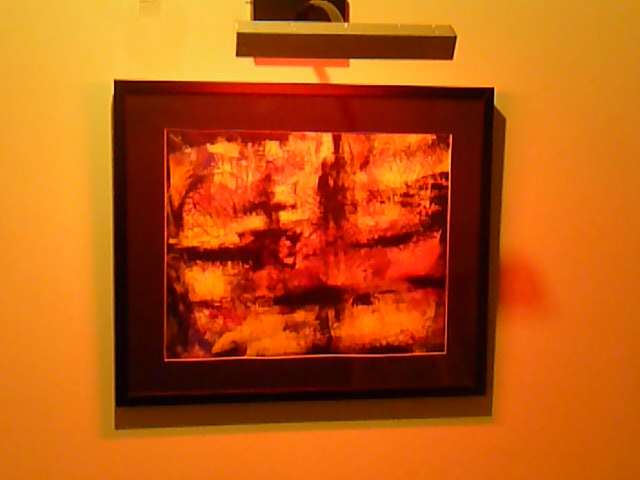
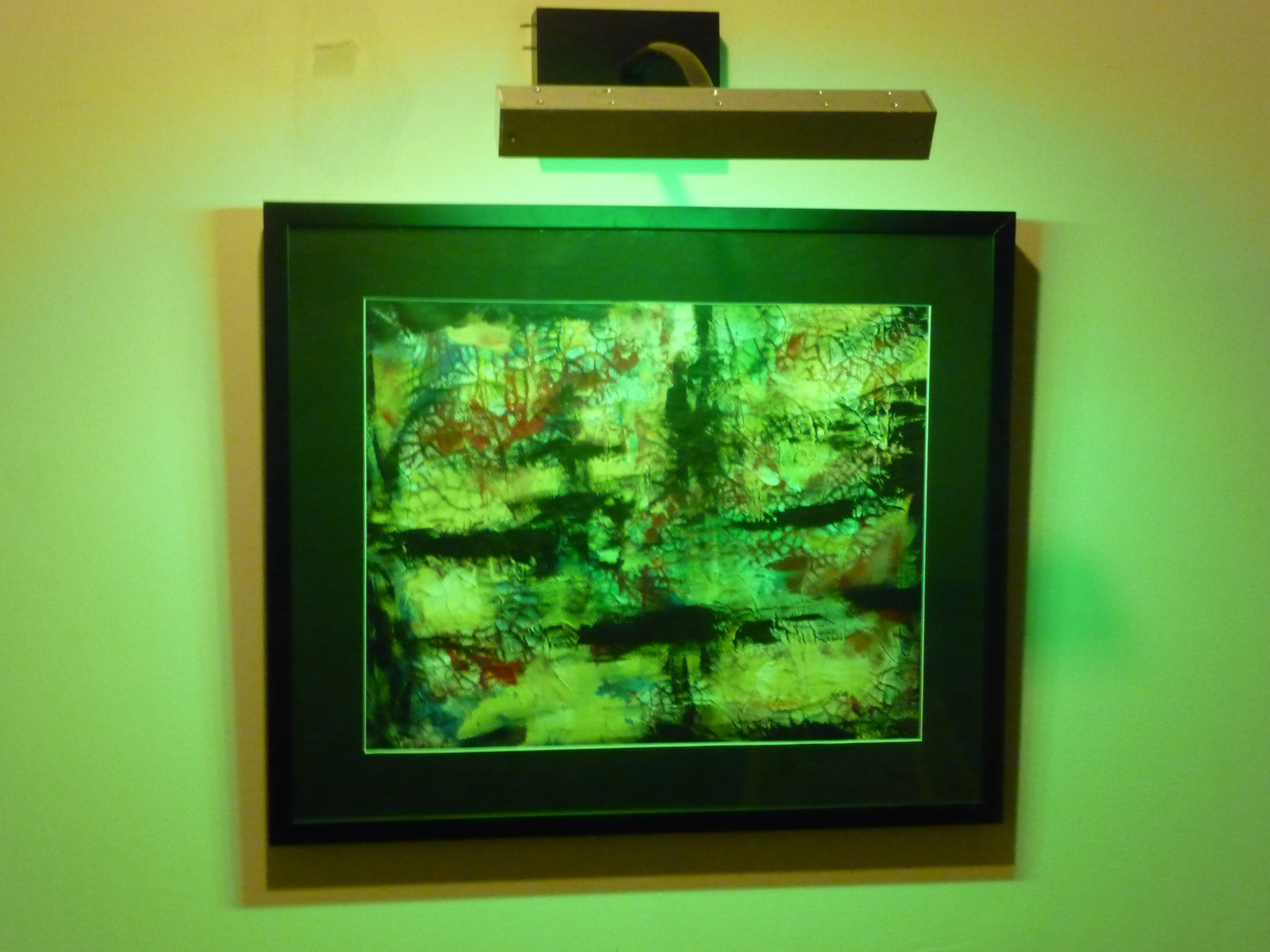
Here is a taste of the new work:
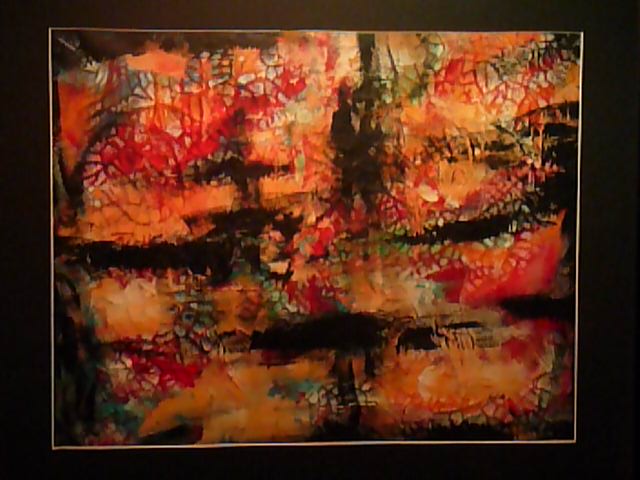
For movies of this new painting under the color changing lights, click below. The mode is set to randomly switch from one color of LED light to another. The first movie is filmed with the room lights on, which I think actually makes for a very nice more subtle effect. The second movie is filmed with the room lights off, which unfortunately also made the camera have a bit harder time focusing.
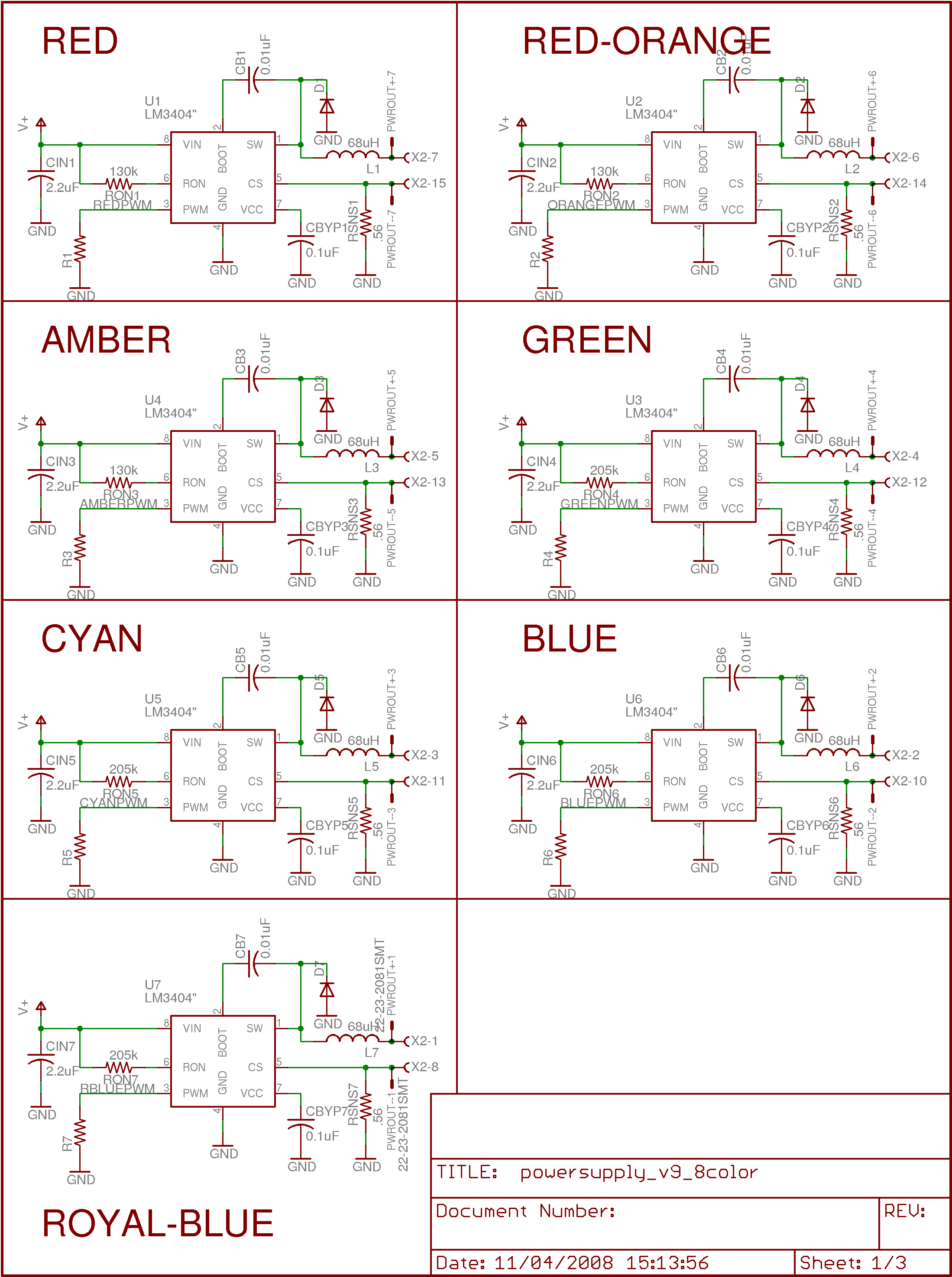
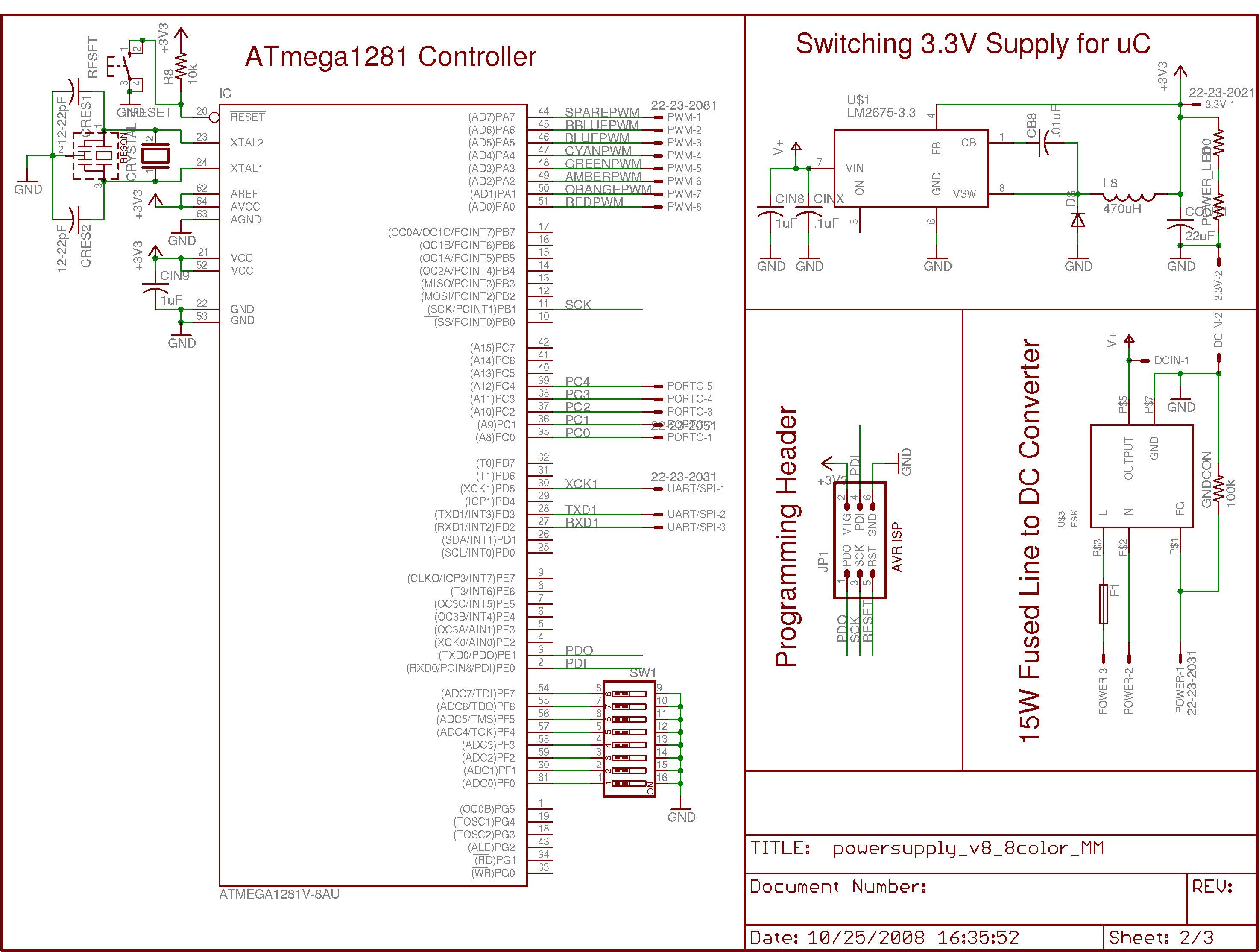
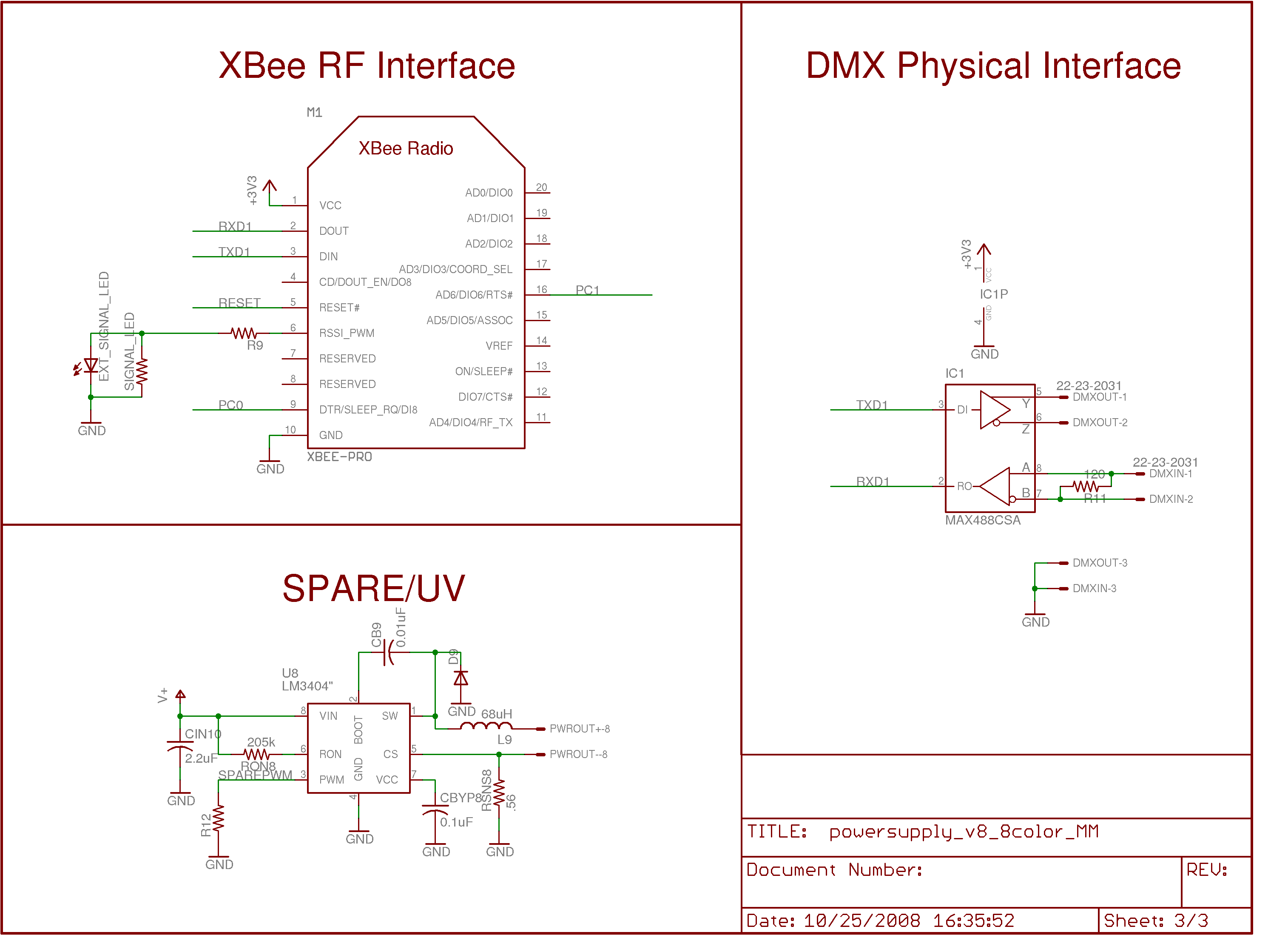
The circuit diagrams are being updated as well. This is the current version of the powersupply.
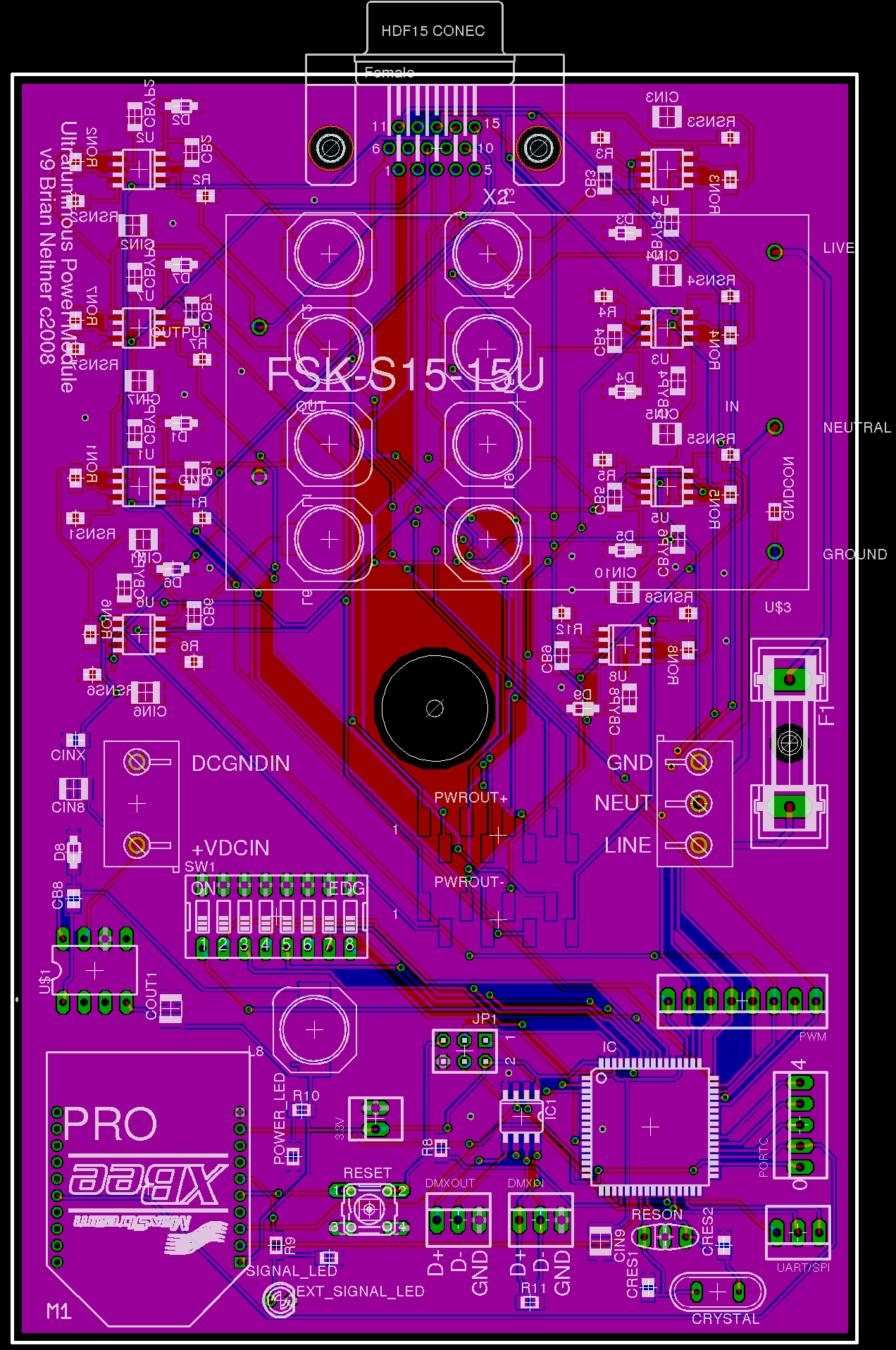
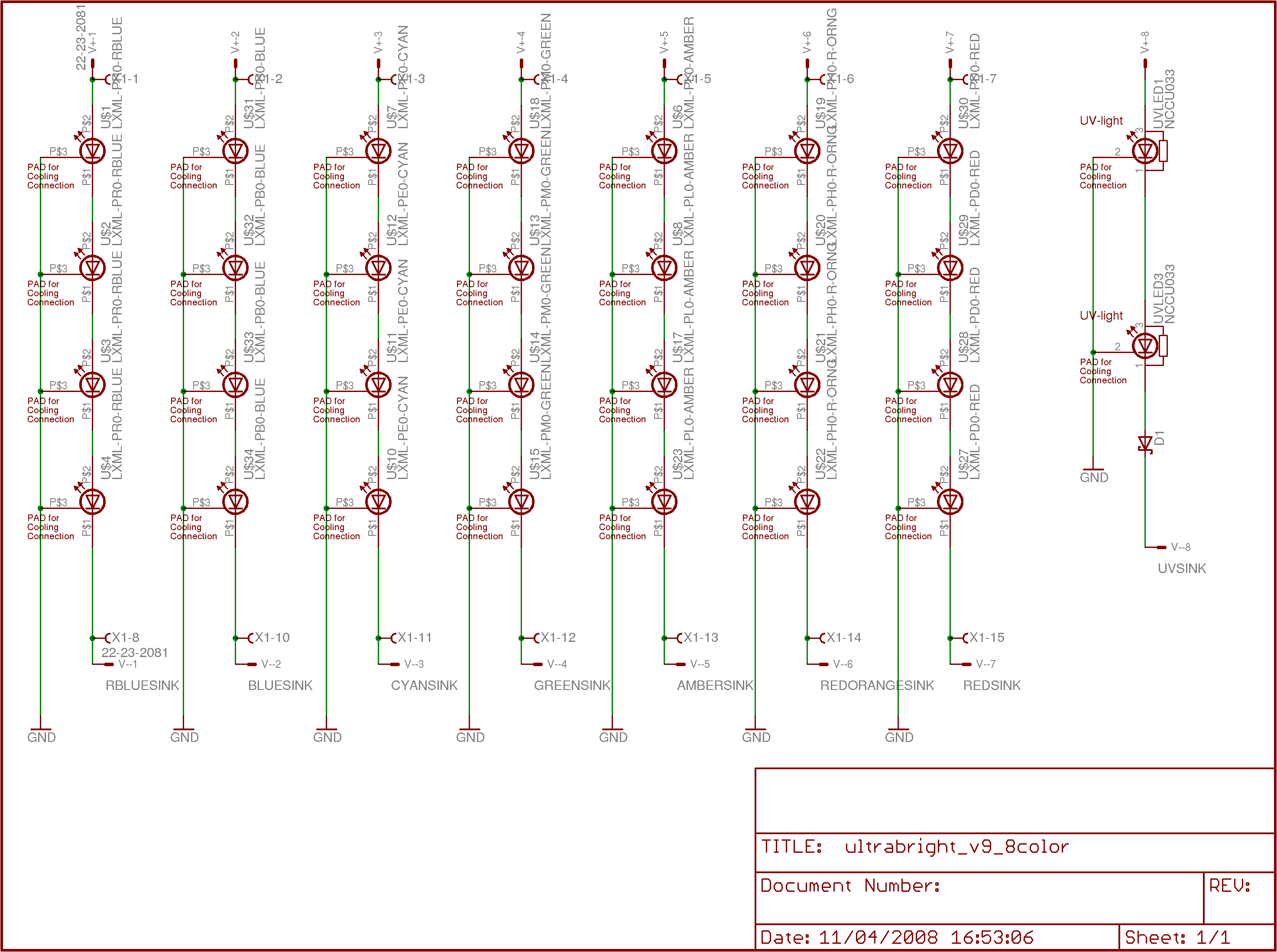
and this is the current version of the LED board.

Updates to the explanations have been made below in the "Details" section.

The goal of this project is to provide as complete of a resource as possible for people interested in getting into creating artwork incorporating LED lighting. As a secondary goal, I'd like to provide basic information on general engineering practices for creating standalone LED art. In particular, I want to explain or accomplish the following.
The goal of this project is not to pretend that either of us invented the field of using LEDs with art. There is an active and vibrant tradition of LED art which started basically when LEDs were first created (well before I was even born), and has gone on to create some truly stunning displays over the years.
However, what is missing from the internet is a single source which novice artists and electrical engineers can use to get into the field on their own. Right now, there are really only two options --- either spend large sums of money on commercial units (which are readily available, but very expensive per lumen), or to have a fairly substantial background in EE. From my point of view, spending $500 for 6 year old LED technology containing $50 worth of parts is not an option for an artist trying to make cool pieces in their spare time, and even for someone with a good amount of money, that $500 could be better spent building a light that is 10 times brighter to achieve a better effect.
The purpose of this website is to begin to address that need for information, in a way that will be useful for an audience ranging from non-technical, to an electronics hobbiest. Very little of the engineering I did to build the lights in this project is novel in any sense -- hell, the power chip for the LEDs is advertised as an LED Driver with the circuits I used outlined in the datasheet. However, as someone starting with only a light EE background (which is still more than most artists would have), it still took me a lot of time and effort to find a good, stable design. If nothing else, the chip selection and board layouts should be very helpful to someone starting from scratch.
Further, this project specifically addresses my own interests, and shouldn't be taken as a complete overview of "LED Art". I think that the coolest aspect of LED art is how it can interact with stationary paintings to make them shift and move in extremely beautiful ways. I think back to when I was sitting in my room as a freshman looking at a painting on my wall under shifting colors of lights, seeing them shift into each other and make the entire painting come alive. This is the medium that I am looking to help spread.
The idea of using LED fixtures with artwork has been explored in a variety of settings, but is still a fairly new area of art exploration. In the recent past, the improved availability of RGB (red, green, and blue) LED light fixtures has made creating LED based artwork much more accessible to the electronically disinclined. This accessibility will result in a new generation of concepts in creating art where old media like acrylic are combined with LED light to create more and more unique and exciting art.
We are seeing the cusp of this curve even now, as architects are including LED based lighting into buildings, and a few artists are beginning to use LED lighting in their work. The purpose of this project is to further expand and enable the use of LED lighting in artwork by providing theoretical information, and information from my own experiences producing artwork of this sort.
This project started in January 2006 as a collaboration between myself and my mother. I am a materials engineering graduate student at MIT, with a strong background in physics and electrical engineering. My mother, Janet Fox, lives in the Washington, D.C, region, and is a communications and outreach project director working to improve energy efficiency as a government contractor and as a volunteer. She is also a part-time artist with a special interest in dream-based and abstract art, and incorporates many colors and beautiful shapes primarily into mixed-medium paintings.
Ultimately, my goal is to publish a guide for the beginning light artist as to how to start on the path to making LED art, along with a list of preferred pigments and advice for how to build or otherwise procure advanced LED lighting fixtures. I also think it would be great to provide starter kits with an LED light fixture along with paints which work particularly well with the light so that new artists can get started with as little difficulty as possible.
The first step of the project was to understand the underlying physics behind LED based artwork. Fundamentally, the eyes are a very odd sensing system. The ears do a frequency based analysis of incoming pressure waves, and report all of the dominant frequencies to the brain for interpretation --- if we hear two frequencies of different pitches, they sound distinct. This isn't quite as true when you talk about harmonics of sounds, as they will start to affect the timbre instead of sounding as a distinct pitch, but the basic idea is that we can pick out independent sounds with different pitches fairly easily.
The eyes, on the other hand, do spatial and frequency-based sensing; however, they throw away much of the information about the specific frequencies detected. For instance, if you look at any particular spot, you will see a single color -- not a spectral map of the complete visible spectrum coming from that point. This is great for the purposes of vision; it would be rather difficult, I think, to walk around while receiving that much information. However, this means that the eye behaves very strangely in the presence of multiple colors from the same location.
The classical example of this effect is the additive color wheel. You mix red light and green light, you get what appears to be yellow light. But how is this possible? If yellow is a frequency of light, how does mixing red (620nm) and green (530nm) produce yellow (590nm) light? There is certainly no physical process that does this sort of mixing in general.
In fact, the idea that red and green combine to form yellow is a trick of the mind only. You may think you're seeing yellow light, but the fact is that you are seeing independent red and green light, and your brain is converting that information into the appearance of yellow! Very strange. This trick is summed up in the Chromaticity Diagram (pulled from wikipedia). On this diagram, pure frequencies are displayed along the outer border from 460 to 700nm. As you mix two colors together, you draw a line between their positions on the border, and the ratio of the two tells you the position in the diagram that your apparent color lies. For example, if you combine 520nm green light with 620nm red light in a 50-50 ratio, you will have what appears to be yellow light. Likewise, if you have 620nm red light and 490nm cyan light in a 50-50 ratio, you will have what appears to be approximately white light.
This explains how an RGB cluster of LEDs can produce so many apparent colors of light -- they aren't actually producing those other frequencies of light; instead they are tricking the eyes into thinking that they are producing those other frequencies of light. To quote wikipedia:
The choice of primary colors is related to the physiology of the human eye good primaries are stimuli that maximize the difference between the responses of the cone cells of the human retina to light of different wavelengths, and that thereby make a large color triangle.
The normal three kinds of light-sensitive photoreceptor cells in the human eye (cone cells) respond most to yellow (long wavelength or L), green (medium or M), and violet (short or S) light (peak wavelengths near 570 nm, 540 nm and 440 nm, respectively). The difference in the signals received from the three kinds allows the brain to differentiate a wide gamut of different colors, while being most sensitive (overall) to yellowish-green light and to differences between hues in the green-to-orange region.
One good point in this is that it says that the responses are peaked at yellow, cyan/green, and violet -- not red, yellow, and blue (the traditional triad of primary absorptive colors). The red, yellow, blue primary color set is obsolete -- the absorption of the cones and rods in the eye are actually shown in the absorption curves:
And to continue quoting Wikipedia:
Since the likelihood of response of a given cone varies not only with the wavelength of the light that hits it but also with its intensity, the brain would not be able to discriminate different colors if it had input from only one type of cone. Thus, interactions between at least two types of cone is necessary to produce the ability to perceive color. With at least two types of cones, the brain can compare the signals from each type and determine both the intensity and color of the light.
For example, moderate stimulation of a medium-wavelength cone cell could mean that it is being stimulated by very bright red (long-wavelength) light, or by not very intense yellowish-green light. But very bright red light would produce a stronger response from L cones than from M cones, while not very intense yellowish light would produce a stronger response from M cones than from other cones (counterintuitively, a "strong response" here refers to a large hyperpolarization, since rods and cones communicate that they are being stimulated by not firing). Thus trichromatic color vision is accomplished by using combinations of cell responses...
Many historical "color theorists" have assumed that three "pure" primary colors can mix all possible colors, and that any failure of specific paints or inks to match this ideal performance is due to the impurity or imperfection of the colorants. In reality, only imaginary "primary colors" used in colorimetry can "mix" or quantify all visible (perceptually possible) colors; but to do this the colors are defined as lying outside the range of visible colors: they cannot be seen. Any three real "primary" colors of light, paint or ink can mix only a limited range of colors, called a gamut, which is always smaller (contains fewer colors) than the full range of colors humans can perceive.
The next critical concept to understand is that between a "monochromate" color with only one frequency, and a "polychromate" color made up of a collection of frequencies. At the root, the fundamental underlying physical process of absorption is still occuring, and this is where the apparent colors in the subtractive system come from. A magenta pigment absorbs green light, and a cyan pigment absorbs red light. When you mix them together, the mixture absorbs both green and red light, reflecting blue.
However, what we want to do is more complex -- the selection of specific colors *without* exciting other nearby colors in the pigment. For example, we want to be able to put down a splotch of yellow paint that will appear yellow, and only yellow (or black). In this example, you start with yellow, a primary absorptive color that absorbs strongly in the blue. The removal of the blue from white light causes the green and red receptors in the eye to be excited, resulting in an apparent yellow color.
Where this breaks, is if you consider what that yellow paint looks like under green light. The paint only absorbs in the blue, so under green light it will appear green. Under red light, likewise, it will appear red. This means that as we vary the RGB color emitted by a LED light fixture with this idealized primary pigment, we are simply fading the color from red to yellow to green, with no ability to force it to only reflect real yellow light. If instead, we had a pigment that actually absorbed everywhere except for at yellow, we would remove that shifting color effect entirely, allowing for "addressability" of individual colors matching specific LED light outputs. This sort of manipulation of the way that the colors look under different illumination spectra is called photometamerism.
So, while it is true that in a standard absorption schema, you can use magneta, yellow, and cyan pigments to mix and form any color, this is not a complete picture when you're interested in this sort of photometamerism. Colors will simply not show up properly unless the incoming spectra happens to match the color you're trying to emit because the pigment may emit polychromatic light.
This imprecision in the color reflection where paints will change colors instead of directly fading in and out is, frankly, an aesthetically ugly effect that makes it very difficult to produce something that looks good.
What if you want only the yellow parts of a piece of art to appear brightly lit, distinct from red, green, cyan, and orange parts? The only way to achieve this is to identify a pigment which uniquely reflects in the 590nm region, and absorbs everywhere else. Then, you can include a 590nm LED that emits true yellow light to select that pigment for viewing specifically. The number of colors you can uniquely "address" is limited only by the broadness of your reflection peaks.
So, you can take a pigment that absorbs everywhere that is not yellow, and a pigment that absorbs everywhere that is not green, you can put them next to each other and get very discrete fading from the green region being illuminated, into the yellow region being illuminated by using one LED for yellow and one LED for green. This sort of effect looks extremely good -- the discrete effect makes the painting feel much more alive and active, the spatial difference between the colors introducing a strong aspect of movement. I personally think it is by far the most effective type of technique to use with LED illuminated artwork.
Of course, in the real world there are no ideal pigments. All real pigments are a complicated pattern of absorption, and may absorb in unexpected ways. For instance, you may purchase a blue paint, and find that for some reason, it reflects yellow as well when only the yellow LED is on. This sort of nonideality is a large part of why in LED art to date, colors like orange, green, and purple are so drastically under-represented compared to colors like red and blue.
This combination of additive light synthesis using RGB led clusters with absorption based pigments for reflecting light in a painting poses some serious problems for artists wanting to use LED based lighting to accentuate particular paints in their work -- if they choose a paint that reflects in the wrong colors, they could do a lot of work and end up with something that looks not at all like they intended. With this in mind, the first step in the project was to build some prototype LED lights and use it to characterize the various pigments on the market.
The first light for making these tests was built in October 2006 and used LEDs of six different colors (red, amber, green, cyan, blue, and royal blue) to test the reflective performance of various paints. Using commercially available, pure pigments (mixing is a bad idea for this sort of artwork), we identified specific brands and colors which responded fairly closely and strongly to a specific LED wavelength and not to the others. These pigments are ones, therefore, which reflect with only one strong peak instead of multiple or broad reflection peaks. We also decided that incorporating blacklight UV LEDs into the fixture would allow for some very exciting possibilities through the use of fluorescent paints.
Essentially, this six LED test system acts as a "poor man's" spectrophotometer that measures directly the reflective response of a pigment at precisely the frequencies that the LEDs are emitting, measured qualitiatively by the eye. If a pigment on the paint splotch shines brightly when the green LED is on, but not when either the cyan, or amber LEDs are on, then it has a "narrow" reflective band for the purposes of this art.
In practice, finding green paints which actually reflect green light was extremely difficult, far more difficult than finding either red, blue, or orange colors. So, if you've been using RGB LED clusters and have found that your blue and reds show up great, but your greens are dull and flat -- you're not alone! It's the fault of the paints, not your technique. Check back later for a list of pigments we've tested and found to work the best with producing greens.
The next step was to begin creating artwork. This process was long, but very productive. In this time, I designed and built a new, more professional light fixture which I call the Ultrabright Illuminator (described more below), and we've had a few small art shows where the fixture and artwork is displayed.
All videos may be distributed freely with appropriate attribution to myself (Brian Neltner) and my mother (Janet Fox).
The soundtrack is my piece "Tuvan Dream", written for the advanced electronic music class (21M.540). You may also download the song by itself.
In order to do this project, I had to design a new class of LED Light Fixture. All currently commercially available LED light fixtures are not nearly good enough for doing high-quality art, and they are still far outside my budget range (for example, a similar module on ebay, including the power supply, is nearly $1500!). The primary problem with the currently available fixtures, even beyond the cost, is that they are designed for producing an apparent color, not emitting a real frequency. Thus, they generally only include red, green, and blue LEDs as with these three you can make light that gets close to simulating most colors. However, for the sort of work that I want to do, with a large number of independently selectable reflective colors, real frequencies need to be emitted, and the artwork really has to be made with full awareness of the restrictions imposed by using LED light.
To address these failings of the current market, I developed the Ultraluminous Illuminator. The light fixture is designed with two Nichia UV LEDs as well as red, green, cyan, and royal blue LEDs (the best colors for our artwork thus far). This light fixture is substantially better than any commercially available fixture due to it's inclusion of nearly 600mW of UV light output, as well as around three times the output (around 2500 lumens adding up the LED datasheet specs, and multiplying by 0.4 to try to account for inefficiencies, and not including the UV) in the other colors as compared to commercially available modules. In version 9, I dropped the number of LEDs from 7 to 4 per color, and dropped the current from 700mA to 350mA, which should make it roughly the same as commercially available modules in brightness per color. However, the incorporation of orange, amber, cyan, royal blye, and UV LEDs means that I can address pigments with far greater versatility than anything I could find on the market. I could also always bring the current back up to 700mA and have a fixture some amount brighter than the market.
It is true that the needed brightness is subjective -- one could get by with a commercially available fixture. However, the brighter your LED source, the more ambient light you can deal with in your gallery. In my case, with these lights, I can have the rest of the lights in the room on and still see a quite strong effect. With the background lights in the room off, the effect is stunning. If you're doing this at night, and only want to use red and blue paints, you could get away with a ColorBlast 12 or similar system; however, that simply wasn't bright enough or colorful enough for what I want in my artwork (certainly not enough to justify spending $1500 on the module, power supply, and controller).
I used a nice gooseneck fixture for the light so that it can be easily mounted above a piece of artwork with the light adjustable to point wherever needed, and the light fixture itself is in an aluminum case 12"x1.5"x1.5", with a holographic diffusing film to make the light smooth and uniform even at a close range.
Overall, the system ends up being rather expensive for me to build -- the UV LEDs cost $90 a piece, plus the cost of boards, machining, the power module, and assembly. The total cost of components ends up being around $450 per fixture to build (in small quantities, at least). This sounds like a lot, but it is literally impossible to find a fixture that has as much color versatility anywhere, and is still a third the cost of the commercially available units. Version 9 is substantially better in terms of cost effectiveness, and I can build them for roughly $300 per fixture, plus $60 if I need to use the new built-in power supply, plus the cost of the UV LEDs if I include them.
I have incorporated wireless communications with a computer to allow a user to change an arbitrary number of fixtures permanently installed in a room in realtime without the need for manual reprogramming.
If anyone is interested in procuring one of these lights for their own projects, please contact me. I am willing to assemble and program systems on a limited basis (mostly limited by my time investment in making them).
The new version (v9) of the power supply and LED board are based heavily on the old versions, so I have left the old versions up on the website to draw from. These are the main changes:
I chose to switch to the Atmega1281 processor because I was tired of needing to boot into windows in order to program the system. I am also learning how bootloaders work with the intent of setting it up so that I can reprogram the firmware over Zigbee wireless. I had some issues getting this chip to run stable which I finally narrowed down to an unstable oscillator. I had been using an internally compensated ceramic resonator (Murata CSTLS8M00G53-B0), but when I switched to a crystal oscillator with external capacitors for stability, all of my problems went away. I'm also now running the entire system on 3.3V instead of 5V so that it can cleanly interface with the Xbee Zigbee interface chip. I accomplished this by using the LM2675-3.3, a closely related chip to the regulator I was using originally.
I wanted to be able to permanently install a light on a wall while retaining the ability to control it remotely. By far the best solution I found for this was to use the Xbee RF Module, a great chip which lets you convert a system that would normally communicate over USART into one that talks over Zigbee transparently. You can also do more advanced things like give RF modules addresses, use mesh networking, and use guaranteed delivery, but for now I'm just using transparent USART mode. Best of all, the chip is only about $20. I'm using the one with a wire whip antenna, which I stick out the side of my aluminum case through a small hole.
I found this great hollow gooseneck support from Moffatt which is wonderful. I left on the HD15 connectors in case I want to have a more portable "light stick" with power coming out of the end, but also put on SMT Molex male header pins so that I can run ribbon cable through the gooseneck and connect to the middle of the board instead of the end. It looks really good to do it this way, but be sure that you get plugs which are spec'd for the gauge wire you use. In my case, I used the Molex 68301-1019 for the SMT header, and the Tyco 3-640622-8 26AWG Connector
I found the FSK-S15-24U, a great little 15W 24VDC power supply that fits perfectly inside the case and solders directly into my board. I used screw terminals for Live, Neutral, and Ground, and put on a fuse to protect the power supply. I also put on screw terminals for +24V and GND so that I can run a low voltage DC line common to all lights and then only have to buy one larger power supply. Each little brick costs about $60, so in an installation with many lights, it's definitely preferable to use a central supply. I'm using a Meanwell SE-600-24, a 600W power supply, to run the lights in my gallery now.
I switched from 4+1 channels with 7 LEDs per channel plus 2UV to 7 channels of 4 LEDs each plus one channel of 2 UV, all at 350mA instead of 500-700. I had one of my Rebel LEDs burn out, and the brightness is so high already that even at half the current with half as many LEDs, the lights still leave nothing to be desired for my particular application. Of course, I could run them at 700mA instead, but I'd rather they run cool and forever than run twice as bright (for now). Plus, it balances better with the UV LEDs now.
The diffuser did a fine job of protecting viewers from the UV LEDs, but I am worried that if the cover were to come off someone could hurt their eyes. To deal with this, I purchased clear acrylic adhesive, and suspended very find silica (sand) powder in it to scatter the light. Putting a big blob of this over each UV LED (oh... each $60 LED... it pained me to do this) resulted in what looks to be a pretty much permanent diffuser over each one. These would not be easy to remove, and are unlikely to fall off. Of course, I am not suggesting that these LEDs are now safe, just that I am now comfortable using them in my own home, under my own supervision.
Just in case I want to implement it someday, I included a place to solder on an RS485 transceiver, which would be the first step in implementing DMX.
I put in an 8-switch DIP switch in case I want to let a user set a variable (like device address or default mode) physically instead of through reprogramming or sending commands with the Zigbee interface.
Here are new Schematics and Layouts for the current version.
This design uses 6 each of the state-of-the-art Luxeon Rebel LEDs in whatever four colors are desired (I used red, green, cyan, and royal blue), along with two NCSU034A Nichia UV LEDs to produce the light output. Both of these LEDs are particularly nice because their heat sinks are not electrically connected to the die like some older Luxeon LEDs were. This means I can have a single heat plane to remove heat from the LED die instead of needing to electrically isolate every single LED's heat sink plane from every other.
As a word of warning, the NCSU034A LEDs output over 300mW of UV light at 385nm! This is a LOT! What makes them especially dangerous is that the die is only a millimeter or two on a side, so the angular intensity of the light is extremely high. Do *NOT* turn these on in an environment where anyone can look directly at them. They are extremely dangerous to the eye, and you will have a *permanent* blind spot if you look directly at them. To make them safe, I used polyethylene plastic sandwiching a Luminit Holographic Light Shaping Diffuser (LSD... yeah, I know, they came up with the acronym first) an inch and a half away from the board to make the apparent source size over an inch in diameter. This decreases the angular intensity from the class 3b level to the class 1 level. I am not liable if you blind yourself by using these LEDs! Seriously, don't fuck around with these.
Funny story that. Every time I tell an MIT student that the UV LEDs will permanently blind them if they remove the cover, the response is the same. First, they say "Really?", and then they attempt to look into the endcap. True story. Explains a lot, I think.
Anyway, I used a hot plate and some heat channeling tricks in the thermal plane to effectively solder the Luxeon Rebel LEDs to the boards I printed (they're a bit of a pain to solder by hand). I chose to use a monitor connector for the power connector because each pin is able to carry up to 3A without a problem. Each channel of LEDs draws 700mA, so a typical header is really pushing the limits. A nice side effect is that the cable assemblies and connectors are very readily available and are pretty cheap.
Due to the large expense of the actual LEDs, I chose to separate the power supply from the LED board so that if the power supply had errors, I could correct them without remaking the LED board as well. This also makes things much more modular overall, so I think it was the correct choice. The end result is that the LED board only actually has LEDs and a single protection diode to prevent against somehow plugging the supply in backwards (unlikely with a chiral connector like the HD15, but better safe than sorry with $180 worth of UV LEDs). The back of the board has the soldermask removed with no traces so that it can be directly screwed down into an aluminum chassis to act as a heat sink. Additionally, thermal vias were placed near the heat sink to let heat move from the LED die to the back of the board.
The actual chassis is a 1.5"x1.5" U-channel of aluminum with a 1/8" wall thickness. I milled a slot into each side so that I could slide the sandwiched polyethylene/LSD into the slot to form a difficult to remove and professional-looking cover. I then milled two end caps out of ABS plastic to prevent MIT students from looking in the ends in an attempt to blind themselves.
Note that both of the above images are shrunk, not low-quality. Just click on them to view the unscaled version in your browser. If you would like eagle schematics and board layouts for this, please contact me. I only make images readily downloadable so that I have some (illusion of?) control over who gets them (I'm looking at you, China). Not that they're particularly tricky, I just would like to have an idea of who is using my designs. The designs are copyrighted (anyone may use them for non-commercial use), but I have no particular desire to patent any aspect of the design (the state of LED light fixture patents being rather absurd enough already).
Power is one of the trickiest parts of building a high-quality and reliability LED system. First, LEDs want to be operated in "constant current" mode, and the brightness is usually controlled by current, not voltage. Additionally, on the types of high powered LEDs used in this project, the forward voltage can vary by up to a volt between the minimum and maximum specified. When operating a series of 6 LEDs, this adds up to provide a fair amount of uncertainty in the total forward voltage.
For instance, the Royal Blue Luxeon Rebels have a nominal forward voltage of 3.15V, but can vary between 2.55 and 3.99V. That means that the actual voltage drop could be anywhere between 15.3V and 23.94V, and the power supply needs to be able to handle that range while providing a constant 700mA. Further, LED brightness should be controlled using PWM or byte encoding at a high frequency to achieve the highest efficiencies. Efficiency may seem like a silly thing to worry about in an LED fixture, but there are serious problems which arise from generating heat on the board -- the LEDs can only withstand temperatures of 130C, so it is critical to make sure that light generation is as efficient as possible.
The best part I have found for doing this sort of power regulation and supply is the LM3404 from National Semiconductor. This is a current feedback buck converter (switching regulator) with up to a 70V input voltage and 1A of output current with internal transistors, so it is relatively easy to get 85%+ efficiency on the current source with a minimum of external components. Other designs will use a current mirror or source built out of discrete transistors and using linear regulation -- these will typically be much, much less efficient than the LM3404.
The converter essentially works by closing a switch to put the input voltage on the output. After the LED load, the current goes through a "sense resistor" before going to ground. The current will dictate the voltage across the sense resistor according to V=IR, and that voltage is compared to an internal reference. If the voltage is too low, the current is also too low, so the voltage output switches on. If the voltage is too high, the current is also too high, so the voltage output switches off. In this way, a very simple infinite proportional gain feedback system is built that provides a current set by the value of the sense resistor to the load, regardless of the input voltage.
The LM3404 is also great in that it provides a PWM port. When the pin is pulled low, the current output stops, and when you set it high, the current output turns back on. This allows me to turn the LED on and off extremely quickly in order to change the apparent brightness.
The PWM ports are, in turn, controlled by a Microchip dsPIC30F4013. There is no particular reason why this chip is special, it's just one that I've used in a lot of projects. It has 5 independent 16-bit timers, which makes writing PWM routines trivial. Additionally, it supports many interrupt levels (unlike the Atmega parts), so support is less complicated. I'm not much of a programmer, so the more I can buy built into the chip, the better.
I included a RS232 connection as well as a USB port so that when I get around to finishing it, I can set the device up to be reprogrammed without changing the actual software. The idea is that the user will draw out a pattern on the chromaticity diagram using a java applet on their computer, it will compile into a script, and download the script into the EEPROM on the dsPIC. From then on, when the light is turned on, it will boot up into the last programmed color sequence.
I also left the three SPI pins free so that when I get around to it I will be able to interface the dsPIC with a wireless communication chip using Bluetooth, Zigbee, or perhaps even 802.11 so that computer configuration files can be uploaded without even needing a cable. Doing it that way will make permanent installations a heck of a lot nicer to administer. If you happen to be good with wireless protocols and might be interested in helping me design that part of the system, please feel free to contact me. I'm always looking for a good collaborator to design with (and potentially go into business with if it works out well).
There's a 5V switching regulator, the LM2675-5.0, also from National Semiconductor, which supplies the digital components in the circuit. The idea of linearly regulating 36V to 5V with the 14% efficiency that entails, was unattractive at best.
Finally, after some unfortunate incidents with designs that weren't properly protected against user error, I put a full bridge rectifier on the (nominally) 36V DC power input. This way, the user can connect the positive to either input without damaging the device (in fact, it will run regardless of how it's plugged in).
Again, please note that the above are high quality images scaled down for display in this file. Just click on the images to view them unscaled. Also, if you would like to get eagle files for the power supply, just contact me and I will send you a copy.
If you are interested in doing LED based art and are looking for advice, are interested in having me build you a custom built Ultraluminous Illuminator LED fixture (with whatever colors you want to use installed and preprogrammed), or doing a collaboration (Boston area only, please) with me, please contact me by sending me an email at neltnerb@mit.edu. I'll have to work out the legal issues associated with providing LED lights first, but I believe this just entails paying 5% of the proceeds to Phillips for the using their intellectual property and probably having you sign your eyes away in the case of a UV equipped light.
![]() |
![]() |
|
|
Brian Neltner is a fifth year graduate student in the Department of Materials Science and Engineering at MIT. His research with the Biomolecular Materials Group involves using viruses to biotemplate catalysts suitable for converting ethanol into hydrogen gas and carbon dioxide. He received dual bachelors degrees in Physics and Materials Science and Engineering in 2005, and has been working actively with using light and color as a medium for art since 2006. Brian is an amateur musician, having performed a wide variety of choral and solo vocal music, and is a hobbiest electronic music composer. He is a black belt in karate and teaches the Shotokan Karate Club, having been the president and captain of the team since 2004. He is also the treasurer of the NECKC, a regional karate organization. Brian has been the president of the Club Sports' Council for three years, coordinating the interests of all the Club Sports at MIT, including funding. Brian is very interested in meditation and philosophy (not to be confused with the semanticology that seems to be in vogue these days) and is particularly inspired by the "Tao Te Ching" and Osho's "Meditation". He has a website that he uses to record the neat experiences he's had in doing meditations and energy games. |
Janet Fox lives in the Washington, D.C, region, and is a communications and outreach project director working to improve energy efficiency as a government contractor and as a volunteer. She is also a part-time artist with a special interest in dream-inspired and abstract art, primarily creating mixed-media paintings. Janet began exhibiting and selling artwork in Indianapolis, Indiana, in the 1990's. Several paintings have received awards, and a number of works have been published. She is currently working with Brian on new paintings for a collaborative exhibition of LED + Art, planned for viewing in Boston, Massachussettes, in late 2008 or 2009. |
Also with thanks to Keith Durand and Mike Tarkanian
for their help in designing the mechanical parts of
the light, as well as to Dan Taub for his help with
programming the computer interface.