QTools Users Manual
- Build a survey in 4 steps!
- Workspace
- Folder Management
- Survey
- Add Question Set
- Add Question
- Add Text
- Delete Question Set
- Delete Question
- Delete Text
- Edit Question
- Edit Text
- Export Survey Results
- Import Questions
- Invite Participants
- Move Question Sets
- Preview Survey
- Rename Question Set
- Response Options
- Set Active/Expire Date
- Sort Questions
- View Survey Properties
- View Survey Questions
- View Survey Results
- View Survey Status
Survey
Sort Questions
- Click on a Question Set
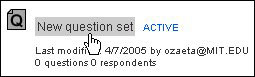
- Click on the Questions tab

- Under the Sort Order column, re-arrange the numbers by clicking in
each textbox and entering a new sort order number.
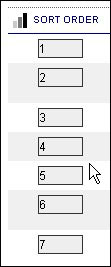
Move a Question Upward
For this example, refer to the screenshot displayed above under
step 3. This will be the original order which will be modified.
Example 1. Change the order so that 4 is displayed second from the top.
Solution: Enter 2 in 4's textbox, then click Re-sort
Example 2. Change the order so that 7 displays first.
Solution: Enter 1 (or a number less than 1) in 7's textbox, then click Re-sort
Move a Question Downward
For this example, refer to the screenshot displayed above under
step 3. This will be the original order which will be modified.
Example 1. Change the order so that 3 displays third fromt the bottom
Solution: Enter 6 in 3's textbox. then click Re-sort
Ecample 2. Change the order so that 1 displays last.
Solution: Enter 8 (or a number greater than 7) in 1's textbox, then click Re-sort